
Key Takeaways
- Configure Asana portfolio rollup fields to calculate cumulative sums across all connected projects using designated numeric attributes.
- Confirm that all projects grouped inside the target Asana portfolio utilize an identical numeric or time-tracking custom field.
- Complete the five-step setup process by choosing Rollup, selecting the source field formula, and titling the new portfolio column.
- Verify the calculated total directly inside the Asana portfolio table to ensure project contributions aggregate as expected.
Create a portfolio field in Asana that sums a numeric custom field or time-tracking field across member projects. Aggregated data then displays directly in portfolio views to simplify status reviews across multiple initiatives.
For plan limits and team seat pricing behind this workflow, read our Asana review or connect Asana to AI agents in Asana API and MCP.
Key steps
What do you need before starting in Asana?
Asana requires the following workspace setup before you begin:
- Open the portfolio that contains the projects whose numeric values should be aggregated.
- Confirm that the relevant numeric custom field or time-tracking field is present in the portfolio’s projects.
- Choose a portfolio field title that differs from the source field’s project-level name.
How do you complete the steps in Asana?
Follow these 5 steps in Asana in order:
Open the portfolio field controls
Open the portfolio and select the control to add a field. The screenshot shows a portfolio field menu with field types including Number and Formula. It is an older or variant route that shows a field-type menu, so use it as context for the portfolio field controls rather than assuming it displays the complete current rollup workflow.
The documented flow begins with + Add field in the portfolio.
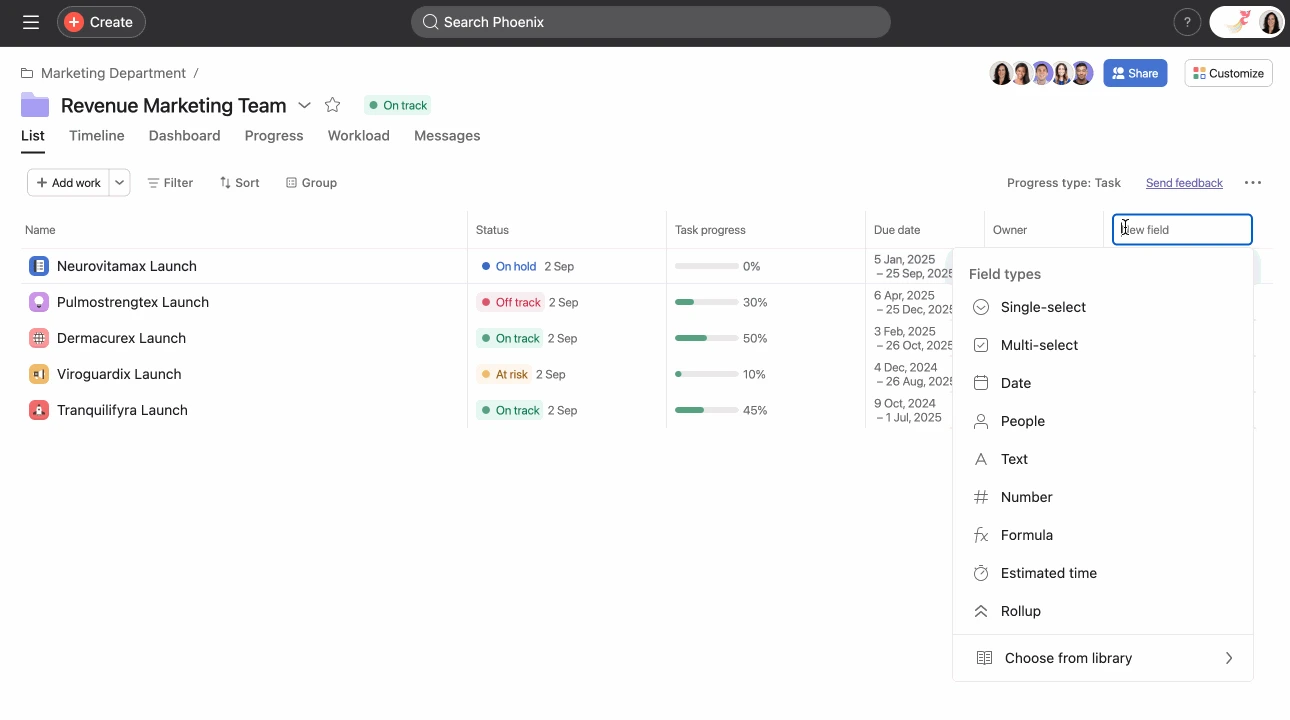
The visible menu shows portfolio field types including Formula. This screenshot reflects a variant or older route. The current documented rollup flow begins with + Add field and selecting Rollup. Screenshot source Choose Rollup
From the field menu, select Rollup. Portfolio rollups now use formula custom fields, according to the product evidence. The screenshot’s visible menu includes Formula among the field types, but it does not visibly show the Rollup choice. Follow the Rollup option in the current flow if presented.
Select the numeric source field
Under Formula, click into the brackets beside Rollup and begin typing the name of the numerical field to aggregate. Rollups sum numeric data from global custom fields or time-tracking fields present in the portfolio’s projects.
Choose the field whose values represent the measure you want to see at portfolio level. The source does not define the business meaning of any particular metric, so use the name and context of your own project field.
Name and create the portfolio field
Give the rollup a title, then click Create field. The portfolio title must differ from the name of the field within the projects. For example, if the project field is called “Effort,” a distinct portfolio title such as “Effort Rollup” follows the documented naming rule.
This title helps distinguish the aggregated portfolio value from the project-level values.
Review the result in context
Return to the portfolio’s fields and inspect the new rollup. Confirm that it is the intended measure and that the aggregated values reflect the numeric data in the portfolio’s projects. The feature is intended to show underlying project data without navigating away from the portfolio.
If the expected source values are not represented, verify that the relevant field is numeric and present in the projects included in the portfolio.
How does this Asana setup work in practice?
Worked example: aggregate project effort
A portfolio manager wants to review the total effort committed across three active software projects by aggregating a shared numeric field named Effort.
| Choice | Why it matters | How to check |
|---|---|---|
| Open the portfolio and add a field. | The rollup is created at portfolio level. | The portfolio field options are open. |
| Choose Rollup and select Effort in the Formula brackets. | Effort is the hypothetical numeric project field the owner wants to aggregate. | Effort is the selected numeric source field. |
| Name the portfolio field Effort Rollup. | The portfolio label differs from the project field name, as required. | The new title is distinct from Effort. |
| Create the field and inspect it alongside portfolio project data. | The owner can confirm the aggregate is attached to the intended measure. | The portfolio displays the Effort Rollup field. |
The manager verifies the summed value in the portfolio column and confirms that the underlying field definitions remain consistent across all member projects.
How do you verify your result in Asana?
The portfolio now contains a field that sums the selected numeric data from its projects. Read the aggregate in the context of the source field you chose. A rollup represents the selected field’s numbers. Its business meaning depends on how your team defines that field.
| Step | What you should see |
|---|---|
| Open the portfolio field controls | The portfolio is open and its field-creation options are available. |
| Choose Rollup | The new portfolio field is set up as a Rollup. |
| Select the numeric source field | The intended numeric custom field or time-tracking field appears as the rollup input. |
| Name and create the portfolio field | The title differs from the project field name and the new field is created. |
| Review the result in context | The portfolio displays the new rollup field for the intended numeric measure. |
Related Asana guides include How to add a custom field to an Asana project and How to build a project rule in Asana.
Which official Asana sources were checked?
Every step and limit in this Asana guide was verified against official documentation on 21 Nov 2026 following how we check figures, alongside more walkthroughs in our Asana tutorials hub:
How do you troubleshoot common Asana issues?
What data can a portfolio rollup aggregate?
The source says rollups sum numeric data from global custom fields or time-tracking fields present in the portfolio’s projects. It does not state that non-numeric fields can be rolled up.
Why does the portfolio field need a different title?
The portfolio field title must differ from the field name used within projects. Use a distinct title so the aggregate is distinguishable from the source field.
Can I use the same global formula field in projects and portfolios?
The source says global custom fields used for rollups can be shared across projects and portfolios, similarly to other global custom fields.
 Reviewed byDanny Kirk
Founder of ReddiReach.
 Checked byAndrés Felipe
Digital designer and marketer.
Every figure is checked against the vendor's own page. Read our editorial standards.