
Key Takeaways
- Open Add Elements > Contact & Forms in the Wix Editor and click Edit Form to customize fields, rules, and settings.
- Prepare your target page in the Wix Editor and assign collaborator roles in your dashboard if routing submission alerts.
- Add the form element, configure fields and rules, set naming and spam protection, adjust submit and mobile layouts, and test.
- Test inside the form builder Preview tab and click Open Form in your Forms dashboard after publishing your site.
You can add a new or premade Wix Forms element in the Wix Editor to capture inquiries, subscriptions, payments, or e-signatures on your site. Teams configure custom fields, conditional rules, reCAPTCHA spam filtering, and collaborator alerts so submissions arrive structured and verified.
For plan limits and team seat pricing behind this workflow, read our Wix review or connect Wix to AI agents in Wix API and MCP.
Key steps
What do you need before starting in Wix?
Wix requires the following workspace setup before you begin:
- Access to your site in the Wix Editor and Forms & Submissions in the site dashboard
- A list of required fields, conditional rules, or multi-page sections for your form
- Assigned collaborator roles on your Wix site if specific roles should receive notifications
How do you complete the steps in Wix?
Follow these 5 steps in Wix in order:
Add a new or premade form in the Wix Editor
In your Wix Editor, click Add Elements > Contact & Forms. Click Create New Form and drag it onto your page, or choose from Premade Forms for subscribe, payment, e-sign, or inquiry flows.
Premade Forms speed up standard layouts, while Create New Form starts blank for custom intake needs.
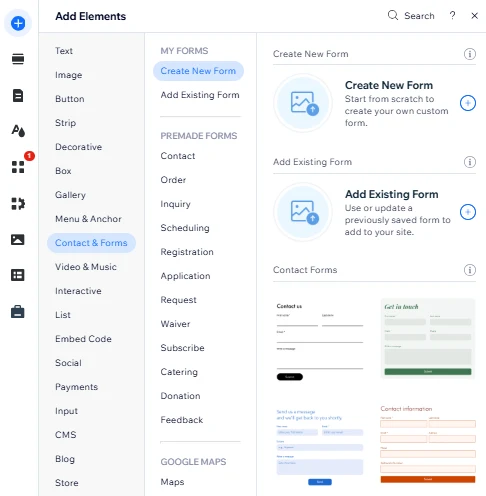
Open Add Elements, select Contact & Forms, and drag Create New Form onto your page. Screenshot source Configure fields, columns, and conditional rules
Click the form and click Edit Form. Click Add on the left to insert fields, use Field Settings to customize options, or click Duplicate and Delete.
Drag a field's right edge and place a second field beside it for two columns. Use Rules for conditional visibility, or Pages with a Submit field per page so visitors click Next.
Set the form name, required markers, and spam filter
Click Settings and enter a Form Name. Select a required marker (Asterisk, Label showing Required, or None), then open Spam filter settings under Spam filter to pick Only reCAPTCHA, Basic and reCAPTCHA, or Advanced and reCAPTCHA.
Also verify Site member details (Enabled auto-fills member contacts; Disabled requires manual input) and Language & regional format.
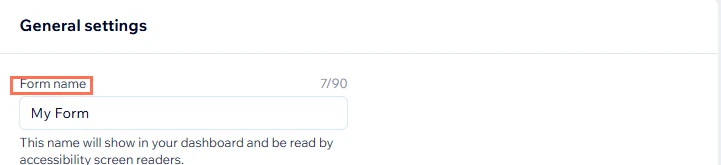
Enter a descriptive internal label in the Form Name field inside the form builder Settings panel. Screenshot source Customize submit behavior, mobile layout, and design
Click Submit > Field Settings to set Submit button text and When a visitor submits a form (Submission message with Message display time, or external URL redirect). Select Mobile in the Layout drop-down, resize fields, and click Save.
In the Wix Editor (and Switch to mobile), open Settings to refine Layout spacing and Design styles.
Preview the form and assign notification recipients
Test in the builder Preview tab, then publish your site to enable Open Form in your Forms dashboard. For alerts, open Forms & Submissions, click More Actions > Form notifications, click Edit > Action, and choose + Add Recipients > Collaborator Roles > Apply under Set Recipients.
Using Collaborator Roles keeps alerts synced as staff roles change.
How does this Wix setup work in practice?
Worked example: Launching a two-column service inquiry form
A creative agency builds a two-column inquiry form that reveals budget questions conditionally, filters bot spam, and alerts project managers.
| Choice | Why it matters | How to check |
|---|---|---|
| Resize contact inputs into two columns and add a conditional Rule | Keeps contact fields compact and shows extra questions only when relevant. | Preview displays two columns and reveals the conditional field on selection. |
| Set Form Name to Service Inquiry and Spam filter settings to Advanced and reCAPTCHA | Labels entries clearly and applies all three Wix spam filter layers. | Settings shows Service Inquiry and Advanced and reCAPTCHA selected. |
| Select Collaborator Roles under Form notifications > Set Recipients | Sends submission alerts to every teammate assigned that collaborator role. | Clicking Apply saves the role on the notification automation. |
After publishing the site, the team clicks Open Form in the Forms dashboard and submits a test entry to verify notifications.
How do you verify your result in Wix?
Verify your live form by publishing your Wix site, opening your Forms dashboard, and clicking Open Form to submit a test entry. Next, monitor incoming responses in Forms & Submissions and refine conditional Rules as needed.
| Step | What you should see |
|---|---|
| Add a new or premade form in the Wix Editor | The form appears on your page with Edit Form and Settings buttons. |
| Configure fields, columns, and conditional rules | Your fields, columns, and conditional rules appear on the builder canvas. |
| Set the form name, required markers, and spam filter | The Settings panel saves your Form Name, marker, and spam level. |
| Customize submit behavior, mobile layout, and design | Clicking Save updates desktop and mobile form layouts. |
| Preview the form and assign notification recipients | Test entries pass in Preview and collaborator roles save under Set Recipients. |
Related Wix guides include How to build and track workflows with Wix Automations in Wix and How to set up 301 redirects and domain forwarding in Wix.
Which official Wix sources were checked?
Every step and limit in this Wix guide was verified against official documentation on 27 Nov 2026 following how we check figures, alongside more walkthroughs in our Wix tutorials hub:
How do you troubleshoot common Wix issues?
Why is Open Form missing next to my form in the Forms dashboard?
If Open Form is unavailable in the Forms dashboard, your form is unpublished. Publish your Wix site first, or test inside the form builder using the Preview tab.
How do visitors move across a multi-page Wix form?
When creating multiple sections with Pages, add a Submit field onto every page. That control lets visitors click Next to step through each page.
What is the difference between the three Wix Forms spam filters?
Only reCAPTCHA challenges suspected bots with invisible reCAPTCHA, while Basic and reCAPTCHA also checks network identifiers and contact info. Advanced and reCAPTCHA adds a third filter layer if the first two do not flag spam.
 Reviewed byDanny Kirk
Founder of ReddiReach.
 Checked byAndrés Felipe
Digital designer and marketer.
Every figure is checked against the vendor's own page. Read our editorial standards.