
Key Takeaways
- Storing the latest assignee ID in a custom user field routes subsequent tickets from that requester back to the same agent.
- You need Admin Center access, your Zendesk subdomain URL, and Basic authentication credentials for REST API webhooks.
- Create the Handler agent user field, add a user-update webhook and trigger, then add a ticket-update webhook and creation trigger.
- Confirm the recipe in a sandbox when assigning a first ticket populates Handler agent and a second ticket routes automatically.
Give returning customers personal continuity by automatically assigning new tickets to the last agent who assisted that requester in Zendesk. Admins wire one custom user field, two REST API webhooks, and two triggers so repeat requesters reconnect with a familiar rep.
For plan limits and team seat pricing behind this workflow, read our Zendesk review or connect Zendesk to AI agents in Zendesk API and MCP.
Key steps
What do you need before starting in Zendesk?
Zendesk requires the following workspace setup before you begin:
- Administrator access in Zendesk Admin Center on a Suite or Support plan.
- Basic authentication credentials authorized to update Users and Tickets via the Zendesk REST API.
- A sandbox or test requester profile to validate both triggers before live deployment.
How do you complete the steps in Zendesk?
Follow these 5 steps in Zendesk in order:
Create the Handler agent user field
In Admin Center, click People > Configuration > User Fields and click Add Field. Select Text, enter Handler agent in Display Name (setting Field key to handler_agent), add an optional Description, and click Save.
Advise agents not to edit or clear handler_agent manually unless an agent leaves the team.
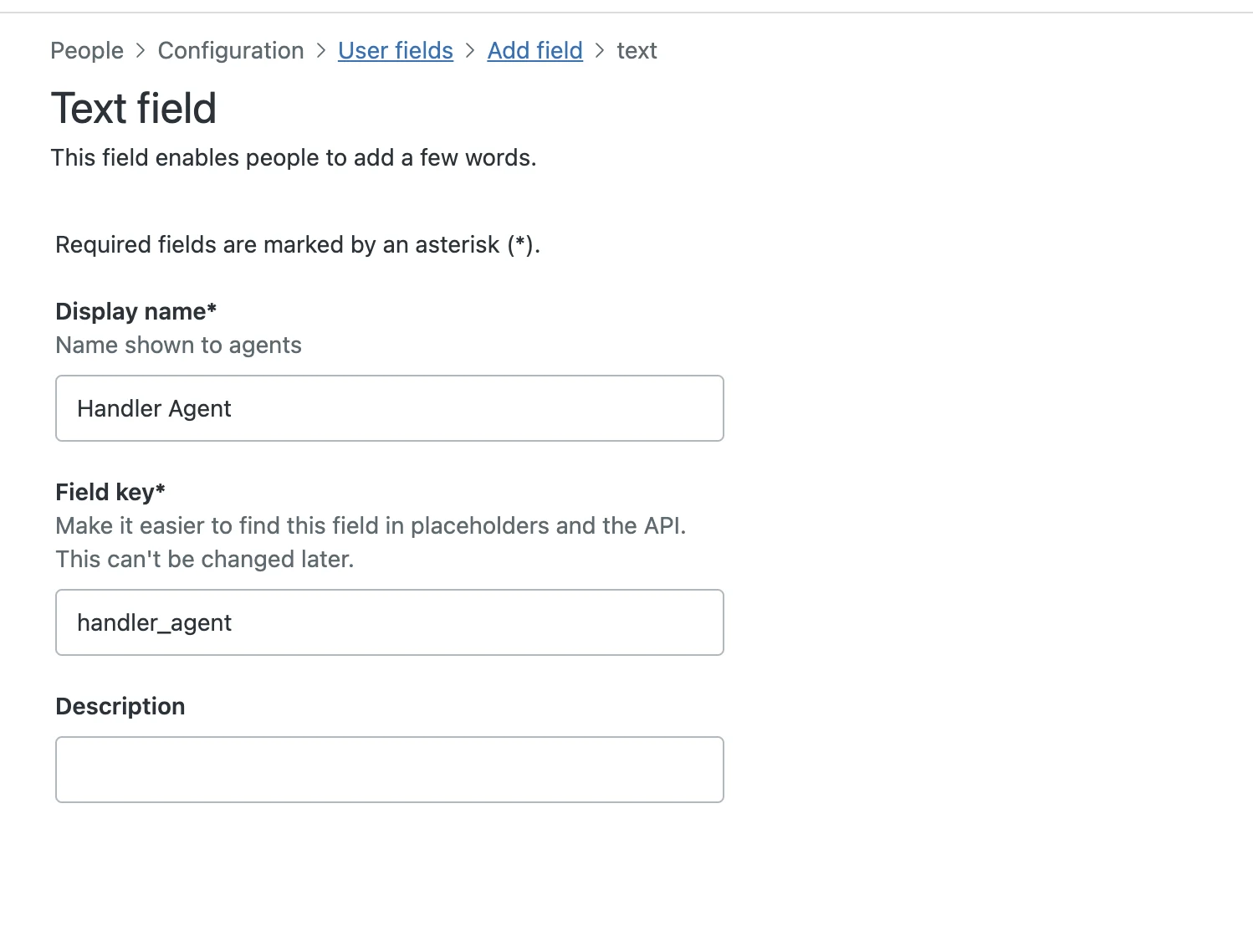
Select Text as the field type and enter Handler agent so Zendesk sets the field key to handler_agent. Screenshot source Create a webhook to update the requester
Open Apps and Integrations > Webhooks > Webhooks and click Create Webhook. Set Name to Update user handler agent, Endpoint URL to https://yourdomain.zendesk.com/api/v2/users/{{ticket.requester.id}}.json (with your subdomain), Request method to PUT, Request format to JSON, and Authentication to Basic authentication.
Confirm your credentials hold user-update permissions so requester profile writes succeed.
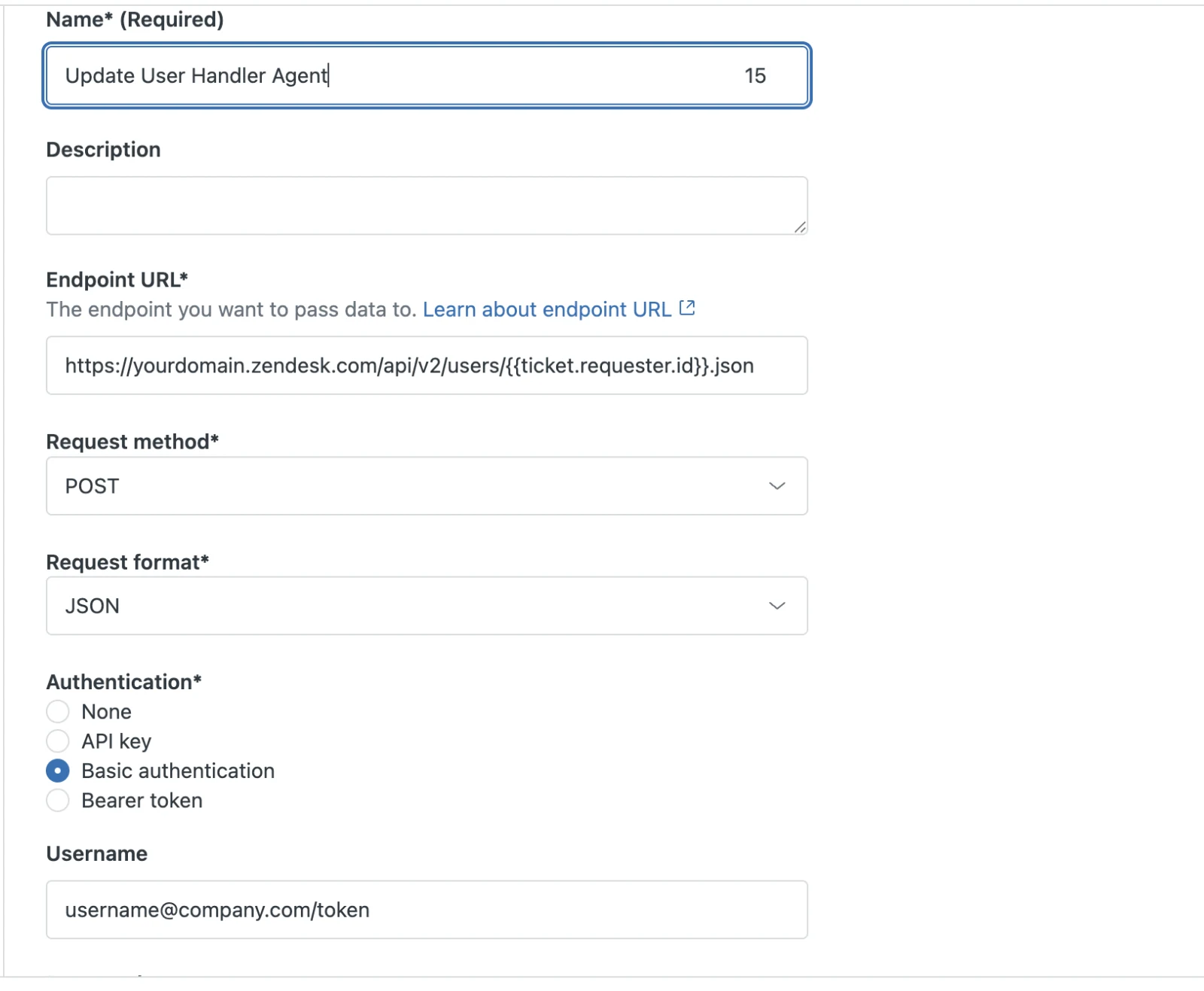
Verify the Endpoint URL, PUT request method, JSON request format, and Basic authentication settings on your webhook. Screenshot source Build a trigger to save the latest agent
Go to Objects and rules > Business rules > Triggers and click Create trigger. Name it Assign handler agent, require Ticket: Ticket | Is | Updated, Ticket: Assignee | Changed, and Ticket: Assignee | Is not | (blank), set Notify by: Active Webhook | Update user handler agent with the JSON body writing the assignee ID to handler_agent, and click Create.
Requiring a non-blank assignee stops unassigned updates from clearing stored handlers.
Create a webhook to update incoming tickets
In Apps and Integrations > Webhooks > Webhooks, click Create Webhook. Set Name to Update ticket, Endpoint URL to https://yourdomain.zendesk.com/api/v2/tickets/{{ticket.id}}.json (with your subdomain), Request method to PUT, Request format to JSON, and Authentication to Basic Authentication.
Keeping user and ticket writes in separate webhooks makes invocation logs simple to audit.
Add a creation trigger to route repeat requesters
Open Objects and rules > Business rules > Triggers and click Add trigger. Name it Assign ticket to end user handler agent, require Ticket: Ticket | Is | Created and Requester: Handler_agent | Is not | (blank), set Notify by: Active Webhook | Update ticket with the JSON body assigning from handler_agent, and save.
Combine this rule with business hours, priority, or SLAs as needed, and test in a sandbox first.
How does this Zendesk setup work in practice?
Worked example: Keeping onboarding customers with one specialist
A SaaS support team on Suite Professional routes returning onboarding customers back to the specialist who handled their setup ticket.
| Choice | Why it matters | How to check |
|---|---|---|
| Add Handler agent (handler_agent) Text user field | Stores the specialist's ID on the customer profile. | Profiles display Handler agent in the sidebar. |
| Link Update user handler agent to Assign handler agent | Saves the specialist ID whenever assignee changes. | Assigning ticket one to Maya populates Maya's ID. |
| Link Update ticket to Assign ticket to end user handler agent | Assigns follow-up tickets straight back to Maya. | Ticket two opens already assigned to Maya. |
Repeat requesters stay paired with one onboarding specialist while new customers enter standard triage.
How do you verify your result in Zendesk?
Verify the workflow in your sandbox by assigning a test user's first ticket, checking their Handler agent field, and submitting a second ticket to confirm automatic assignment. Add business-hours or priority conditions if urgent requests need on-call routing.
| Step | What you should see |
|---|---|
| Create the Handler agent user field | Handler agent appears in User Fields as an active Text field with key handler_agent. |
| Create a webhook to update the requester | Update user handler agent is listed as an active JSON PUT webhook. |
| Build a trigger to save the latest agent | Updating a test ticket's assignee populates Handler agent on the requester profile. |
| Create a webhook to update incoming tickets | Update ticket appears active alongside Update user handler agent. |
| Add a creation trigger to route repeat requesters | A second ticket from your test requester assigns automatically to their stored handler. |
Related Zendesk guides include How to add custom ticket fields to forms in Zendesk and How to create ticket macros for standard responses in Zendesk.
Which official Zendesk sources were checked?
Every step and limit in this Zendesk guide was verified against official documentation on 27 Nov 2026 following how we check figures, alongside more walkthroughs in our Zendesk tutorials hub:
How do you troubleshoot common Zendesk issues?
How are tickets routed the first time a brand-new customer writes in?
New requesters have a blank Handler agent field, so the creation trigger skips them. Their first ticket routes normally and then populates Handler agent for future tickets.
Why did Handler agent stay blank after assigning a ticket?
Check webhook logs under Apps and Integrations > Webhooks to confirm your real subdomain and Basic authentication credentials. Also confirm Assign handler agent checks Ticket Is Updated and Assignee Changed.
Can we override last-agent routing for urgent or off-hours tickets?
Yes, add extra conditions to Assign ticket to end user handler agent. Combining business hours, priority rules, or SLAs lets urgent tickets route to an active group.
 Reviewed byDanny Kirk
Founder of ReddiReach.
 Checked byAndrés Felipe
Digital designer and marketer.
Every figure is checked against the vendor's own page. Read our editorial standards.