
Key Takeaways
- Parabola, rebranded as Prowork, delivers visual workflow automation designed for finance and operations teams managing multi-step reconciliations, exception queues, and recurring audits.
- Parabola provides a free Basic tier for single users with 1,000 credits, while multi-seat Business subscriptions require custom sales negotiation.
- Parabola builds autonomous agents from data flows and references Model Context Protocol capabilities in documentation without stating tier-specific entitlements.
- Parabola does not publish multi-user Business rates online, making it unsuitable for teams seeking simple cloud connections or upfront software pricing.
When a reconciliation, exception queue or recurring report needs an owner who can trace and change the working logic, you need more than a black-box handoff. Parabola has renamed its product Prowork, and it is the strongest fit for finance and operations teams that need visible, editable automation. Skip it if a one-step cloud integration is all you need, or if you need a published team price before you speak to sales.
Agent access
- API
- Not found on official pages
- MCP server
- Official, hosted, OAuth 2.0
- Works with
 ClaudeClaude Code
 Gemini
 Cursor
 ChatGPT
What are the core advantages and trade-offs of using Parabola Prowork?
What works
- Sources, rules and calculations remain visible and editable
- Flows can run on demand, on a schedule or from an event
- Basic is free indefinitely with 1,000 credits for one user
What to watch
- Business pricing needs a conversation with sales
- Credits are consumed when an agent runs
- Basic is built for an individual, not a team evaluation
How does Parabola Prowork transform operations and finance data workflows?
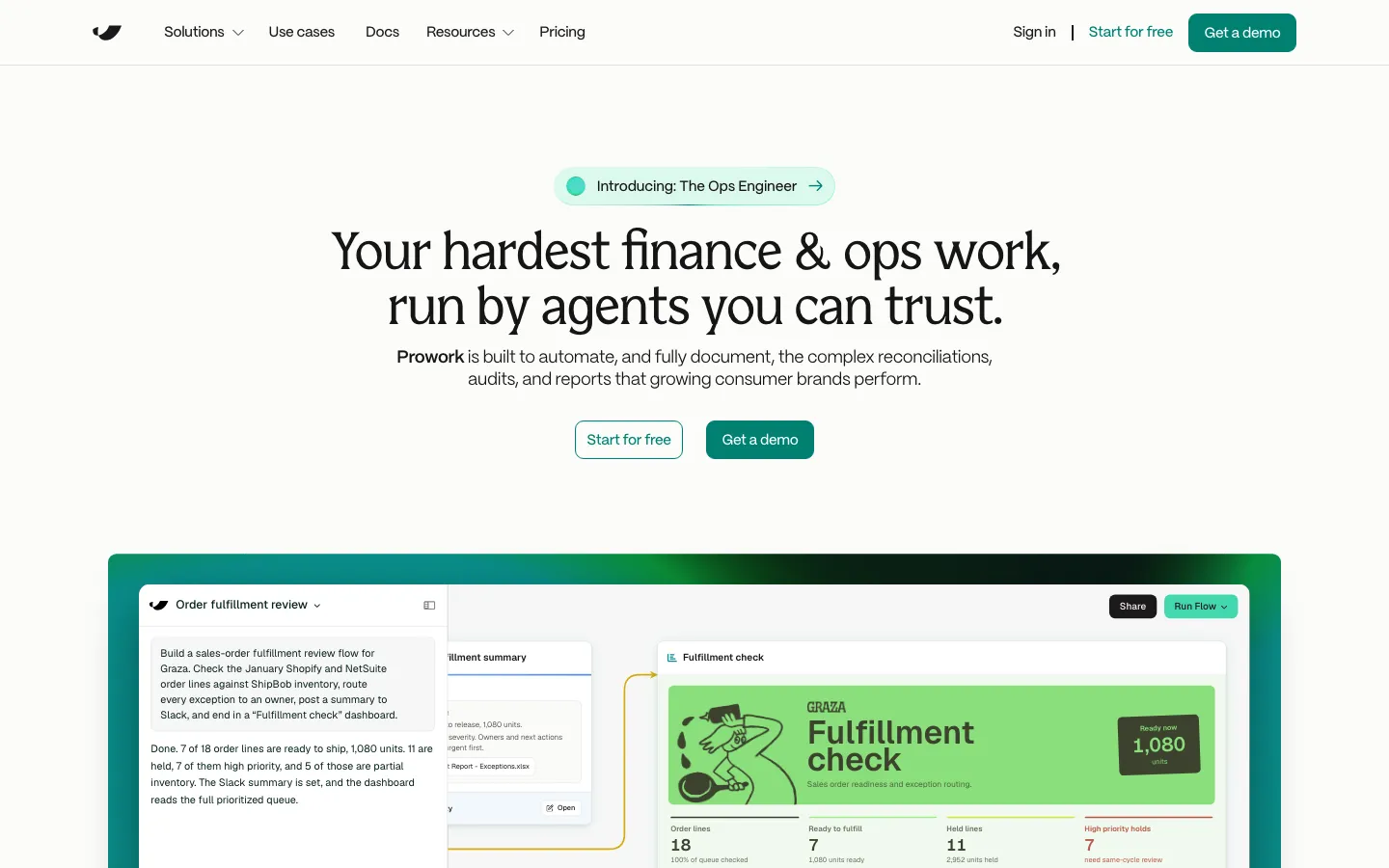
Parabola operates under the product name Prowork to deliver visible workflow automation. It is designed for the recurring work that sits between systems, rules and human judgment: reconciliations, audits, reports, exceptions and handoffs. In the marketing tools directory, it is the option to consider when a result needs to be explained, not merely delivered. Prowork turns the sources, transformations, calculations, rules and decisions into a visible Flow that can be changed when the work changes.
That focus makes sense when the process owner needs to answer a hard question about a result. You can start from files, inboxes or business systems, explore a live problem, and capture the useful process as a code-backed flow. The flow is not merely a diagram. Prowork says it retains the inputs and intermediate results so the team can trace what happened, add its own edge cases and improve the same implementation.
If your objective is ordinary cloud-to-cloud automation, the extra structure may be more than you need. If the process affects a close, a supplier feed, inventory or a management report, I think the inspectable record is Prowork's strongest reason to exist. Keep the decision anchored to the systems and controls the work actually needs.
Which operations and finance teams gain the most value from Parabola?
Operations owners
Make recurring handoffs and exception work visible, trace their inputs, and update the process without waiting on an engineering queue.
Finance teams
Inspect source data, calculations and exceptions before turning a reconciliation or report into a repeatable flow your team can explain.
Process leaders
Bring process owners and technical administrators into a controlled rollout with clear access, change and recovery responsibilities for production work.
Data-heavy operators
Connect files, inboxes and business systems, then keep the sources, rules and calculations editable for the people responsible for outcomes.
The free Basic plan is a good way for one person to prove a real process, but it is not a published team package. Teams that need multiple people, access controls, deployment assistance or custom credit volumes are evaluating Business, so they should decide whether that service model is part of the value, not a footnote to Parabola bill.
What table manipulation and visual automation tools does Parabola offer?
Visible, code-backed flows
Prowork captures each source, rule, calculation, decision and exception as a visible, editable step while generating the code underneath. That is especially useful for work where the team must explain a number or alter a rule without starting the automation again. The right first Flow is a narrow, recurring process whose unusual cases are already known by the people who do the work.
Validation before production
The product's own workflow moves from exploring a problem to capturing it, validating it against live data, then running and improving it. I would treat that sequence as the buying test: compare the Flow with real examples, trace the result back through its inputs, and make sure the business owner can recognize the exceptions before scheduling it.
Scheduled and event-driven runs
A Flow can run on demand, on a schedule, or when an email, webhook or new data arrives. Prowork also describes managed agents with connected data, triggers, permissions, monitoring, run history and failure handling. This gives a recurring workflow a route from a useful analysis to a production system without rebuilding it elsewhere.
Integrations and API steps
Prowork lists connections across ERP, finance, warehouse, APIs, email and file systems, and describes pre-built integrations for the self-serve plan. Its integrations page also says an API step can handle a source that is not listed. That breadth matters only if the required systems, permissions and data direction match your process, so make those checks part of a Business conversation.
Controls for a wider rollout
Business adds deployment support from Parabola's Applied AI team, role-based permissions, version history and rollback, centralized integration governance, SSO and audit trails. Those are not reasons to move a solo task into Business. They are reasons to consider it when several people depend on a production process and someone must own access, changes and recovery.
How does Parabola structure pricing across Basic and Business tiers?
Price checked 14 Nov 2026
| Plan detail | BasicFree | BusinessContact sales |
|---|---|---|
| Who it is for | Individual users | Teams |
| Users | 1 user | Multiple users |
| Credits | 1,000 credits | Custom credit volumes |
| AI use | Limited AI | Not published |
| Support | Community support | Applied AI team enablement |
| Access controls | Not published | ✓ |
Prowork plans, 14 Nov 2026.Prowork pricing
Free is the published starting price, and the vendor says that tier can be used indefinitely. It includes one user, 1,000 credits and limited AI. There is no published dollar amount for additional usage, a Business plan, an added user or an annual discount, so there is no honest team bill to calculate from the public information.
- Credits are consumed when agents run, not while a Flow is being built
- Simple agents use fewer credits, while more complex work can use more
- Self-serve users can add pay-as-you-go credits as usage grows
- Business credit volumes are tailored to the customer's usage
That makes credits the commercial question to settle before you automate a busy process. Count representative runs, including the work that contains documents, exceptions or several steps, rather than treating 1,000 credits as a direct proxy for 1,000 outcomes.
What features and support packages are included in Parabola Business?
Parabola Business represents the team subscription path, requiring sales engagement rather than self-serve onboarding. Parabola positions it as a deployment with its Applied AI team, including a proof of concept using production data, training and support, integrations at scale and governance features. That can be a meaningful advantage if the automation is central to finance or operations, because the technical work and the process knowledge have to meet in the same rollout.
Ask for terms that name the people who will use the workspace, the expected monthly credit volume, the systems to connect, the scope of the proof of concept and the support after launch. Those details decide the real cost and whether Prowork is a platform your team can operate after the initial deployment.
What pricing opacity and workflow limits affect Parabola users?
Parabola withholds public Business pricing as its most prominent limitation. A small team cannot compare Prowork's multi-user cost against another automation product from the public pages, and Basic does not substitute for that comparison because it is explicitly for one user. A sales conversation is reasonable for a production deployment, but it slows a buyer who still needs a budget number to make the case.
Credit pricing also requires a real workload test. Prowork explains that complex tasks consume more when agents run, but it does not publish a simple per-process rate. The practical risk is underestimating the volume of a scheduled process or the effort of document-heavy exception work.
Finally, Prowork is deliberately specialized. Its strongest materials concern finance and operations processes that need traceable logic, permissions and monitoring. A marketer or developer who only wants to send data from one SaaS app to another may be buying more environment than the job requires.
Which workflow automation platforms serve as viable Parabola alternatives?
For customer-facing app or AI-agent integrations, read the  Pipedream review. Pipedream Connect offers SDKs to handle user authentication for 3,000+ APIs, while its Workflows product is shutting down on March 31, 2027, so it is not the choice for a new event-driven process.
For a team that needs automated cloud flows to synchronize files, collect data or send notifications, the Power Automate review is the relevant sibling. Its desktop flows also support RPA, which makes it worth comparing when the work includes desktop software as well as cloud services.
Is Parabola Prowork the top choice for visible data automation?
Parabola Prowork provides a compelling solution when automated data operations must remain fully transparent and editable for process owners. Its visible flows, validation model and Business governance speak directly to finance and operations work where a result needs an explanation. It is less compelling for a lightweight app connection, and it cannot win a price comparison for a team until Parabola supplies a quote.
Start with one recurring process that has known exceptions, validate the Basic Flow against real examples, then request Business terms only if multiple owners, governed access or deployment help are genuinely part of the job.
How was Parabola Prowork product functionality reviewed?
Parabola published Prowork pricing, tool documentation, and integration libraries were reviewed directly on 14 Nov 2026. Public plan details are limited to Basic and the Business sales path, and every published figure follows how we check figures.
- Prowork pricing and plan details
- Prowork documentation for flows, scheduling and controls
- Prowork product and integrations pages
What are the common user questions regarding Parabola Prowork?
What is Prowork by Parabola?
Prowork is Parabola's AI-native platform for finance and operations. It turns operational data and process logic into visible, code-backed flows that teams can inspect, validate and run.
Is there a free Parabola plan?
Yes. Basic is a free self-serve tier that Parabola says can be used indefinitely. It includes one user, 1,000 credits and limited AI.
How do Prowork credits work?
Credits are consumed when agents run, rather than while they are built. Simpler agents use fewer credits, and Business customers receive custom volumes matched to their usage.
Can Prowork run automatically?
Yes. Flows can run on demand, on a schedule, or when an email, webhook or new data arrives.
 Reviewed byDanny Kirk
Founder of ReddiReach.
 Checked byAndrés Felipe
Digital designer and marketer.
Every figure is checked against the vendor's own page. Read our editorial standards.