
Key Takeaways
- Texta AI enables enterprise SEO and marketing teams to monitor generative engine optimization signals and assign prompt citation follow-ups to specific owners.
- Texta AI offers a Starter tier at $49 monthly for 50 prompts, scaling up to Pro at $199 monthly for 150 prompts.
- Texta AI lacks public API documentation and native MCP server connections, requiring prospective enterprise customers to verify automation capabilities prior to adoption.
- Texta AI concentrates primarily on generative search engine monitoring rather than full article drafting, with steep price jumps between entry-level prompt monitoring tiers.
Texta AI is a sensible pick when your marketing team needs to turn AI-search signals into assigned work, not merely collect another dashboard. Its $49 Starter plan is a narrow way to begin with 50 prompts; choose another product if content drafting is your main job, or if the jump to $199 for 150 prompts does not match your coverage needs.
Agent access
- API
- Not found on official pages
- MCP server
- Not found on official pages
- Automation
- Make
What are the main pros and cons of using Texta AI?
What works
- Tracks prompt coverage, mentions, and citations across major answer engines
- Routes changes to the people responsible for content, citation, or competitive work
- Includes source analysis on Starter and expands workspaces as plans grow
What to watch
- Starter is limited to 50 tracked prompts
- Pro costs $150 more each month than Starter
- No public API, MCP, seat allowance, or monitoring cadence is listed
What generative search visibility features does Texta AI provide?
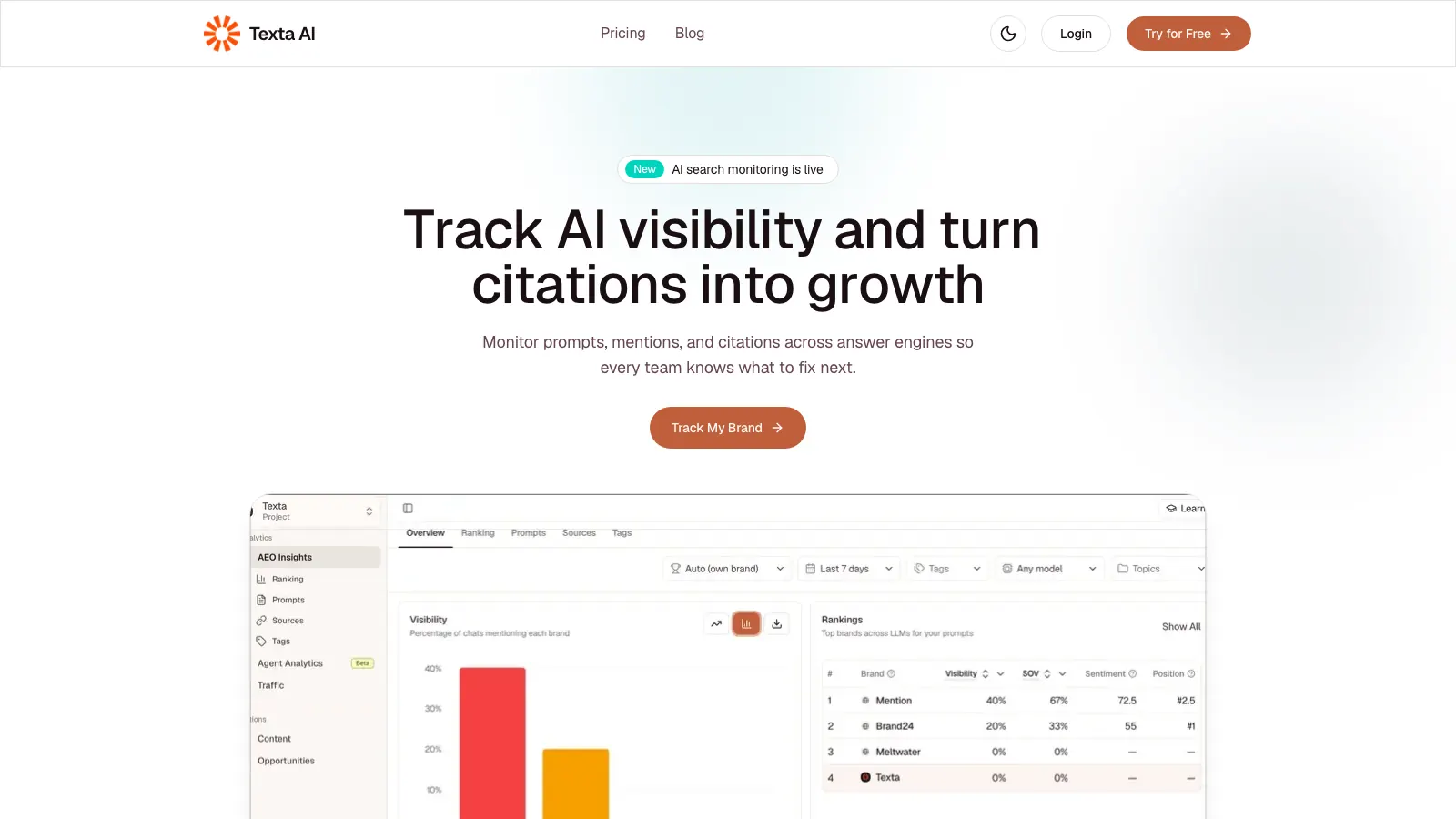
Texta AI provides generative visibility tracking designed to operate enterprise GEO workflows rather than serving as an automated long-form article writer. It watches prompts, mention share, citation quality, and competitor movement across ChatGPT, Gemini, Claude, Perplexity, and other answer engines. That distinction matters if you arrived looking for a writing assistant: Texta's free tools include an AI Content Writer, while the paid plans are for visibility operations. Compare it with the best AI visibility tools if you need to weigh different ways to run that work.
The useful idea is the handoff. A disappearing citation or a competitor gain matters only when someone owns the response. Texta says it can route priority changes to the right team for content updates, citation fixes, and competitive response. For a team already dividing work among SEO, content, and growth, that can be more valuable than another aggregate score because it keeps the signal connected to a decision.
Start modestly. The documentation suggests beginning with 10 to 20 high-value, real-user-style questions, adding competitors, then allowing initial collection cycles before treating a trend as stable. That makes Texta better suited to a deliberately chosen monitoring program than to a broad, set-it-and-forget-it sweep of every possible query.
Who gets the greatest marketing benefit from Texta AI?
In-house GEO leads
Choose it when one owner connects prompt signals to SEO, content, and leadership work.
Growth teams
It suits teams using citation and mention shifts to prioritize their next response.
Multi-brand operators
Advanced provides five workspaces and 350 prompts for teams managing multiple active programs.
Teams with a workflow gap
Choose it when ownership and follow-up regularly disappear after useful insights emerge.
I would not choose Texta just because your team writes a lot. The paid product is not positioned as a content suite. Its free AI Content Writer may be useful separately, but the subscription is a monitoring, diagnostics, reporting, and workflow purchase. Teams that need an editor to improve a draft should choose a writing-specific product instead.
Which citation monitoring and prompt tracking features are included in Texta AI?
Prompt-level visibility
Texta monitors how often a brand appears across the major answer engines it names, then surfaces prompt coverage, mention share, and citation quality. The point is not to treat all AI answers as one number. You can identify the questions where your brand is absent and the source patterns influencing a response, which gives a content or SEO owner somewhere specific to start.
Citation diagnostics and source data
Its feature set includes citation intelligence, citation gap detection, source analysis, and a Sources dashboard. The documentation also says source tables can be exported as CSV for external analysis. That is a practical route for a team that needs to take the evidence into its own reporting, though the public material does not describe an API or an MCP server for agent-driven access.
Actions instead of passive alerts
Texta frames its workflow around detecting AI-search changes, assigning the appropriate owner, and verifying improvements. The product pages name content updates, citation fixes, and competitive response as examples of the work that follows. That is a stronger fit for a team with an established operating rhythm than for a solo user who only wants occasional visibility checks.
Reporting and competitor context
The platform also lists executive reporting, competitive GEO alerts, and model-specific trends. You can add three to five direct competitors during setup and use the Ranking, Sources, and Actions areas to review the program. Be conservative with interpretation: Texta says initial collection cycles are needed before trends become stable, and it does not publish whether collection refreshes in real time, daily, or weekly.
Integrations named by Texta
Texta's solutions page names Vercel, Slack, Gemini, Make, Claude, and Supabase. The stated use cases range from routing coverage and citation alerts to comparing model behavior and storing GEO datasets. These names establish the integrations Texta promotes, not which subscription tier includes each one, so confirm plan access before designing a workflow around any of them.
How does Texta AI price its Starter and Pro monitoring tiers?
Price checked 27 Nov 2026
| Plan detail | Starter$49/mo | Pro$199/mo | Advanced$399/mo | EnterpriseCustom |
|---|---|---|---|---|
| Project workspaces | 1 | 2 | 5 | Contact sales |
| Tracked prompts | 50 | 150 | 350 | Custom |
| Mention scoring | Basic | Advanced | Advanced | Not published |
| Source analysis | ✓ | ✓ | Advanced | Not published |
Texta lists these prices with $, checked 27 Nov 2026.Texta AI pricing
For a team running one ongoing visibility program, the published monthly subscription example is Pro at $199. It buys two project workspaces and 150 prompts, which is three times Starter's prompt allowance for about four times the monthly price. Texta does not publish a per-seat price or a seat allowance on its pricing page, so confirm your member requirements before calling that the complete team bill.
- Starter at $49 a month: one workspace, 50 prompts, basic mention scoring, and source analysis
- Pro at $199 a month: two workspaces, 150 prompts, and advanced mention scoring
- Advanced at $399 a month: five workspaces, 350 prompts, and advanced source analysis
- Enterprise: custom monitoring, governance, and workflows through sales
What enterprise monitoring and workflow controls does Texta AI offer?
Texta AI Enterprise provides tailored monitoring packages, governance controls, and custom workflows for complex marketing teams. Texta also says it supports enterprise deployment expectations including access controls, clear data-handling practices, and dedicated onboarding support. There is no public price, published prompt cap, or public workspace total, so it belongs in a sales conversation after the Advanced plan's five workspaces or 350 prompts cease to fit.
Where does Texta AI fall short on plan pricing and flexibility?
Texta AI imposes steep tier price jumps that present significant budget challenges when teams need to expand prompt tracking limits. Fifty prompts can cover a focused first set, and Texta's own documentation recommends beginning with 10 to 20 important questions. But a team that wants branded, category, and competitor coverage across several markets can reach that ceiling quickly. The next listed plan costs $199 a month, with no published option between Starter and Pro.
Several buying details are still absent from the public plan table. It does not state which plans include workflow routing, competitor alerts, executive reporting, Slack, or the named integrations. It also does not show user-seat limits, refresh cadence, an API, or MCP access. Those gaps do not make the product unusable, but they do mean you should get the answers in writing before making Texta the system a team depends on.
Finally, Texta's label can be misleading. Its paid offer is focused on AI-search monitoring and action workflows. The free tools catalog does include content generators, document chat, and converters, but a team seeking writing-specific assistance should look at a dedicated writing product instead of assuming the paid plans handle drafting.
What are the top competitive alternatives to Texta AI?
 AI Peekaboo review is the first comparison I would make if agent access is essential: its plans start at $30 a month and include API and MCP access.
If your concern is the written output itself rather than AI-search monitoring,  Twain review is for researched outbound sequences for email, LinkedIn, and calls.
 Wordtune review is for rewriting and grammar correction. Texta is the better fit only when the work begins with visibility signals and finishes with a team-owned action.
What is the final verdict on implementing Texta AI for GEO?
Texta AI delivers clear operational value when an organization requires accountable team members to action prompt citation shifts. Its core monitoring, citation diagnostics, competitor context, and action workflow form a coherent operating layer. The tradeoff is a narrow Starter plan and public buying details that stop short of the questions a team usually asks about seats, cadence, and automation access.
Use Starter to establish a focused prompt set, then move to Pro only when 50 prompts or one workspace demonstrably blocks the program. Ask Texta to confirm seats, refresh timing, integrations, and API or MCP availability before you make it part of an automated reporting workflow.
How were the features and limits of Texta AI researched?
Texta AI features, pricing tiers, and prompt limits were verified against official documentation on 27 Nov 2026. The alternative facts come from each product's own record: AI Peekaboo was checked 27 Nov 2026, while Twain and Wordtune were checked 27 Nov 2026. Every figure follows how we check figures.
- Texta AI pricing and feature pages
- Texta AI solutions and free-tools pages
- Texta documentation for setup, billing, security, and FAQs
What are the common questions about using Texta AI?
What does Texta AI monitor?
Texta AI monitors brand visibility across ChatGPT, Gemini, Claude, Perplexity, and other AI answer engines. It lists prompt coverage, mention share, citation quality, competitor movement, and source analysis among its monitoring capabilities.
How much does Texta AI cost?
Starter is $49 a month for one workspace and 50 prompts. Pro is $199 a month for two workspaces and 150 prompts, while Advanced is $399 a month for five workspaces and 350 prompts. Enterprise is priced through sales.
Does Texta AI have an API or MCP server?
Texta's public material does not publish API or MCP access. Its documentation does say source tables can export CSV data, and its solutions page names several integrations. Confirm automation access directly before building around it.
Is Texta AI a content-writing tool?
The paid product is positioned for AI visibility monitoring, diagnostics, reporting, and workflows. Texta also publishes free content tools, including an AI Content Writer, but its subscription pricing is for GEO monitoring plans.
 Reviewed byDanny Kirk
Founder of ReddiReach.
 Checked byAndrés Felipe
Digital designer and marketer.
Every figure is checked against the vendor's own page. Read our editorial standards.