
Key Takeaways
- Locate external links pointing to missing pages by inspecting the Broken Backlinks report inside Ahrefs Site Explorer.
- Confirm you have entering rights or access to inspect the target domain profile inside an active Ahrefs account.
- Follow four systematic steps to open the report, inspect referring URLs, evaluate broken targets, and sort findings.
- Verify that listed source URLs point to dead internal paths so webmasters can configure 301 redirects or republish missing content.
Identify external websites linking to broken 404 pages on your domain using the Broken Backlinks report in Ahrefs Site Explorer. Restoring or redirecting these target URLs recaptures lost link equity and improves referral traffic experiences.
For plan limits and team seat pricing behind this workflow, read our Ahrefs review or connect Ahrefs to AI agents in Ahrefs API and MCP.
Key steps
What do you need before starting in Ahrefs?
Ahrefs requires the following workspace setup before you begin:
- The domain, URL, or subsection whose inbound links you want to inspect.
- An Ahrefs account with access to the Broken backlinks report.
How do you complete the steps in Ahrefs?
Follow these 4 steps in Ahrefs in order:
Open Site Explorer for your target
In Site Explorer, enter the domain, URL, or subsection whose inbound links you want to check, then load the report. Choose a domain scope for the whole site or a specific URL when you are investigating one page.
For a whole-site review, use the domain scope and keep it consistent when comparing later reports. Use a URL scope when checking one known destination. Record the scope you used so a missing row is not mistaken for a site-wide check.
Open Broken backlinks
In Site Explorer’s left navigation, open the Backlinks profile section and select Broken backlinks. This report lists referring pages that link to 404 pages on the target, along with anchor and surrounding text.
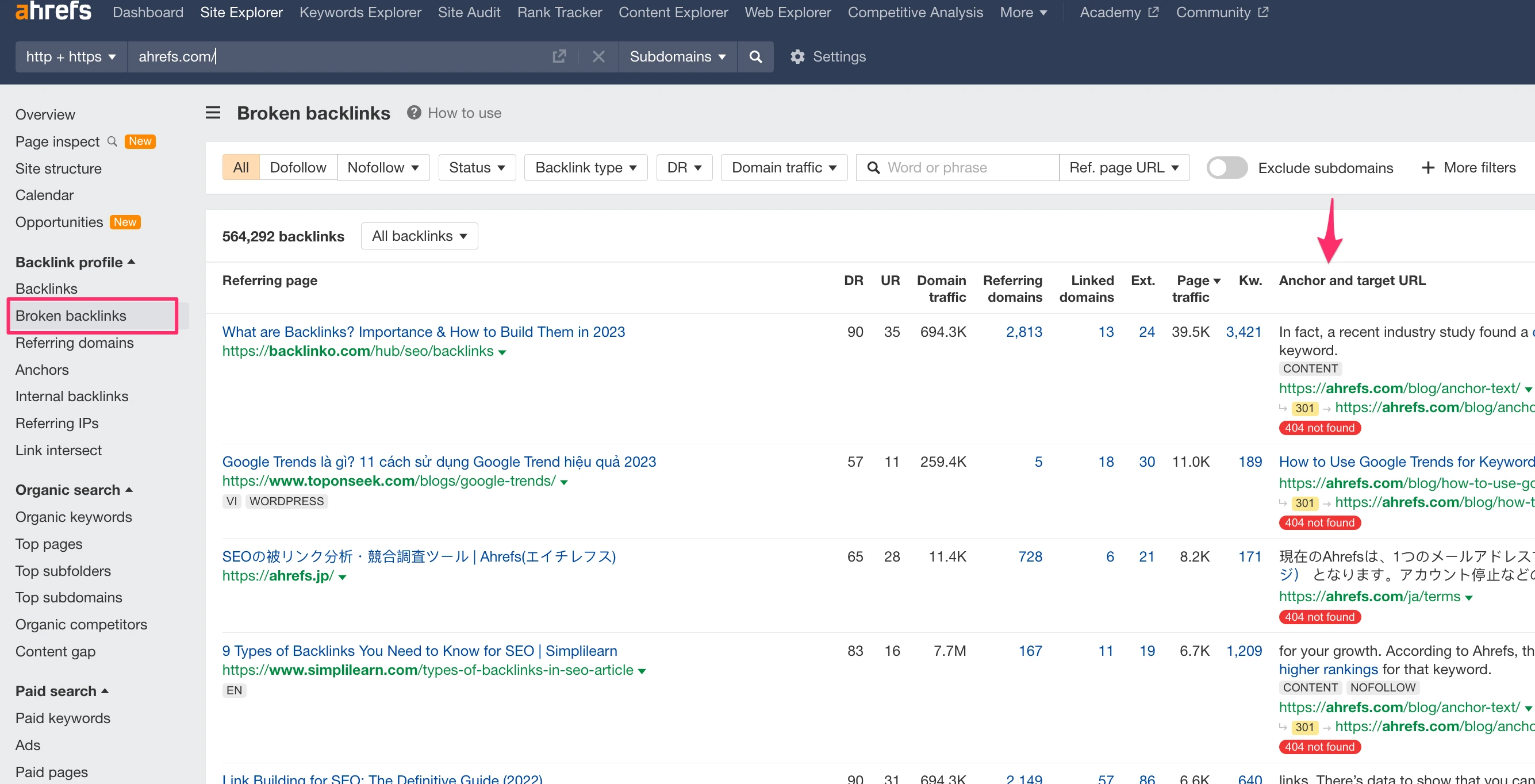
Site Explorer highlights Broken backlinks in the sidebar and lists the referring pages and target URLs. Screenshot source Review the referring pages and broken URLs
In the results, use the Referring page column to identify the external page containing the link. Check Anchor and target URL for the link text and the 404 page on your site. These details help distinguish a valuable link to restore from one that points to an obsolete or irrelevant URL.
Before prioritizing a row, open the referring page and confirm the link is present and points to the reported target. A stale crawl, removed link, or page that has since changed can make the report less actionable. Note the referring page, anchor, target URL, and your verification date together.
Filter or sort the list
Use the report’s filters or sorting controls to focus on useful candidates. Ahrefs documents filtering or sorting by anchor text, URL, DR, and other fields, and says you can combine multiple filters. For example, narrow the list by URL to investigate links pointing to one important page.
When several rows point to one target, group them by target URL before choosing a repair. A target linked from several relevant pages may justify restoring it. A single low-value or unrelated reference may not. If you filter by URL, use the target URL you are investigating and confirm the resulting rows still show the expected referring pages.

Use Backlink type above the report to narrow the broken links by type. Screenshot source
How does this Ahrefs setup work in practice?
Worked example: prioritize a retired product guide with inbound links
An e-commerce site identifies external links pointing to an unindexed comparison guide in Ahrefs and decides whether to redirect or restore the URL.
| Choice | Why it matters | How to check |
|---|---|---|
| Set Site Explorer to the store’s domain scope | The decision concerns links to any page on the site, not one known URL. | The target displayed in Site Explorer is the intended domain. |
| Filter for the old guide’s target URL | Grouping links to that destination makes the repair decision easier to assess. | Visible rows show that target URL and their referring pages. |
| Open each promising referring page | A relevant page that still contains the link is stronger evidence than a report row alone. | The external page loads and its link points to the reported destination. |
| Compare the old guide with the current product pages | Restore it if its content is still useful. Redirect only if a live page closely satisfies the same need. | The chosen destination preserves the original link’s subject and intent. |
The team implements a 301 redirect to an updated equivalent page, preserving link equity from the external referring domain.
How do you verify your result in Ahrefs?
Confirm that the report shows external referring pages linked to 404 URLs on your target. Use the list to decide which pages to restore or redirect to relevant live pages, then review the referring pages before contacting site owners.
| Step | What you should see |
|---|---|
| Open Site Explorer for your target | Site Explorer shows the target you intend to inspect. |
| Open Broken backlinks | The Broken backlinks report is selected for your target. |
| Review the referring pages and broken URLs | The report shows a referring page and a target URL marked as a broken page. |
| Filter or sort the list | The rows reflect the filter or sort criteria you selected. |
Related Ahrefs guides include Ahrefs Link Intersect guide and Find broken internal links in Ahrefs Site Audit.
Which official Ahrefs sources were checked?
Every step and limit in this Ahrefs guide was verified against official documentation on 21 Nov 2026 following how we check figures, alongside more walkthroughs in our Ahrefs tutorials hub:
How do you troubleshoot common Ahrefs issues?
Are these broken links on my site pointing outward?
No. Broken backlinks are inbound links from external referring pages that point to 404 pages on your target site. For outbound links from your own site, use Site Explorer’s Outgoing Links reports instead.
What should I do with a broken page that has backlinks?
Ahrefs recommends restoring the page or redirecting it to a relevant page on your site. Check that the replacement is meaningfully related to the original destination.
Why does a reported referring page no longer show the link?
The page or link may have changed since the report data was collected. Open the referring page and check its current link and destination before requesting a repair. If the link is gone, treat the row as historical evidence rather than an active opportunity.
 Reviewed byDanny Kirk
Founder of ReddiReach.
 Checked byAndrés Felipe
Digital designer and marketer.
Every figure is checked against the vendor's own page. Read our editorial standards.