
Key Takeaways
- Use Ahrefs Link Intersect to identify external websites that link to multiple industry domains while currently omitting links to your target URL.
- Ensure you hold an active Ahrefs account with access to Link Intersect and gather URLs for your target site and several reference websites.
- Carry out 6 defined steps to open Link Intersect, input your target site, enter external URLs, generate the report, inspect prospects, and export data.
- Confirm that results show referring domains linking to multiple target entries while verifying your domain column displays zero backlinks.
Ahrefs Link Intersect analyzes multiple competing websites simultaneously to reveal external domains linking to other industry sites but not your own. Evaluate shared linking sources and intersection counts to prioritize authoritative prospects for link-building outreach.
For plan limits and team seat pricing behind this workflow, read our Ahrefs review or connect Ahrefs to AI agents in Ahrefs API and MCP.
Key steps
What do you need before starting in Ahrefs?
Ahrefs requires the following workspace setup before you begin:
- An Ahrefs account with access to Link Intersect.
- The target domain or URL to compare.
- The competitor domains or URLs you want to compare, up to 10.
How do you complete the steps in Ahrefs?
Follow these 6 steps in Ahrefs in order:
Open Link Intersect
Find Link Intersect under Competitive Analysis in the top navigation. This workflow compares one target against competitor URLs to show link opportunities. Choose Referring domains for a domain-level comparison, which groups opportunities by the websites linking to competitors.
Enter the target and scope
Enter the target domain or URL. Suggestions may appear as you type. If you want to compare one specific page against competitor pages, select Exact URL as the scope. For a broader site comparison, use the target scope appropriate to the domain you entered.
Add competitor URLs
Enter the competitor URLs to compare against the target. The tool supports up to 10 competitors. Check each entry carefully because the report’s intersections depend on the websites or pages you provide.
Generate the report
Select Show link opportunities. The Referring domains report will show domains and their linking relationship to the target and competitors. Read the linking status and competitor columns together to find domains that link to one or more competitors but are not linking to the target.
Inspect promising opportunities
Click a number in the report to inspect the individual backlinks represented by that count. Use the filters to narrow by referring-domain properties or metrics such as DR and Traffic, or adjust which websites are included in the intersection. Keep the comparison criteria aligned with your goal. Filtering changes which opportunities remain visible.
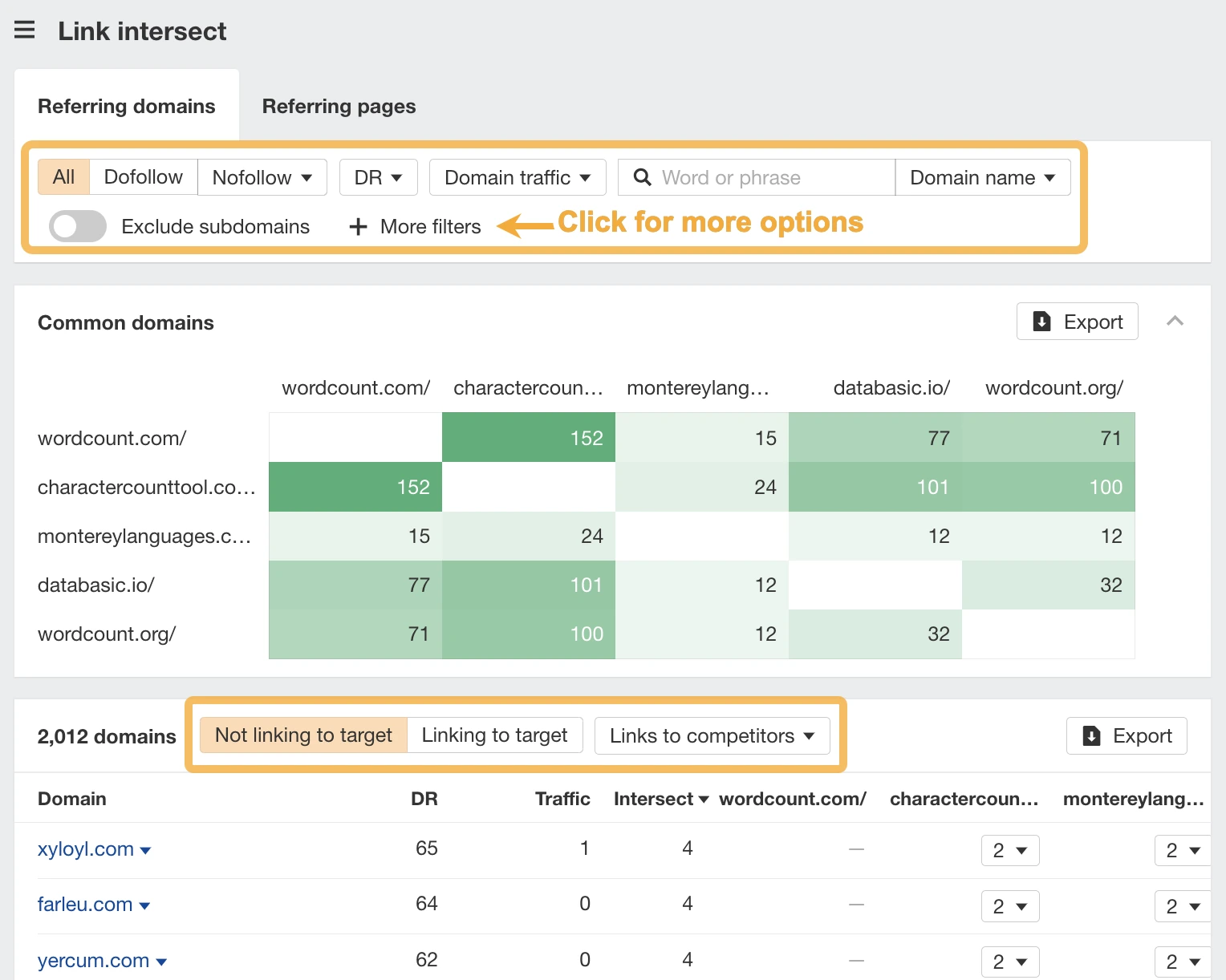
The visible report shows how filters and linking-status columns can narrow the domain opportunities. Export is also visible. Screenshot source Export if you need a separate working list
Use Export in the report’s right corner to take the results into a spreadsheet. A saved working list can help you review the candidate domains and backlink details, but keep the target, competitor set, and any filters with your notes so the comparison can be understood later.
How does this Ahrefs setup work in practice?
Worked example: finding referring domains linking to multiple competing sites
A web publisher compares a flagship resource page against three similar industry resources to identify websites that regularly link to related content.
| Choice | Why it matters | How to check |
|---|---|---|
| Select Referring domains and set the target to Exact URL. | The scenario concerns one target page, so the comparison scope should reflect that page. | The form shows the intended target URL and Exact URL scope. |
| Add three competitor URLs that serve a comparable purpose. | Comparable pages make the resulting opportunity set easier to evaluate against the target. | All three URLs appear in the competitor entries. |
| Generate the report and locate domains that link to competitors but not the target. | This isolates the gap the scenario is intended to investigate. | The linking status and competitor columns support the selection. |
| Open counts for a few candidates and review the backlinks before exporting. | A domain-level intersection alone does not show whether its links are contextually useful. | The shortlist includes only domains with a relevant backlink to review. Export if a separate review sheet is useful. |
Review the specific linking pages and editorial contexts across candidate domains to decide which prospects align with your link outreach campaign.
How do you verify your result in Ahrefs?
The report gives you a competitor-based list of referring-domain opportunities. A domain appearing in the intersection is a lead for inspection, not an automatic outreach recommendation. Check its actual backlinks and relevance to decide whether it belongs on your working list.
| Step | What you should see |
|---|---|
| Open Link Intersect | Link Intersect is open and Referring domains is selected. |
| Enter the target and scope | The target and scope shown in the form match the pages or site you intend to compare. |
| Add competitor URLs | The competitor entries are the intended URLs, with no accidental omissions or mismatches. |
| Generate the report | The report appears and includes the target and competitor comparison columns. |
| Inspect promising opportunities | You have inspected the backlink details for at least one relevant domain, or recorded why the remaining candidates do not fit. |
| Export if you need a separate working list | If needed, the export is available and your notes identify the comparison used. |
Related Ahrefs guides include Find broken internal links in Ahrefs Site Audit and Find organic competitors in Ahrefs Site Explorer.
Which official Ahrefs sources were checked?
Every step and limit in this Ahrefs guide was verified against official documentation on 21 Nov 2026 following how we check figures, alongside more walkthroughs in our Ahrefs tutorials hub:
How do you troubleshoot common Ahrefs issues?
What is the difference between Referring domains and Referring pages here?
Referring domains groups opportunities by the websites linking to the compared targets. Referring pages focuses on individual linking pages, which can contain multiple links to the same website.
Can I compare a single page rather than an entire domain?
Yes. Enter the target URL and select Exact URL for the scope when you want to compare a specific page against competitor pages.
Why do some domains disappear after filtering?
The upper filters narrow referring domains or pages by properties and metrics such as DR and Traffic. The lower filters select which websites to find intersecting links for. Review those settings if an expected opportunity is no longer shown.
 Reviewed byDanny Kirk
Founder of ReddiReach.
 Checked byAndrés Felipe
Digital designer and marketer.
Every figure is checked against the vendor's own page. Read our editorial standards.