
Key Takeaways
- Map organic search competitors using Ahrefs Site Explorer to uncover domains that rank for identical target queries.
- Input your clean root domain or subdomain into Ahrefs using the exact protocol matching your live site architecture.
- Complete five sequential actions to open the competitor map, evaluate traffic values, inspect overlapping keywords, and add domains.
- Verify competitor relevance by checking shared keyword lists in Ahrefs to differentiate industry peers from general information publishers.
Discover organic search competitors in Ahrefs Site Explorer by analyzing shared keyword rankings and domain search volume metrics. Compare visual competitor maps with tabular keyword overlap figures to prioritize domains for detailed gap analysis.
For plan limits and team seat pricing behind this workflow, read our Ahrefs review or connect Ahrefs to AI agents in Ahrefs API and MCP.
Key steps
What do you need before starting in Ahrefs?
Ahrefs requires the following workspace setup before you begin:
- Your website’s domain or subdomain, entered using the same version your site uses.
- Access to Site Explorer in Ahrefs.
How do you complete the steps in Ahrefs?
Follow these 5 steps in Ahrefs in order:
Enter your website in Site Explorer
Open Site Explorer from the Ahrefs top navigation. Enter your root domain, such as example.com, in the search field. Choose the Domain mode to include that domain, or Subdomains mode if you want to include its subdomains too. Use the mode that matches the scope you want to research.
Keep the target mode consistent with the site you want to compare. A domain and a subdomain can have different ranking footprints, so switching modes between reviews can make the competitor set appear to change. Record the chosen target and mode with your notes.
Open Organic competitors
In the Site Explorer left menu, open Organic search, then select Organic competitors. Use a domain or subdomain target to find competing websites. The report can also show competing pages in Exact URL mode, but that is a different view from the website-level competitor map.
Read the competitive map
Review the map of organic competitors. Ahrefs plots estimated organic traffic on the vertical axis and organic traffic value on the horizontal axis. Circle size represents the number of organic pages. Use the map to get a quick view of competing sites. For example, a site close to yours on both axes with a substantial circle may deserve a closer look.
Use the map as a screening view, not a final ranking of business competitors. Traffic and traffic value are estimates, and a large circle only indicates more organic pages. Check the site’s subject matter and audience before treating proximity on the map as meaningful.
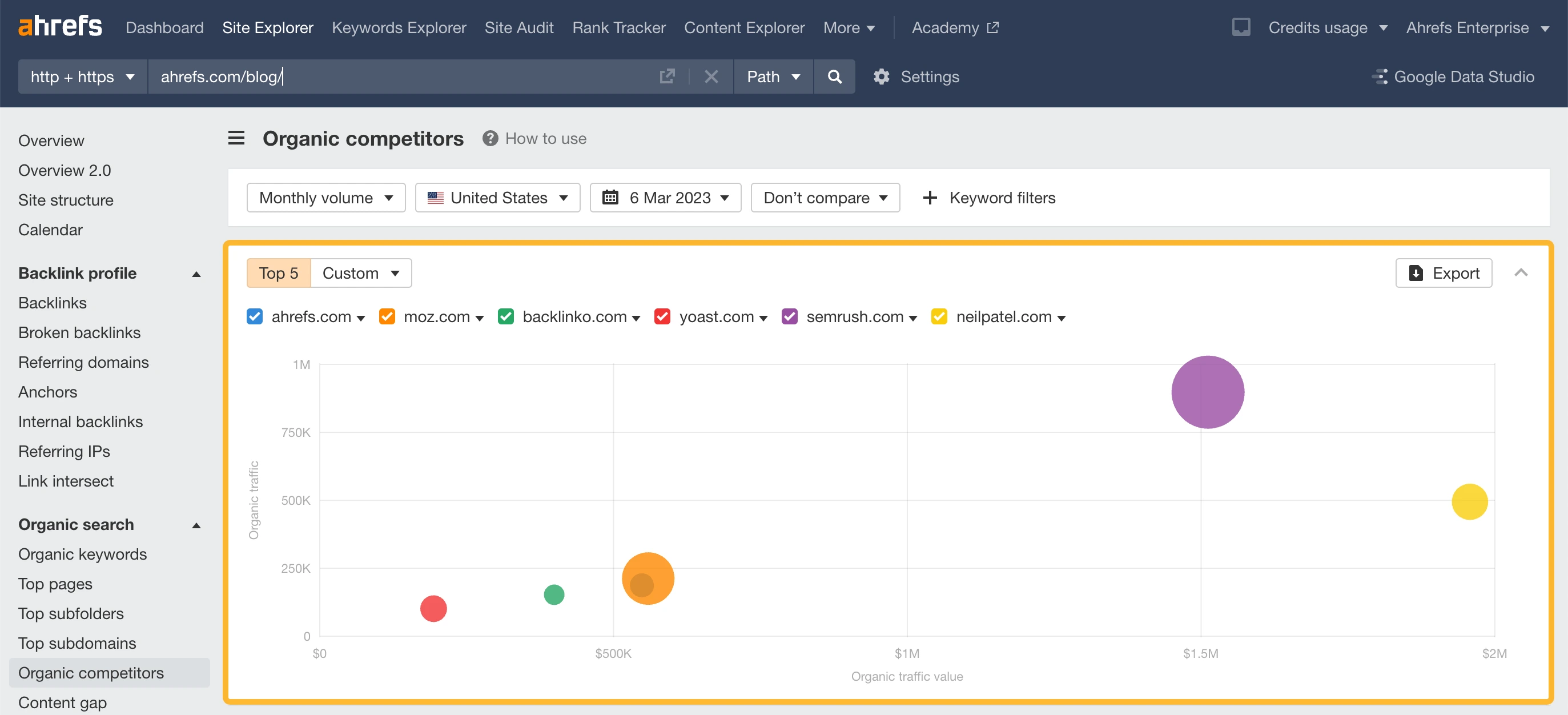
Larger circles represent sites with more organic pages. Screenshot source Check keyword overlap before choosing a competitor
Scroll to the table below the map and review the Keyword overlap column. Common keywords indicate relevance, while keywords unique to the competitor can point to subjects your site does not cover. Favor a site with meaningful overlap and a useful set of unique keywords. Select its number under Competitor’s keywords to open the keywords it ranks for that your target does not.
Open a competitor’s keywords and sample several terms before using them for planning. A high overlap count can include branded or peripheral terms. Look for shared non-brand topics and unique terms that match your audience, then inspect the pages ranking for them.
Add a site to the map if needed
If a useful website is missing from the map, use the Custom dropdown in the competitive map to add it manually. Compare its metrics with the automatically surfaced sites, then revisit the keyword overlap table to see whether it shares enough search terms with your target.
How does this Ahrefs setup work in practice?
Worked example: find search competitors for a regional accounting firm
A regional professional services firm uses Ahrefs Site Explorer to discover domains that compete for commercial tax and accounting queries.
| Choice | Why it matters | How to check |
|---|---|---|
| Enter the firm’s root domain in Domain mode | The question concerns the whole website’s search footprint. | Site Explorer opens for the intended domain in Domain mode. |
| Open Organic search > Organic competitors | The report surfaces websites with overlapping organic rankings. | The map and competitor table are for the selected site scope. |
| Compare sites with similar traffic and keyword overlap | These are useful candidates, but the firm also needs to judge whether their topics reach prospective clients. | The table shows overlap and the site’s subject matter is relevant. |
| Open Competitor’s keywords for one candidate | Sampling its ranking terms separates useful local tax topics from unrelated publishing coverage. | Several sampled keywords and ranking pages fit the firm’s audience. |
The firm isolates commercial service competitors from national tax blogs, creating an actionable peer list for keyword gap research.
How do you verify your result in Ahrefs?
You have a set of candidate organic competitors supported by shared ranking keywords and comparative search metrics. Pick one relevant site and open its competitor keywords to identify topics for further research.
| Step | What you should see |
|---|---|
| Enter your website in Site Explorer | The Site Explorer report opens for your entered target and selected mode. |
| Open Organic competitors | The report displays competing websites for the selected site scope. |
| Read the competitive map | The map shows competitor circles and the axes for organic traffic and traffic value. |
| Check keyword overlap before choosing a competitor | The table includes a competitor row with keyword overlap and a clickable Competitor’s keywords value. |
| Add a site to the map if needed | The manually added site appears in the competitive map. |
Related Ahrefs guides include Ahrefs Link Intersect guide and Find broken internal links in Ahrefs Site Audit.
Which official Ahrefs sources were checked?
Every step and limit in this Ahrefs guide was verified against official documentation on 21 Nov 2026 following how we check figures, alongside more walkthroughs in our Ahrefs tutorials hub:
How do you troubleshoot common Ahrefs issues?
Why does Site Explorer show competing pages instead of competing websites?
Check the target mode. Ahrefs uses Exact URL mode to show competing pages. Use Domain or Subdomains mode for competing websites, or Path mode if you want to analyze a multi-page subfolder.
Why is an obvious search competitor missing?
Ahrefs identifies competitors from overlapping organic rankings, so a site with a different keyword footprint may not appear. Add it manually from the map’s Custom dropdown, then use keyword overlap to assess how relevant it is.
Why does the map look relevant but the competitor’s keywords do not?
Map metrics summarize estimated traffic, value, and page count, while keyword overlap reflects ranking terms. Inspect the competitor’s keywords and sample the ranking pages. If most terms are off-topic or branded, exclude that site from your practical competitor set.
 Reviewed byDanny Kirk
Founder of ReddiReach.
 Checked byAndrés Felipe
Digital designer and marketer.
Every figure is checked against the vendor's own page. Read our editorial standards.