
Key Takeaways
- Build tailored performance summaries in Semrush My Reports by launching a pre-configured template and adjusting custom metrics.
- Confirm your Semrush account includes My Reports access and prepare target reporting goals along with audience requirements beforehand.
- Navigate through six configuration steps in Semrush My Reports to select templates, adjust date ranges, and customize presentation widgets.
- Verify the finished report in Semrush My Reports by checking data completeness across all populated widgets before distribution.
Generate client reports in Semrush My Reports by selecting a ready-to-use template and tailoring widgets to your reporting scope. Customizing dates and SEO metrics delivers actionable performance summaries for stakeholders.
For plan limits and team seat pricing behind this workflow, read our Semrush review or connect Semrush to AI agents in Semrush API and MCP.
Key steps
What do you need before starting in Semrush?
Semrush requires the following workspace setup before you begin:
- Access to Semrush My Reports.
- A reporting question and intended audience, so you can choose a relevant template and decide what should be included.
- A suitable Base or Pro report allocation. The source describes report availability as dependent on subscription and toolkits. Check your account’s available reports before creating one.
How do you complete the steps in Semrush?
Follow these 6 steps in Semrush in order:
Open My Reports and review the template choices
Go to My Reports. On the start screen, review the Ready-to-use templates area and the template names. The screenshot shows this chooser alongside Start from scratch, a template gallery, and an existing reports list.
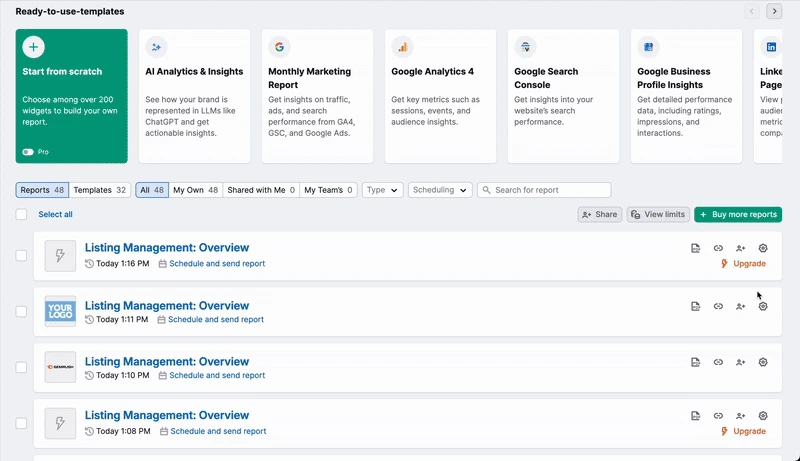
The screenshot shows the template chooser and available report entries, the starting point for selecting a report template. Screenshot source Select a template that fits the reporting question
Choose a template whose stated focus matches the report you need. A template is a starting point for the report. Review its contents instead of assuming it includes every metric or integration your audience needs.
Review the report structure and included data
Inspect the widgets and sections in the report. My Reports can combine Semrush and supported marketing tool data, and reports can include visualizations such as tables and charts. Confirm that the actual widgets and connected sources provide the information you need.
Set the reporting period and adjust content
Set the report date at the top to the period you intend to review. Integration widgets follow the report date by default. An integration widget can be unlinked and given its own dates in its settings. This date control does not affect widgets from the Widgets tab. Remove or adjust content that does not serve the report’s purpose.
Review presentation settings and interpret the data
Use the report layout and formatting options to make the content readable. Page orientation can be changed in Report settings. Add context where useful so the audience can understand what the displayed data does and does not show. Do not infer causes or metric definitions that are not present in the report.
Save or share only after reviewing the finished report
Review the report as a whole before choosing how to distribute it. My Reports supports PDF generation and scheduled email delivery, along with report sharing options that depend on the report and account. Check the available controls and audience in your account before using them.
How does this Semrush setup work in practice?
Worked example: preparing a monthly organic marketing review
An SEO consultant configures a monthly client summary in Semrush My Reports to present search visibility progress and top ranking improvements across key target commercial categories.
| Choice | Why it matters | How to check |
|---|---|---|
| Choose a ready-to-use template whose stated focus matches the monthly marketing review. | A relevant starting structure reduces the work of assembling the report from scratch. | Verify the selected template’s displayed focus before opening it. |
| Inspect each widget and its source. | The report should answer the client’s question using data actually included in the report. | Confirm the necessary source and widget are present. |
| Set the report date to the intended month and check widget-level dates. | Integration widgets normally follow the report date, but can be unlinked individually. | Confirm the report period and any separate widget periods. |
| Add concise context around the displayed data and review the complete report. | Readers need a clear interpretation tied to the report’s scope. | Check that statements are supported by the displayed data. |
The finalized report presents accurate date ranges and filtered keyword metrics, allowing the consultant to schedule recurring monthly delivery through account distribution settings.
How do you verify your result in Semrush?
You have a My Reports report based on a template, with its date range, widgets, and presentation reviewed against your reporting question. The template provides structure, while the final report’s usefulness depends on the data sources and content actually present. Do not treat sample or hypothetical values as forecasts.
| Step | What you should see |
|---|---|
| Open My Reports and review the template choices | You can see the template choices and identify a candidate relevant to your reporting question. |
| Select a template that fits the reporting question | The selected template has a clear relationship to the question and audience you identified. |
| Review the report structure and included data | You can identify the data sources and widgets in the report and explain how they address the reporting question. |
| Set the reporting period and adjust content | The report date is appropriate, and you have checked whether any integration widget uses separate dates. |
| Review presentation settings and interpret the data | The report is readable and its included data can be interpreted in the context of the stated reporting question. |
| Save or share only after reviewing the finished report | The finished report presents the intended scope and content, and any selected sharing method is available for your account. |
Related Semrush guides include How to add competitors in Semrush Position Tracking and How to check draft readability with Semrush SEO Writing Assistant.
Which official Semrush sources were checked?
Every step and limit in this Semrush guide was verified against official documentation on 21 Nov 2026 following how we check figures, alongside more walkthroughs in our Semrush tutorials hub:
How do you troubleshoot common Semrush issues?
Why can’t I create another report?
Report availability depends on your Semrush subscription and purchased toolkits or apps. Check the available report allocation for your account.
Why does a widget show a different time period?
An integration widget can be unlinked from the report date and use dates configured in its own settings. Check that widget’s date settings. The report-level date does not affect widgets from the Widgets tab.
Why doesn’t the chosen template answer my question?
A template is a starting structure and may not include the needed source or widget. Review what it actually contains and adjust the report with supported data sources and widgets.
 Reviewed byDanny Kirk
Founder of ReddiReach.
 Checked byAndrés Felipe
Digital designer and marketer.
Every figure is checked against the vendor's own page. Read our editorial standards.