
Key Takeaways
- Assess draft readability in Semrush SEO Writing Assistant by comparing sentence structure and paragraph lengths against top competitors.
- Secure an active Semrush account with Writing Assistant access and specify target focus keywords and target audience locations beforehand.
- Follow six editing steps in Semrush SEO Writing Assistant to input drafts, generate recommendations, review readability, and refine copy.
- Confirm readability in Semrush SEO Writing Assistant by verifying that the overall readability score satisfies target competitor benchmarks.
Evaluate article readability in Semrush SEO Writing Assistant to identify complex sentences, long paragraphs, and title length issues against top organic competitors. Applying these content recommendations improves reader clarity while aligning with search best practices.
For plan limits and team seat pricing behind this workflow, read our Semrush review or connect Semrush to AI agents in Semrush API and MCP.
Key steps
What do you need before starting in Semrush?
Semrush requires the following workspace setup before you begin:
- A draft you can review in Semrush SEO Writing Assistant or its supported editor integration.
- Target keywords for the recommendations.
- A location and device choice for the recommendation setup.
- Be ready to review suggested changes in context before using them.
How do you complete the steps in Semrush?
Follow these 6 steps in Semrush in order:
Open SEO Writing Assistant
Open SEO Writing Assistant in Semrush to work directly in the platform. The supplied product information also describes integrations for Google Docs, WordPress, and MS Word, but the screenshot provided shows a WordPress post editor with the Semrush panel. That image documents the WordPress variant. Follow the steps here for the readability task wherever you are using the assistant.
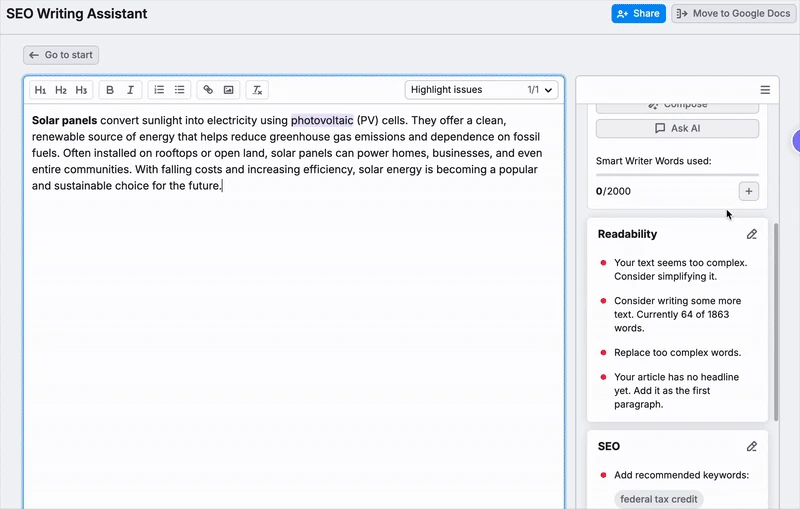
The Readability panel lists issues beside the draft in Semrush SEO Writing Assistant. Screenshot source Set up recommendations
Enter the draft’s target keywords, select a location, and choose a device type, desktop or mobile. Then click Get Recommendations. These inputs are used to generate personalized suggestions, so use the terms and context that match the draft you are checking.
Review the overall score and components
SEO Writing Assistant shows an overall score and a graph covering Readability, SEO, Originality, and Tone of Voice. The overall score considers all four areas, so use it as a broad content-quality signal. For a readability check, open the Readability component to see its details.
Check readability and word count
Compare the current readability score with the target based on the top 10 Google competitors described by the product information. Also review current word count against the recommended target. The tool allows manual adjustment of readability targets and word counts using the pencil icon next to the readability metric, and those changes update the overall score.
Review title and content issues
Inspect the readability details for title issues and content issues. The assistant can flag titles that exceed Google character limits or may need more words, along with long paragraphs, hard-to-read sentences, passive voice, and complex words. Use the flagged text to locate a specific passage to revise.
Revise and recheck the draft
Make focused edits in the document, then review the readability details again. If you use Simplify on flagged content, it opens the Rephraser window with an AI-powered suggestion. Review any generated wording before accepting it, and make sure the revised passage still communicates the intended point.
How does this Semrush setup work in practice?
Worked example: simplifying dense paragraphs in a draft guide
An editor pastes a complex technical draft into Semrush SEO Writing Assistant to identify polysyllabic terminology and overly dense paragraphs that exceed recommended competitor reading ease scores.
| Choice | Why it matters | How to check |
|---|---|---|
| Generate recommendations using the draft’s actual target keywords and audience context. | The tool personalizes recommendations from the supplied keywords, location, and device. | Confirm those inputs before generating the analysis. |
| Expand Readability and locate the flagged paragraph. | This connects the score to a specific passage the editor can review. | The passage is identifiable in the draft and corresponds to a visible content issue. |
| Break up or clarify the passage while preserving its meaning. | The assistant identifies long paragraphs and hard-to-read sentences as content issues. | Re-read the edited passage for completeness and accuracy. |
| Recheck Readability and decide whether more edits are needed. | The updated details show which issues remain after revision. | Compare current readability and word count with their displayed targets. |
The editor splits flagged run-on sentences and shortens introductory paragraphs, observing the readability gauge update in real time until the draft meets target score thresholds.
How do you verify your result in Semrush?
You have a readability review tied to the specific draft: a current score, competitor-based target, word-count context, and identified text or title issues. The score helps locate revision opportunities, but it does not establish that a draft will rank or that every suggested edit fits its audience.
| Step | What you should see |
|---|---|
| Open SEO Writing Assistant | The draft is open alongside the SEO Writing Assistant analysis panel. |
| Set up recommendations | Recommendations have been generated for the intended keywords, location, and device. |
| Review the overall score and components | The Readability section is expanded and shows the current and target readability information. |
| Check readability and word count | You have recorded whether readability and word count are below, at, or above the displayed targets, without treating the target as a guarantee of ranking. |
| Review title and content issues | Each issue you plan to address is tied to a visible title, sentence, paragraph, or word in the draft. |
| Revise and recheck the draft | The revised draft has been rechecked, and you can see which readability flags changed or remain. |
Related Semrush guides include How to add competitors in Semrush Position Tracking and How to build a Semrush My Reports report from a template.
Which official Semrush sources were checked?
Every step and limit in this Semrush guide was verified against official documentation on 21 Nov 2026 following how we check figures, alongside more walkthroughs in our Semrush tutorials hub:
How do you troubleshoot common Semrush issues?
Why can’t I see personalized readability recommendations?
The assistant needs target keywords to generate recommendations. Enter the keywords, location, and device, then choose Get Recommendations.
Does the Readability score use only sentence length?
The supplied product description says it uses the Flesch reading ease formula and also analyzes top 10 Google competitors to set a target benchmark. The expanded details may also show word count, title issues, and content issues.
Should I accept every Simplify suggestion?
No. Simplify opens an AI-powered Rephraser suggestion for flagged content. Review the suggestion against the intended meaning and voice before using it.
 Reviewed byDanny Kirk
Founder of ReddiReach.
 Checked byAndrés Felipe
Digital designer and marketer.
Every figure is checked against the vendor's own page. Read our editorial standards.