
Key Takeaways
- Perform bulk keyword analysis in Ahrefs Keywords Explorer by submitting keyword lists to generate unified metric overview tables.
- Maintain an active Ahrefs subscription and compile keyword terms into comma-separated text or a structured CSV upload file.
- Follow six operational steps in Ahrefs Keywords Explorer to set search parameters, paste batches, run queries, and review metrics.
- Verify batch output in Ahrefs Keywords Explorer by reviewing table rows for volume data and assessing whether difficulty updates are required.
Analyze multiple search queries simultaneously in Ahrefs Keywords Explorer by pasting lists or uploading structured text files. The resulting batch overview displays aggregate search volumes, difficulty ratings, and click metrics for streamlined keyword prioritization.
For plan limits and team seat pricing behind this workflow, read our Ahrefs review or connect Ahrefs to AI agents in Ahrefs API and MCP.
Key steps
What do you need before starting in Ahrefs?
Ahrefs requires the following workspace setup before you begin:
- An Ahrefs account.
- A prepared list of keywords, either as text or a .txt or .csv file.
- A selected search engine and location appropriate to the research.
How do you complete the steps in Ahrefs?
Follow these 6 steps in Ahrefs in order:
Open Keywords Explorer and set the search context
Open Keywords Explorer. Choose the search engine and location for the batch. These are part of the context for the keyword search, so set them before reviewing the results.
Enter or upload the batch
Type keywords separated by commas or new lines, or use Upload to select a .txt or .csv file. Keywords Explorer supports entering up to 10,000 keywords at once. If using a file, review the list beforehand for accidental duplicates or unrelated terms.
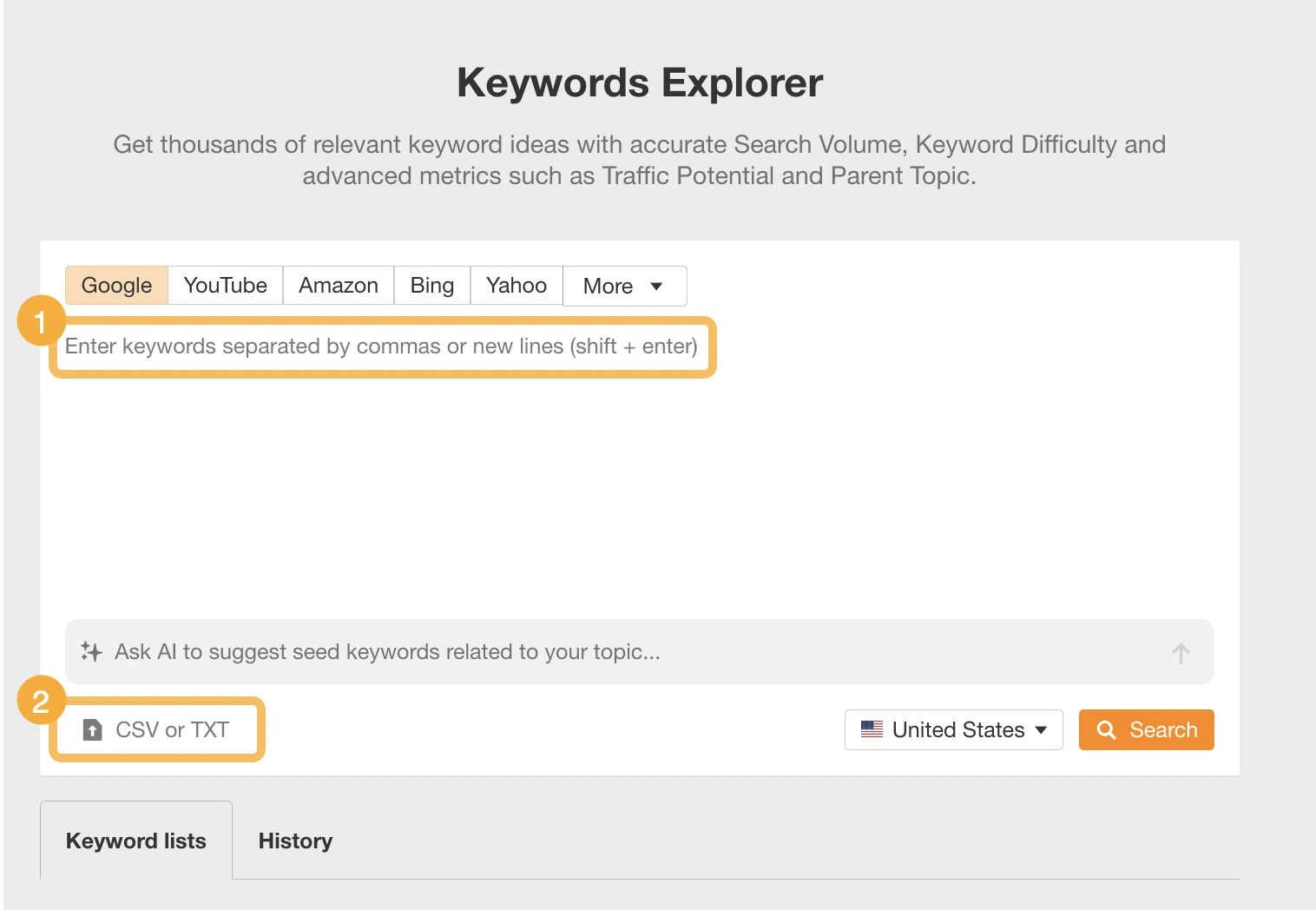
The visible entry screen shows where to paste a batch or choose a CSV or TXT file. Screenshot source Optionally request seed suggestions
If you need more seed ideas before searching, use the AI suggestions feature shown in the entry area to generate related seed keywords. Treat suggestions as candidates to review. Keep the search batch focused on the terms relevant to your research.
Run the search
Select Search. Ahrefs takes you to the Overview section, where a table shows the keywords you entered and their SEO metrics or stats. Review whether the submitted terms appear as expected before making comparisons across the batch.
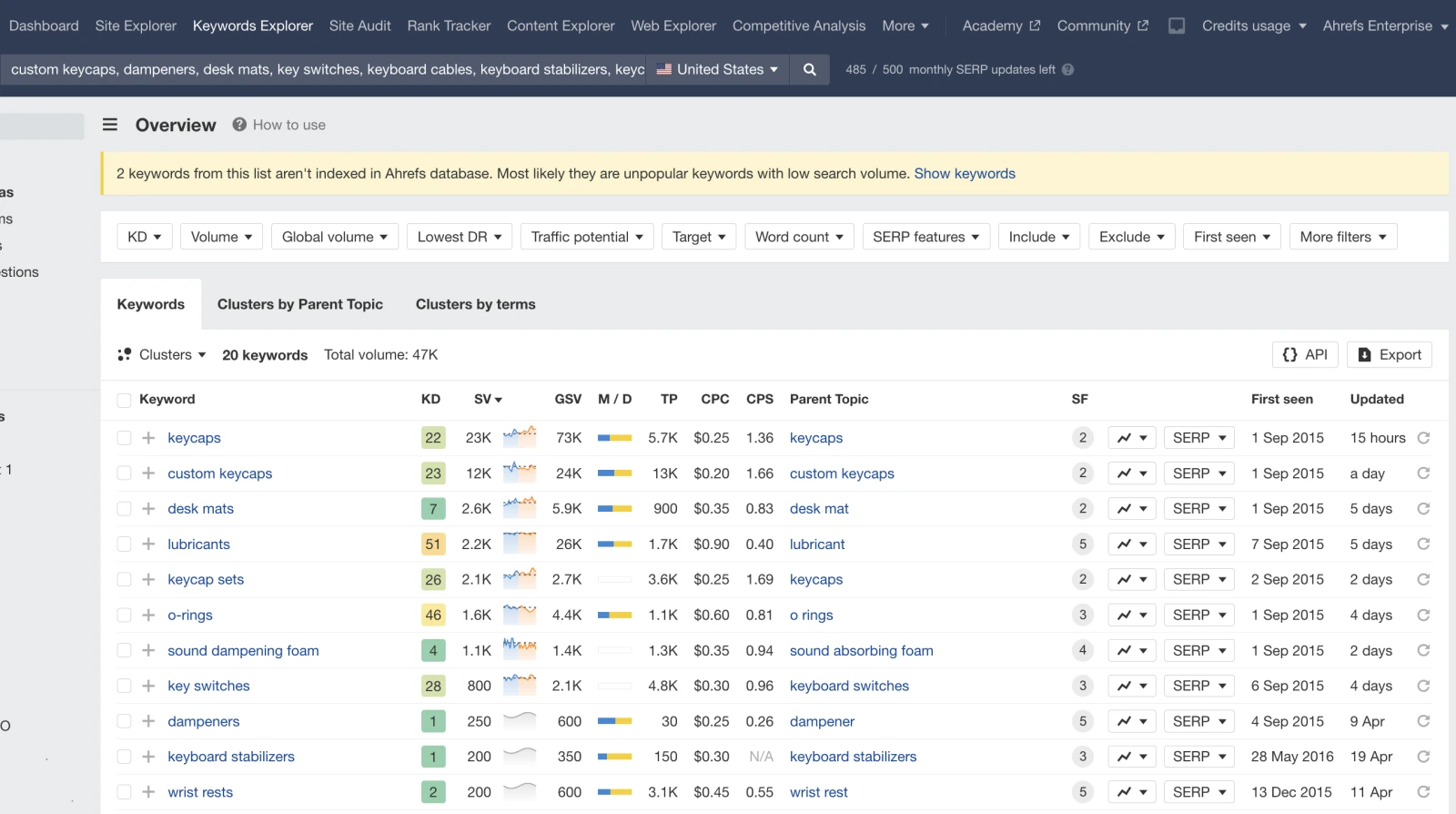
The visible Overview shows a submitted keyword list and its available metrics. Screenshot source Review availability and save for later if useful
Review the metrics shown for each term. Some keywords may not be indexed in Ahrefs’ database, and some may lack a Keyword Difficulty score or show it in gray. If you want to revisit the set, save the keywords to a Keywords List. The number of lists you can save depends on your plan.
Update Keyword Difficulty when needed
For keywords without a KD score or with a gray KD score, the source describes performing a SERP update, including for multiple keywords at once. Advanced metrics fetching consumes one credit per keyword according to the source, so review credit usage before requesting those metrics.
How does this Ahrefs setup work in practice?
Worked example: auditing a batch of commercial product keywords
A content strategist uploads a compiled list of fifty potential product keywords into Ahrefs Keywords Explorer to evaluate total search demand across target geographic markets in a single session.
| Choice | Why it matters | How to check |
|---|---|---|
| Choose the search engine and location for the planned audience. | The search context should match what the researcher wants to evaluate. | Both selections are visible before entering the batch. |
| Upload a CSV containing the prepared keyword set. | The source supports CSV upload, which is practical for an existing batch. | The intended file is selected and the keywords are represented in the entry area. |
| Run Search and review Overview for each submitted term. | The overview table presents the entered keywords and available metrics together. | The returned terms correspond to the prepared batch. |
| Save the batch to a Keywords List if it will be needed again. Consider SERP updates only for missing or gray KD values that matter. | This separates repeat access from optional metric updating and accounts for credit use. | The list is saved if appropriate, and any update decision is limited to relevant keywords. |
The strategist reviews the unified metrics table to identify high-volume terms and selects specific priority keywords for live SERP updates where detailed difficulty metrics are needed.
How do you verify your result in Ahrefs?
You have run a batch search and can review the available keyword metrics together in Overview. Missing data is not a measured value: decide whether it matters to the analysis before using credits for advanced metrics or a SERP update.
| Step | What you should see |
|---|---|
| Open Keywords Explorer and set the search context | The selected search engine and location match the research you intend to do. |
| Enter or upload the batch | The intended keywords are visible in the entry area or the correct file has been selected. |
| Optionally request seed suggestions | The batch contains only the terms you intend to evaluate. |
| Run the search | The Overview table appears and includes the entered keywords. |
| Review availability and save for later if useful | You know which terms have visible metrics and whether the batch should be saved for reuse. |
| Update Keyword Difficulty when needed | Any selected SERP updates have been submitted for the intended keywords, or you have left missing KD values unchanged. |
Related Ahrefs guides include Ahrefs Link Intersect guide and Find broken internal links in Ahrefs Site Audit.
Which official Ahrefs sources were checked?
Every step and limit in this Ahrefs guide was verified against official documentation on 21 Nov 2026 following how we check figures, alongside more walkthroughs in our Ahrefs tutorials hub:
How do you troubleshoot common Ahrefs issues?
How many keywords can I search at once?
The documented maximum is 10,000 keywords in one search.
What file formats can I upload?
The documented formats are TXT and CSV. You can also enter keywords manually, separated by commas or new lines.
Why is a keyword’s KD missing or gray?
The source says a SERP update can update KD for keywords without a score or with a gray score. Advanced metrics fetching consumes one credit per keyword, so account for that before updating.
 Reviewed byDanny Kirk
Founder of ReddiReach.
 Checked byAndrés Felipe
Digital designer and marketer.
Every figure is checked against the vendor's own page. Read our editorial standards.