
Key Takeaways
- Paste up to 200 target domains or URLs into Semrush Bulk Analysis to generate instant side-by-side backlink comparison tables.
- Assemble a clean, line-separated list of target competitors and verify active Semrush Backlinks tool access before submitting queries.
- Complete five structured steps to paste target URLs, initiate analysis, confirm search scope, and evaluate referring domain metrics.
- Verify data by inspecting referring IP distributions and network authority scores to confirm which targets warrant deeper manual analysis.
Compare referring domain and backlink totals across up to 200 URLs or domains simultaneously using Semrush Backlinks Bulk Analysis. Evaluate high-level backlink volume side by side to prioritize competitor domains for in-depth link building research.
For plan limits and team seat pricing behind this workflow, read our Semrush review or connect Semrush to AI agents in Semrush API and MCP.
Key steps
What do you need before starting in Semrush?
Semrush requires the following workspace setup before you begin:
- A Semrush project or access to the Backlinks tool.
- A prepared comparison list of up to 200 URLs or domains, with one entry per line.
- A clear comparison question, such as which competitors have more referring domains or which similar pages have attracted more links.
How do you complete the steps in Semrush?
Follow these 5 steps in Semrush in order:
Choose the comparison set
Decide whether you are comparing whole domains or specific pages. For a domain-level view, use domains consistently. For a content comparison, collect pages that serve a similar purpose, such as competing buying guides. The report accepts up to 200 URLs or domains, so a focused set makes the results easier to interpret.
Open Bulk Analysis and enter targets
In Semrush, open the Backlinks tool and select Bulk Analysis. Paste the targets into the input area at the top, placing one URL or domain on each line. The screenshot shows the Bulk Analysis tab and an input area with multiple domain entries. It is a populated example, not a requirement to use those domains.
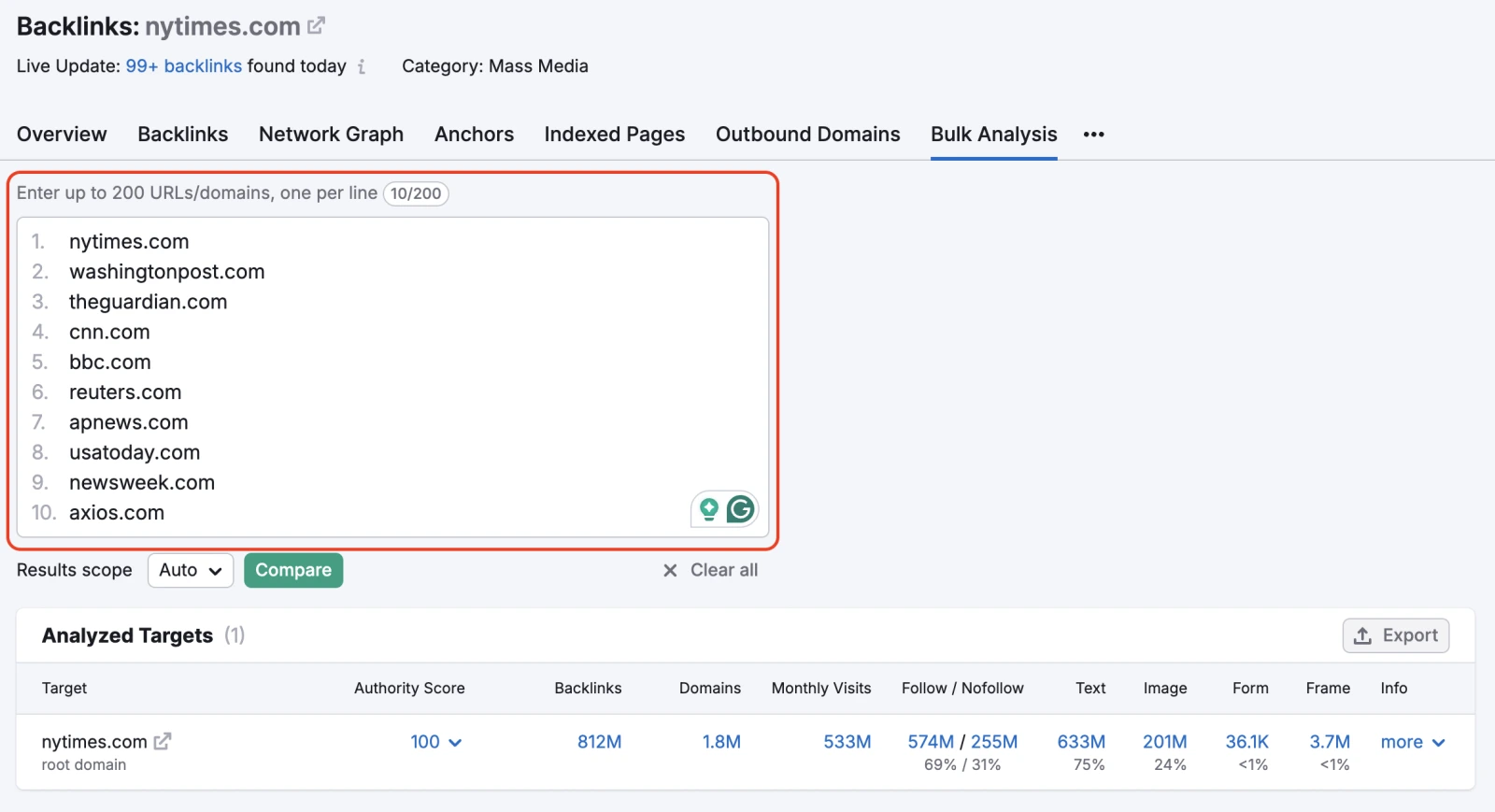
The visible Bulk Analysis tab, target input, and analyzed-target metrics illustrate where to enter a comparison set and where results appear. Screenshot source Run the comparison and confirm scope
Submit the targets using the control available in your current report view. The report populates with one row or target summary for each analyzed entry. Check the analyzed-target list and scope indicators before reading the metrics, especially if the interface shows a root-domain or URL scope choice. Keep the scope consistent across competitors when possible.
Compare backlinks and referring domains
Start with the backlink count and referring-domain count for each target. Backlinks count links, while referring domains let you compare how many distinct domains are represented. Read both together: a target can have a large backlink count without leading on referring domains. Use this to identify profiles worth closer review, not to infer link quality from the counts alone.
Use supporting metrics to refine the read
Review other available columns, which may include Authority Score, monthly visits, follow and nofollow links, link types, and referring-domain categories. Expand Info for referring IP and top-level-domain backlink details. These measures add context to the comparison, but their presence does not establish why a profile differs or whether a link is valuable.
How does this Semrush setup work in practice?
Compare competitors for a buying guide
A publishing team plans a baseball-hat buying guide and reviews how comparable guides perform across search engines.
| Choice | Why it matters | How to check |
|---|---|---|
| Collect URLs for comparable buying guides, rather than mixing guides with unrelated homepages. | The comparison question is about similar content attracting links. | Each target is a guide serving a comparable reader need. |
| Enter the selected guide URLs one per line in Bulk Analysis. | The report accepts URL entries as well as domains and can compare a broad set. | The analyzed-target list includes each intended guide. |
| Compare backlink and referring-domain totals together. | The two counts reveal both link volume and the number of referring domains represented. | The comparison notes both metrics for each guide. |
| Inspect Info and relevant supporting fields for the strongest candidates. | Referring IP and top-level-domain details, along with other available metrics, can give additional context for further review. | The next research shortlist is based on the report evidence, with link quality still requiring separate evaluation. |
The team decides which comparable guide to inspect manually for potential referring sites and content angles based on referring domain counts.
How do you verify your result in Semrush?
You now have a side-by-side snapshot of link-profile scale across the selected targets. Use backlink and referring-domain differences to prioritize which competitors, domains, or comparable pages deserve manual review. Treat this report as a prospecting comparison: it shows counts and other reported metrics, but does not by itself explain how links were earned or establish their quality.
| Step | What you should see |
|---|---|
| Choose the comparison set | Your list contains no more than 200 entries, and each entry matches the type of comparison you want to make. |
| Open Bulk Analysis and enter targets | The input area displays the intended targets on separate lines and the count is within the 200-target limit. |
| Run the comparison and confirm scope | The analyzed targets correspond to your submitted list, and the displayed scope is appropriate to the comparison. |
| Compare backlinks and referring domains | You have noted which targets lead or trail on both backlinks and referring domains without treating either count as a quality score. |
| Use supporting metrics to refine the read | You have inspected only the supporting fields relevant to your question and expanded Info if referring IP or top-level-domain details matter. |
Related Semrush guides include How to add competitors in Semrush Position Tracking and How to build a Semrush My Reports report from a template.
Which official Semrush sources were checked?
Every step and limit in this Semrush guide was verified against official documentation on 21 Nov 2026 following how we check figures, alongside more walkthroughs in our Semrush tutorials hub:
How do you troubleshoot common Semrush issues?
Why does the report show different totals than I expected?
The selected scope may differ from the URLs or domains you intended to compare. Review the target entries and any visible scope setting, then rerun the comparison with consistent target types.
Why can one target have many backlinks but fewer referring domains?
Backlink and referring-domain counts measure different things: many links can point from a smaller set of domains. Compare both figures and inspect the other available metrics before deciding what to investigate.
Where can I find referring IP or top-level-domain backlink details?
Expand Info in the report. Those details are available there according to the report description.
 Reviewed byDanny Kirk
Founder of ReddiReach.
 Checked byAndrés Felipe
Digital designer and marketer.
Every figure is checked against the vendor's own page. Read our editorial standards.