
Key Takeaways
- Open Ahrefs Site Explorer to inspect paid search queries, cost-per-click estimates, traffic share, and historical ad creatives for any competing domain.
- Ensure your Ahrefs subscription includes Site Explorer access and determine the specific competitor domain or subfolder to analyze before running queries.
- Follow 5 guided steps to enter the domain, select a target country, scan performance columns, apply filters, and inspect ad copy history.
- Verify that the Paid keywords table populates with country-specific keywords, cost metrics, and destination landing pages ready for commercial evaluation.
Ahrefs Site Explorer features a Paid keywords report to analyze bidding terms, traffic share, estimated CPC, and historical ad copy across competing websites. Enter a competitor domain to inspect destination URLs and uncover high-intent search queries driving paid traffic.
For plan limits and team seat pricing behind this workflow, read our Ahrefs review or connect Ahrefs to AI agents in Ahrefs API and MCP.
Key steps
What do you need before starting in Ahrefs?
Ahrefs requires the following workspace setup before you begin:
- An Ahrefs account with access to Site Explorer.
- The competitor’s domain or the specific website section you want to analyze.
- A target country, since paid keyword results can differ by country.
- A clear research question, such as finding non-branded terms, high-traffic queries, or lower-cost keywords.
How do you complete the steps in Ahrefs?
Follow these 5 steps in Ahrefs in order:
Open Site Explorer for the competitor
In Site Explorer, enter the competitor’s domain. Choose the domain, URL, or subsection scope that matches your research. Use a competitor domain when you want a broad view. Use a narrower target when you want to inspect only one part of its site.
Open Paid keywords and choose a country
Open the Paid keywords report. Select the country relevant to your market. The report shows keywords for which the target appears in paid search results, and country selection changes the market being reviewed.
Scan the keyword and performance columns
Review the keyword list alongside paid traffic, CPC, and URL information. The supplied Ahrefs screenshot shows a United Kingdom report for asana.com, with keyword rows such as “gantt chart” and visible CPC and traffic values. Treat those as an example of the report layout, not current data for your competitor.
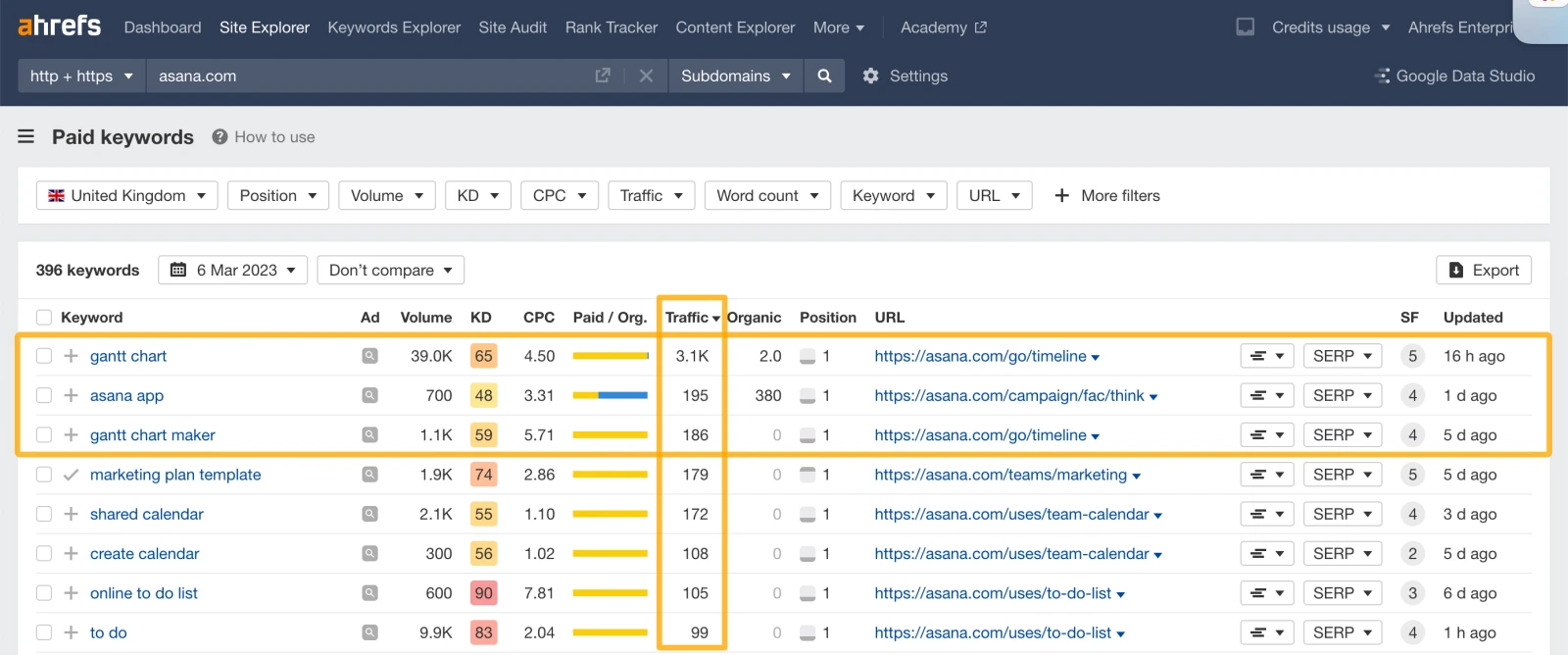
The visible table includes keyword rows such as “gantt chart” and “asana app,” with CPC and traffic columns for the selected country. Screenshot source Narrow the list to your question
Use a keyword filter to focus the list. To look for non-branded terms, use the filter’s “Doesn’t contain” phrase match rule and enter the competitor’s brand name. To explore low-cost paid terms, set a CPC maximum appropriate to your budget. A low CPC alone does not establish commercial value.
Inspect ad history and landing pages
For a keyword of interest, open its Ad position history to review the visual history of pages with Google Ads activity. Hover over ad bars when you need to read ad copy. Use the URL column to identify the page receiving paid traffic, then open that page for a separate landing-page review.
How does this Ahrefs setup work in practice?
Worked example: shortlisting paid terms for a competitor
A marketing team evaluates an enterprise project management competitor for an upcoming search campaign in one target country to identify relevant search terms.
| Choice | Why it matters | How to check |
|---|---|---|
| Select the target country before comparing terms. | Paid activity and metrics are country-specific, so a market-relevant view is needed. | The country label in the report matches the campaign market. |
| Keep a branded query in a separate review group. | A branded search may reflect demand for the competitor itself and should not be confused with generic category demand. | The query’s branded status is noted alongside the keyword. |
| Apply a “Doesn’t contain” phrase match filter using the competitor’s brand name for a generic-term pass. | This focuses the review on terms that do not include the brand phrase. | The filter is set to the intended phrase and results are reviewed after filtering. |
| Inspect CPC, paid traffic, and the URL for a relevant generic query, then check its ad history if available. | These details help frame the observed activity and show which page the competitor sends visitors to. | The keyword, visible metrics, destination URL, and any ad-history note are captured without treating them as a forecast. |
Assess whether the identified generic terms match your product positioning, then evaluate landing page copy and target acquisition costs before launching campaigns.
How do you verify your result in Ahrefs?
You have a country-specific shortlist of competitor paid search terms, with traffic and CPC context, destination pages, and ad-history observations where available. Use these signals to decide which terms merit further evaluation against your own budget, offer, and landing pages. A competitor’s paid activity is evidence of advertising, not proof that a term will be profitable for your business.
| Step | What you should see |
|---|---|
| Open Site Explorer for the competitor | The report header shows the competitor and the target scope you intended to analyze. |
| Open Paid keywords and choose a country | The country shown in the report matches the market you want to assess. |
| Scan the keyword and performance columns | You can identify at least one relevant keyword and the corresponding traffic, CPC, and destination URL where available. |
| Narrow the list to your question | The remaining results match the segment you intended to review, and the filter criteria are visible or recorded. |
| Inspect ad history and landing pages | You have recorded the relevant ad-history observation and the destination page for at least one priority keyword. |
Related Ahrefs guides include Ahrefs Link Intersect guide and Find broken internal links in Ahrefs Site Audit.
Which official Ahrefs sources were checked?
Every step and limit in this Ahrefs guide was verified against official documentation on 21 Nov 2026 following how we check figures, alongside more walkthroughs in our Ahrefs tutorials hub:
How do you troubleshoot common Ahrefs issues?
Why do I see few or no keywords?
The selected target scope or country may not match the activity you are investigating, or the report may have few recorded paid keywords for that target. Confirm the domain scope and country, then reconsider whether a broader target is appropriate.
How should I interpret CPC?
CPC is the average cost of a click on paid search results for a keyword. Use it as a comparison point against your budget, not as a guarantee of your own click cost or profitability.
Why does a low-cost keyword still look unappealing?
Low cost does not necessarily mean strong commercial value. Review whether the query fits your offer and audience, and use the landing page and other available keyword context before deciding to pursue it.
 Reviewed byDanny Kirk
Founder of ReddiReach.
 Checked byAndrés Felipe
Digital designer and marketer.
Every figure is checked against the vendor's own page. Read our editorial standards.