
Key Takeaways
- Navigate to Ahrefs Site Explorer's Internal backlinks report to inspect all incoming site links, source pages, and anchor text pointing to a target URL.
- Confirm you have an active Ahrefs account with Site Explorer permissions and know the exact target URL path requiring internal link evaluation.
- Complete 5 straightforward steps to enter the URL, open Internal backlinks, examine referring pages, apply status filters, and evaluate incoming link attributes.
- Confirm that filtered rows display referring internal URLs and verify whether target HTTP status codes reveal unnecessary redirects or broken internal links.
Ahrefs Site Explorer provides an Internal backlinks report to evaluate internal linking architecture pointing to any specific target URL. Review anchor text distribution, referring page paths, and target HTTP response codes to detect redirection chains or broken paths.
For plan limits and team seat pricing behind this workflow, read our Ahrefs review or connect Ahrefs to AI agents in Ahrefs API and MCP.
Key steps
What do you need before starting in Ahrefs?
Ahrefs requires the following workspace setup before you begin:
- An Ahrefs account with access to Site Explorer.
- The exact target page or site scope whose incoming internal links you want to inspect.
- A specific question for the report, such as which pages link to the target, whether links are nofollow, or whether the target is broken or redirected.
How do you complete the steps in Ahrefs?
Follow these 5 steps in Ahrefs in order:
Open Site Explorer for the target
Enter the exact target page you want to investigate in Site Explorer, using the scope that matches your question. The Internal backlinks report can show links for a target domain, URL, or subsection. Choose the page-level target when your goal is to see links pointing to one specific page.
Open Internal backlinks
Navigate to Internal backlinks for the target. The report lists internal links on the target domain, URL, or subsection. In the screenshot, the report shows controls including All, Dofollow, Nofollow, Target HTTP code, Backlink type, and a referring page table.
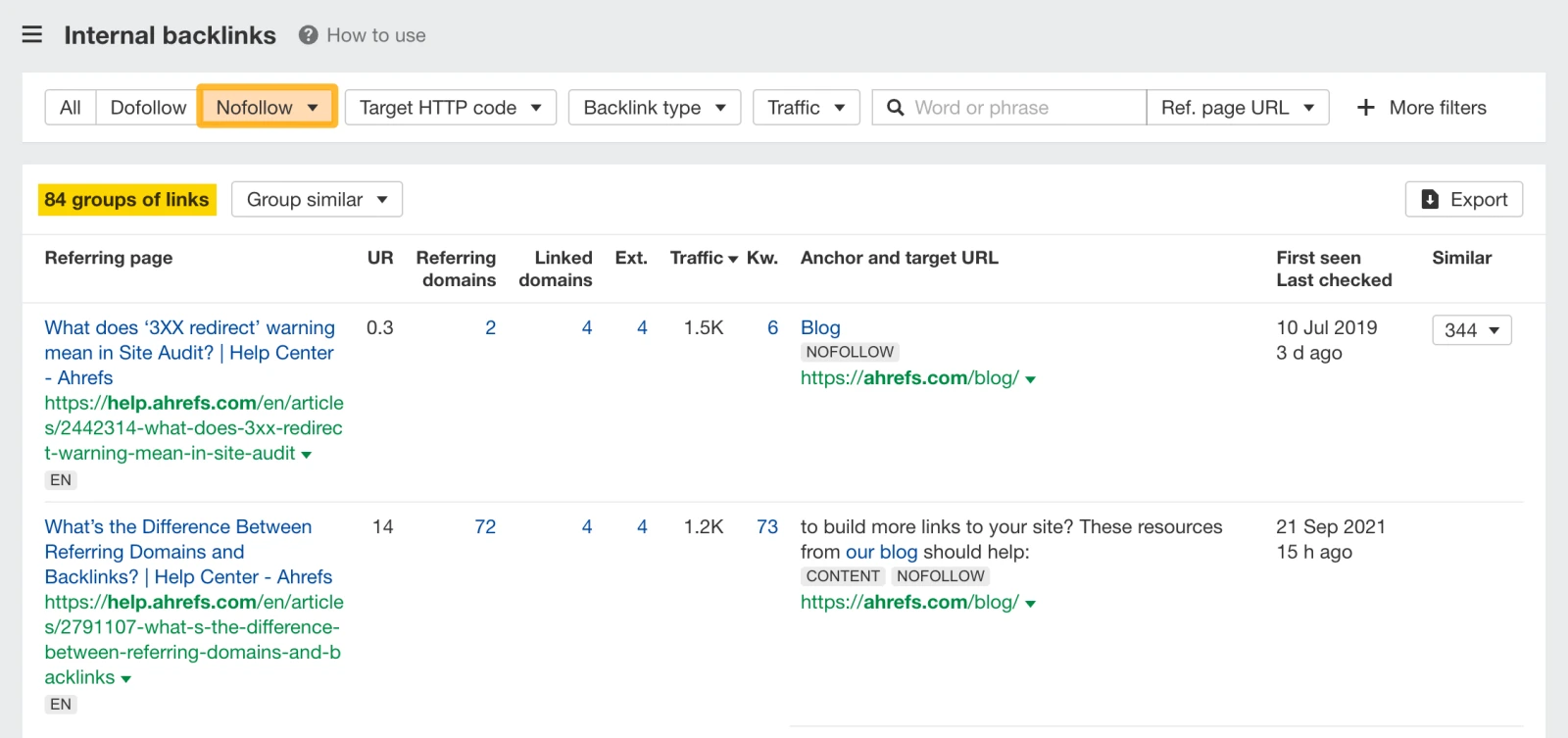
The screenshot shows the Internal backlinks report controls and a referring page result table, including a visible Nofollow filter. Screenshot source Review the referring pages and target details
Inspect the referring page information and the linked target details in the rows. The screenshot includes columns for referring page, referring and linked domains, traffic, keywords, anchor and target URL. Use the columns actually available in your report to identify which internal pages link to the target page.
Apply a filter for the question you have
Choose a filter only when it matches the issue you want to investigate. Select Nofollow to find nofollow internal links. To look for broken or redirected targets, use Target HTTP code and select the relevant status category, such as 404 Not found or 3XX redirect, as described in the source.
Inspect the filtered rows and decide what to do
Review the remaining rows and verify the linked target and referring page before acting. For nofollow links, assess whether removing the nofollow attribute is appropriate for that link. For broken or redirected pages, identify the affected target and clean up the link or destination as relevant to your site.
How does this Ahrefs setup work in practice?
Worked example: investigating internal links pointing to a product page
A site administrator needs to map which internal pages link to a key product page and check whether existing links point to a redirected URL.
| Choice | Why it matters | How to check |
|---|---|---|
| Open Site Explorer with the exact product page as the target. | A URL-level scope focuses the report on the specific page in question. | The target shown in Site Explorer matches the intended product page. |
| Open Internal backlinks and inspect referring page rows. | The report is designed to show internal links for the selected target scope. | The owner can identify relevant referring pages and linked target details. |
| Apply Target HTTP code and select the 3XX redirect category if checking redirects. | The source describes this filter for finding redirected pages. | The filtered rows show the redirect status category being investigated. |
| Verify each row and decide whether the internal destination should be updated. | A redirect finding identifies a link to review, while the site owner decides the appropriate correction. | The owner records the affected links and chooses a follow-up action based on the intended destination. |
The team obtains a page-specific list of linking URLs to determine whether to update source anchor links directly or keep existing redirects active.
How do you verify your result in Ahrefs?
The report gives you a list of internal pages linking to your target, with filters to focus on a link attribute or target HTTP status. Use the rows to decide whether a particular link or destination needs correction. A filter narrows the report. It does not by itself determine what change is appropriate for your site.
| Step | What you should see |
|---|---|
| Open Site Explorer for the target | Site Explorer is scoped to the intended target page. |
| Open Internal backlinks | The report title is Internal backlinks and the target scope is correct. |
| Review the referring pages and target details | You can identify the referring page rows relevant to your target. |
| Apply a filter for the question you have | The selected filter reflects the link attribute or target status you intend to review. |
| Inspect the filtered rows and decide what to do | You have identified the specific links that need follow-up and the reason for that follow-up. |
Related Ahrefs guides include Ahrefs Link Intersect guide and Find broken internal links in Ahrefs Site Audit.
Which official Ahrefs sources were checked?
Every step and limit in this Ahrefs guide was verified against official documentation on 21 Nov 2026 following how we check figures, alongside more walkthroughs in our Ahrefs tutorials hub:
How do you troubleshoot common Ahrefs issues?
Why are links to other pages appearing?
The target scope may be set to a domain or subsection instead of the specific URL. Reopen Site Explorer with the exact target page and check the scope shown for the report.
Why can’t I find nofollow links in the results?
The report may still be showing all links or another filter. Select Nofollow and review the filtered rows for the target.
Why do I see a 3XX or 404 status for a target?
The Target HTTP code filter is surfacing redirected or not-found targets. Confirm the linked destination in the row, then decide whether to update the internal link or address the destination.
 Reviewed byDanny Kirk
Founder of ReddiReach.
 Checked byAndrés Felipe
Digital designer and marketer.
Every figure is checked against the vendor's own page. Read our editorial standards.