
Key Takeaways
- Leverage Ahrefs Keywords Explorer to generate broad keyword variations, search query suggestions, and co-occurring terms from any initial seed phrase.
- Log in to an active Ahrefs account and select a defined topical seed keyword that accurately describes your target subject matter.
- Follow 5 systematic steps to enter your seed keyword, choose an ideas report, inspect matching terms, analyze related ranking terms, and shortlist phrases.
- Check that generated keyword lists display search volume, Keyword Difficulty scores, and SERP features relevant to your intended content format.
Ahrefs Keywords Explorer surfaces diverse search opportunities through dedicated Matching terms, Related terms, and Search suggestions reports built around a seed keyword. Explore phrase variations, shared ranking queries, and popular question formats to expand your topic coverage.
For plan limits and team seat pricing behind this workflow, read our Ahrefs review or connect Ahrefs to AI agents in Ahrefs API and MCP.
Key steps
What do you need before starting in Ahrefs?
Ahrefs requires the following workspace setup before you begin:
- An Ahrefs account.
- A seed keyword or phrase that describes the topic you want to research.
- A search engine and location suited to your audience.
How do you complete the steps in Ahrefs?
Follow these 5 steps in Ahrefs in order:
Search your seed keyword
Open Keywords Explorer, set the search engine and location, enter one seed keyword or phrase, and run the search. The seed anchors the related ideas, so begin with wording that matches the subject you want to explore.
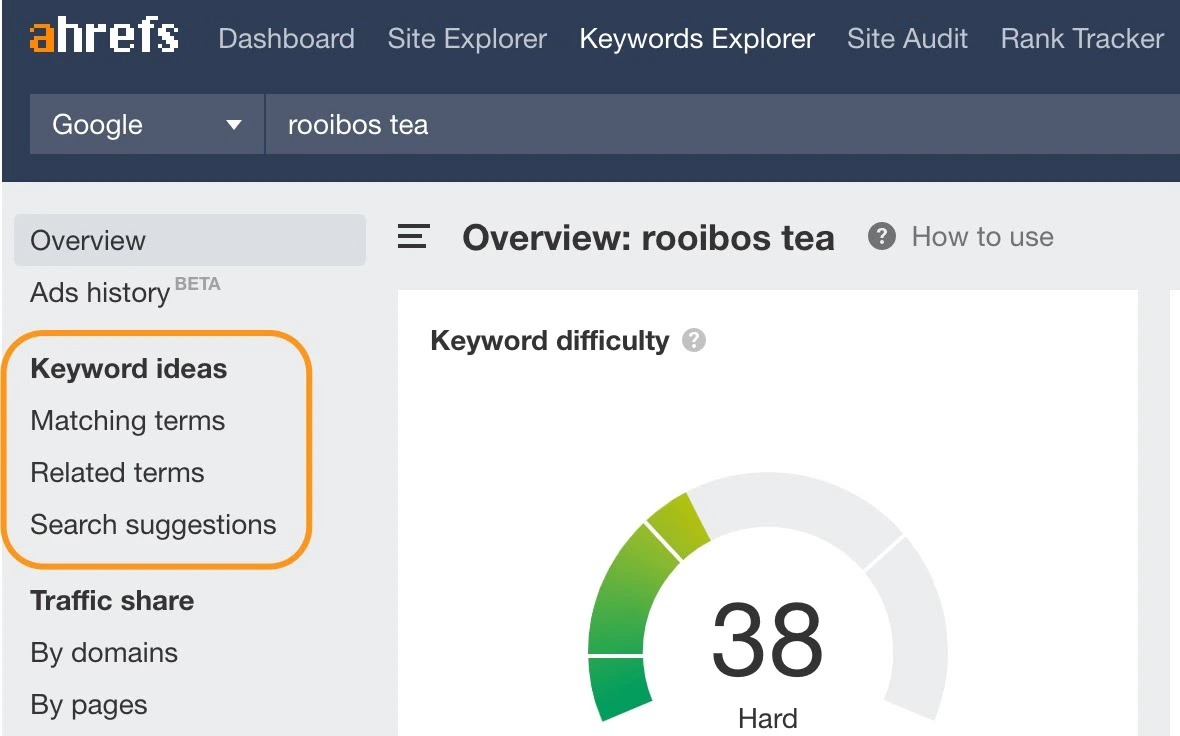
The visible interface shows the rooibos tea seed and the keyword ideas report navigation. Screenshot source Choose the keyword ideas report
Open Keyword ideas and choose the report that matches your question. Matching terms includes ideas containing the seed’s words. Related terms uses terms associated with top-ranking pages for the seed. Search suggestions shows suggestions drawn from Google’s autosuggest feature.
Use Matching terms for variations
In Matching terms, choose Terms match to find ideas containing the seed words in any order, or Phrase match to keep the entered word order. Terms match can surface alternate word arrangements. Use the Questions toggle when you want to focus on ideas with question modifiers such as what, why, or how.
Use Related terms to explore ranking pages
In Related terms, choose Also rank for to see keywords the top-ranking pages for the seed also rank for. Choose Also talk about to see terms those pages frequently mention. Select All to show both. The Top 10 or Top 100 setting changes the range shown: for Also rank for, it concerns whether the pages rank in the top 10 or top 100. For Also talk about, it selects the top 10 or top 100 ranking pages used for frequently mentioned terms.
Review Search suggestions and shortlist ideas
Open Search suggestions to review ideas based on Google’s autosuggest. Across reports, assess whether each term fits the topic and the content or research question you are working on. Keep a shortlist with the report and mode that produced each idea so its context is clear.
How does this Ahrefs setup work in practice?
Worked example: exploring keyword ideas around a beverage seed topic
A content marketer researches organic search opportunities around specialty teas to develop an educational content hub and product comparison guides.
| Choice | Why it matters | How to check |
|---|---|---|
| Search the seed and open Matching terms. | This is a direct way to find ideas containing the seed words. | The report is associated with rooibos tea. |
| Try Terms match, then compare Phrase match if word order matters. | The two modes define matching differently and can reveal different candidate wording. | The selected mode is visible while reviewing ideas. |
| Turn on Questions when the research goal is question-style queries. | The toggle narrows to question modifiers such as what, why, or how. | The resulting list is being reviewed as question-oriented ideas. |
| Open Related terms and choose Also talk about to investigate recurring topics, then shortlist relevant terms. | Frequently mentioned terms can suggest topics that appear in ranking pages’ discussions. | Each shortlisted idea has a clear connection to the seed and a recorded report context. |
Organize shortlisted terms by user search intent, prioritizing question terms for informative articles and commercial queries for product catalog pages.
How do you verify your result in Ahrefs?
You have a set of related keyword ideas organized by how they relate to the seed: word matching, ranking-page associations, frequently discussed terms, or search suggestions. The report explains where an idea comes from. It does not by itself determine whether that idea belongs in your content plan.
| Step | What you should see |
|---|---|
| Search your seed keyword | The Overview is for the intended seed keyword and search context. |
| Choose the keyword ideas report | The selected report matches the type of idea you want to collect. |
| Use Matching terms for variations | The matching mode and Questions setting reflect the variation you are looking for. |
| Use Related terms to explore ranking pages | The Related terms mode and Top 10 or Top 100 setting are understood and selected for your research question. |
| Review Search suggestions and shortlist ideas | Your shortlist contains relevant ideas and identifies the report or mode used. |
Related Ahrefs guides include Ahrefs Link Intersect guide and Find broken internal links in Ahrefs Site Audit.
Which official Ahrefs sources were checked?
Every step and limit in this Ahrefs guide was verified against official documentation on 21 Nov 2026 following how we check figures, alongside more walkthroughs in our Ahrefs tutorials hub:
How do you troubleshoot common Ahrefs issues?
When should I use Terms match instead of Phrase match?
Use Terms match when you want the seed words in any order, including alternate arrangements such as “flights to las vegas” from the seed “las vegas flights.” Use Phrase match when you want the seed words to remain in the order entered.
What does Also rank for show?
It shows keywords that the top-ranking pages for your seed also rank for. Its Top 10 or Top 100 setting changes whether the shown rankings fall within the top 10 or top 100.
How is Also talk about different?
It shows keywords frequently mentioned by top-ranking pages, rather than keywords those pages also rank for. Its Top 10 or Top 100 setting changes which ranking pages are used for the frequently mentioned terms.
 Reviewed byDanny Kirk
Founder of ReddiReach.
 Checked byAndrés Felipe
Digital designer and marketer.
Every figure is checked against the vendor's own page. Read our editorial standards.