
Key Takeaways
- Review the Ahrefs Site Explorer Best by links report to determine which URLs on a target domain have earned the highest quantity of referring domains.
- Confirm your Ahrefs subscription includes Site Explorer access and determine the exact domain, subdomain, or URL path you wish to evaluate.
- Complete 6 sequential steps to enter the target, scan linked pages, filter for live URLs, locate broken pages, check internal links, and plan actions.
- Confirm that the table lists URLs sorted by referring domain volume and verify that HTTP status filters isolate working or broken pages accurately.
Ahrefs Site Explorer features a Best by links report that displays any domain's most-linked URLs sorted by total incoming backlinks and referring domains. Filter by HTTP status code to uncover high-equity broken pages for reclamation or study top editorial resources.
For plan limits and team seat pricing behind this workflow, read our Ahrefs review or connect Ahrefs to AI agents in Ahrefs API and MCP.
Key steps
What do you need before starting in Ahrefs?
Ahrefs requires the following workspace setup before you begin:
- An Ahrefs account with access to Site Explorer.
- The exact target domain or subsection you want to analyze.
- A question to guide the review, such as which pages attract backlinks or whether broken pages have links.
How do you complete the steps in Ahrefs?
Follow these 6 steps in Ahrefs in order:
Open Best by links for a target
In Site Explorer, enter the target website or subsection and open the Best by links report. The report lists pages with backlinks pointing to them, including external and internal links.
Review the highest-linked page rows
Scan the Target page results and their link data to find pages attracting links. For competitor research, note the kinds of pages represented among the strongest results, such as research studies when that pattern appears in your data.
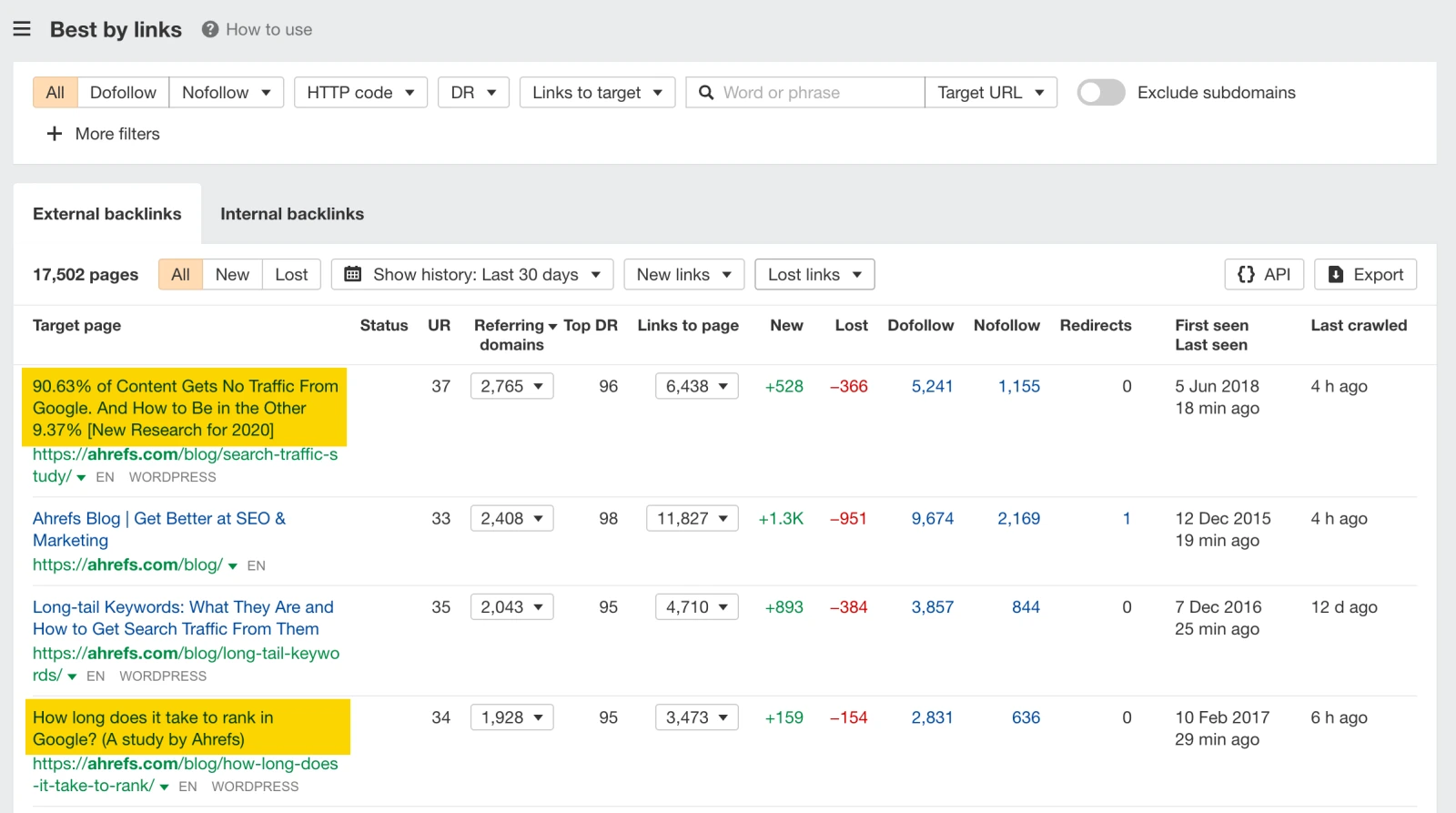
The visible report shows Best by links, External backlinks and Internal backlinks views, filters, and target page rows. Screenshot source Focus on live pages when needed
If you want to review pages that are live, add the HTTP code filter for 200 OK. This excludes redirected or not-found pages from that view, according to the report guidance.
Investigate broken pages with backlinks
To look for broken-link opportunities, use the HTTP code filter for 404 not found and examine pages that still have backlinks. Open the page's Links to page dropdown to inspect referring domains and backlinks without opening a new tab.
Review internal links separately when relevant
Switch to Internal links when investigating links within your own site. For dead internal links, filter for Dofollow links and HTTP code 404 not found. For nofollowed internal links, use the Nofollow links filter and inspect the source pages behind a link count when you need context.
Choose a follow-up based on the evidence
For a broken page with valuable backlinks, assess whether restoring or recreating the resource is appropriate, then consider outreach to sites still linking to it. For a live page, use the observed topics and formats to guide further content research. For dead internal links, locate and correct the internal references.
How does this Ahrefs setup work in practice?
Worked example: finding broken pages with high backlinks on an industry site
An SEO specialist inspects a prominent industry resource site to identify broken 404 pages that retain significant backlink equity from external publications.
| Choice | Why it matters | How to check |
|---|---|---|
| Enter the competitor domain and open Best by links. | This makes the report's page rows specific to the competitor being reviewed. | The target shown in Site Explorer is the intended competitor. |
| Filter HTTP code to 404 not found. | The analyst wants to isolate broken pages for review. | The report displays the selected 404 filter. |
| Choose a candidate page with backlink evidence and inspect Links to page. | The source domains help establish whether the broken resource still attracts links. | Referring domains and backlinks are visible for the candidate. |
| Compare the broken resource's topic with the site's content plans before taking action. | Links create a research lead, while the fit of a replacement or recovery needs separate judgment. | The proposed follow-up is tied to the observed topic and sources. |
Identify high-value topics from broken URLs, create an updated equivalent resource, and initiate outreach to webmasters linking to the dead page.
How do you verify your result in Ahrefs?
Best by links helps you find pages with the most backlinks for a target, then investigate link type and page status. Treat the report as a way to identify opportunities for review: a high backlink count alone does not establish that a page should be recreated, promoted, or changed.
| Step | What you should see |
|---|---|
| Open Best by links for a target | The report is showing pages for the intended target website or subsection. |
| Review the highest-linked page rows | You have identified one or more page rows relevant to the research question and recorded the visible link evidence. |
| Focus on live pages when needed | The report's HTTP code filter is set to 200 OK and the visible results reflect that filter. |
| Investigate broken pages with backlinks | The report shows 404 pages with link data, and the relevant referring sources are available for inspection. |
| Review internal links separately when relevant | The Internal links view and chosen Dofollow or Nofollow filter match the issue you are investigating. |
| Choose a follow-up based on the evidence | Your next action is tied to specific page rows and link sources visible in the report. |
Related Ahrefs guides include Ahrefs Link Intersect guide and Find broken internal links in Ahrefs Site Audit.
Which official Ahrefs sources were checked?
Every step and limit in this Ahrefs guide was verified against official documentation on 21 Nov 2026 following how we check figures, alongside more walkthroughs in our Ahrefs tutorials hub:
How do you troubleshoot common Ahrefs issues?
Why does a high-ranked page appear to be broken?
The page may return a 404 while retaining backlinks. Apply the HTTP code filter for 404 not found and inspect its referring domains and backlinks before deciding whether to recover or recreate it.
How can I focus on pages that are live?
Add the HTTP code filter for 200 OK. This narrows the report to live pages under that filter.
Why are internal link findings different from external backlink findings?
The report has separate External backlinks and Internal backlinks views. Switch to Internal links when you want to examine links between pages on the target site, then apply the relevant Dofollow or Nofollow filter.
 Reviewed byDanny Kirk
Founder of ReddiReach.
 Checked byAndrés Felipe
Digital designer and marketer.
Every figure is checked against the vendor's own page. Read our editorial standards.