
Key Takeaways
- Custom Gorgias auto-tag Rules attach operational Tags and optional agent assignments so urgent fulfillment, multi-brand, social, and Klaviyo-synced contacts stay cleanly segmented.
- Before building these Rules, identify your fulfillment specialist agent, confirm connected brand integrations, and review any Klaviyo segments that pull Gorgias events.
- Across five steps, you build Cancel order and Urgent order edit rules, tag multi-brand integrations and customer languages, auto-tag social comments safely, and apply a customer-only tag for Klaviyo hygiene.
- Verify your Rules by confirming urgent order tickets land tagged and assigned in Views while automated vendor emails stay excluded from your shopper-tagged Klaviyo segments.
You can speed up fulfillment interventions, route multi-brand or multilingual tickets, and keep vendor addresses out of Klaviyo marketing lists using custom Gorgias auto-tag Rules. Combining targeted **Tags** with agent assignments and channel conditions organizes your **Views** while protecting social accounts and email list hygiene.
For plan limits and team seat pricing behind this workflow, read our Gorgias review or connect Gorgias to AI agents in Gorgias API and MCP.
Key steps
What do you need before starting in Gorgias?
Gorgias requires the following workspace setup before you begin:
- Permission to create and edit Rules, Tags, and Views in your Gorgias workspace
- Designated fulfillment or multilingual agents in Gorgias if using Rule auto-assignment
- Access to your Klaviyo segment definitions if Gorgias is connected to Klaviyo
How do you complete the steps in Gorgias?
Follow these 5 steps in Gorgias in order:
Set up Cancel order tagging and fulfillment agent assignment
Open Rules in Gorgias and create a Cancel order Rule that adds a cancellation Tag and sets the ticket to auto-assign directly to a specific agent who works closely with fulfillment. Save the Rule so cancellation requests bypass general first-in, first-out triage.
Direct assignment to your fulfillment liaison cuts critical minutes between a shopper requesting a cancellation and warehouse staff halting the pick-and-pack ticket. Pair the cancellation Tag with a dedicated View so backup agents can cover the queue when the primary specialist is offline.
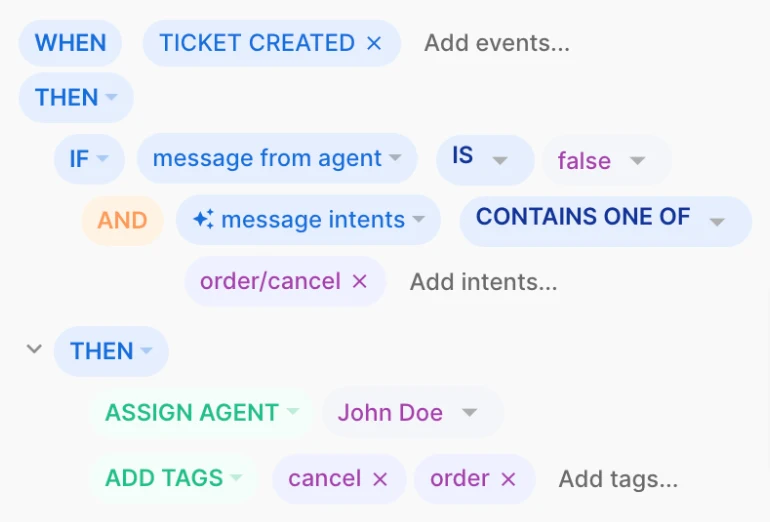
Check both the tag action and specific agent auto-assignment inside the Cancel order Rule setup. Screenshot source Tag Urgent order edit requests on recently placed orders
Create an Urgent order edit Rule configured to detect and tag tickets where a shopper reaches out about changing a recently placed order (such as updating a shipping address or swapping a size). Map the applied Tag to a top-of-sidebar Views queue.
Scoping the Rule specifically to recently placed orders prevents older delivered orders from cluttering your urgent edit queue. Agents working the Urgent order edit View can amend shipping details before the warehouse prints labels.
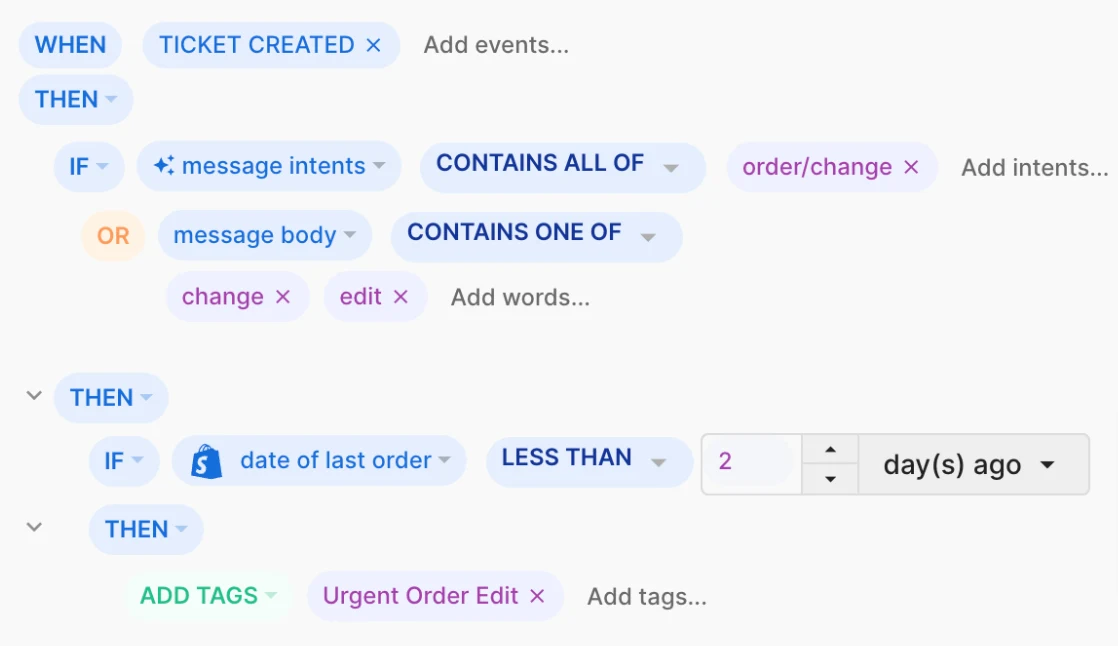
Inspect the recent-order timing and edit intent conditions used to apply the Urgent order edit tag. Screenshot source Tag tickets by brand integration and customer language
If you operate a multi-brand workspace, create a Tag tickets based on integrations Rule that checks which integration a ticket arrived from and applies the matching brand Tag. Next, create an Identifying language in tickets Rule to detect the language used by the customer, apply a language Tag, and assign the ticket to matching bilingual agents.
Combining brand-integration tags with language tags lets multi-store teams filter Views by both storefront and language (for example, Storefront B + French) without maintaining separate Gorgias helpdesks.
Auto-tag Facebook and Instagram comments instead of auto-replying
Create a social sorting Rule for Facebook and Instagram comments that applies Tags to social media posts and comments (such as tagging positive customer comments) rather than sending automated replies. Route those tagged social threads into dedicated social Views for manual review.
Never set up auto-reply Rules on social media comments, because automated comment replies can be registered as spammy and deactivate your social media account. Auto-tagging gives your social team clean queues to track positive praise and answer real questions safely.
Tag genuine shoppers to exclude vendor emails in Klaviyo
Create an Exclude emails in Klaviyo hygiene Rule in Gorgias that auto-tags tickets created specifically by your customers or potential shoppers. Then open Klaviyo and include that exact shopper Tag as a required filter in every Klaviyo segment that contains Gorgias events.
Whenever any ticket is created in Gorgias, its sender contact details automatically generate a profile in Klaviyo, including automated system notifications and vendor emails. Requiring your Gorgias customer Tag inside Klaviyo segments prevents supplier addresses and no-reply bots from entering promotional campaigns.
How does this Gorgias setup work in practice?
Worked example: Stopping shipped-wrong-address tickets and cleaning Klaviyo segments
A multi-brand apparel merchant wants warehouse liaisons to catch order cancellations and address edits before fulfillment while stopping wholesale vendor emails from receiving Klaviyo newsletter blasts.
| Choice | Why it matters | How to check |
|---|---|---|
| Configure Cancel order Rule to tag and auto-assign directly to the fulfillment liaison | Sends cancellation tickets straight to the agent communicating with warehouse staff. | New cancellation emails assign immediately to the fulfillment agent with the cancel tag. |
| Add Urgent order edit Rule for recently placed orders and map to a priority View | Surfaces size and shipping-address changes while orders are still editable. | Address-change requests on recent orders appear at the top of the Urgent order edit View. |
| Auto-tag customer/shopper tickets in Gorgias and require that tag in Klaviyo Gorgias segments | Excludes automated carrier notices and fabric-vendor emails synced from Gorgias ticket creation. | Vendor profiles created from inbox notifications no longer qualify for Klaviyo campaign segments. |
Warehouse liaisons intercept cancellations and address edits before labels print, and marketing campaigns in Klaviyo reach only genuine customers and prospective shoppers.
How do you verify your result in Gorgias?
Check your Gorgias Views and a recent customer ticket vs a vendor notification email to verify that fulfillment, brand, language, social, and Klaviyo hygiene Tags apply selectively as designed. Next, audit every Klaviyo segment referencing Gorgias events to make sure the customer tag condition is saved on each one.
| Step | What you should see |
|---|---|
| Set up Cancel order tagging and fulfillment agent assignment | Order cancellation inquiries automatically receive the cancellation Tag and assign to your designated fulfillment agent. |
| Tag Urgent order edit requests on recently placed orders | Tickets requesting edits on recently placed orders display the urgent order edit Tag immediately in your View. |
| Tag tickets by brand integration and customer language | Incoming multi-brand and non-default-language tickets show their respective brand integration and language Tags. |
| Auto-tag Facebook and Instagram comments instead of auto-replying | Facebook and Instagram comments receive sorting Tags in Gorgias with zero automated public replies sent. |
| Tag genuine shoppers to exclude vendor emails in Klaviyo | Real customer tickets carry the shopper Tag in Gorgias, and Klaviyo segments containing Gorgias events filter exclusively for that Tag. |
Related Gorgias guides include How to create auto-tag rules from common templates in Gorgias and How to set up business hours and order auto-reply rules in Gorgias.
Which official Gorgias sources were checked?
Every step and limit in this Gorgias guide was verified against official documentation on 27 Nov 2026 following how we check figures, alongside more walkthroughs in our Gorgias tutorials hub:
How do you troubleshoot common Gorgias issues?
Why are supplier and automated system email addresses showing up as profiles in Klaviyo?
Every ticket created in Gorgias automatically creates a profile in Klaviyo from the sender's contact details. Auto-tag tickets created by actual customers or potential shoppers in Gorgias, then include that tag as a required filter in all Klaviyo segments that contain Gorgias events.
Why should we auto-tag Facebook and Instagram comments instead of using auto-reply Rules?
Auto-reply Rules on social media comments can be registered as spammy by Facebook or Instagram and risk deactivating your social media account. Auto-tagging social posts and comments lets your team sort praise and questions safely into Views without automated public replies.
How can a multi-brand store separate tickets from different storefronts inside one Gorgias account?
Create a Rule that checks which integration each incoming ticket arrived from and applies the corresponding brand Tag. You can then filter Views and reporting by each brand Tag alongside language or urgency tags.
 Reviewed byDanny Kirk
Founder of ReddiReach.
 Checked byAndrés Felipe
Digital designer and marketer.
Every figure is checked against the vendor's own page. Read our editorial standards.