
Key Takeaways
- Create reusable standard and form templates under Workspace settings > Templates or Team settings > Templates.
- Use Team settings > Templates whenever you need to preset team-specific workflow statuses or team labels.
- Choose workspace or team scope, configure Aa placeholders or required form fields, assign defaults and integrations, and file via Option/Alt C.
- Confirm preset properties and required fields load when pressing Option/Alt C and verify issues filter by template in Insights.
You can build standard and form issue templates in Linear to prefill properties, prompt reporters with placeholders or required fields, and standardize cross-channel intake. Teams use templates across Linear, Slack, Asks, and support integrations so issues arrive complete and filter cleanly in Insights.
For plan limits and team seat pricing behind this workflow, read our Linear review or connect Linear to AI agents in Linear API and MCP.
Key steps
What do you need before starting in Linear?
Linear requires the following workspace setup before you begin:
- Access to Team settings > Templates (for team templates) or Workspace settings > Templates (for cross-team templates).
- Connected Slack, Asks, Intercom, Zendesk, Zapier, or Email integrations in Linear if exposing templates to external intake.
How do you complete the steps in Linear?
Follow these 4 steps in Linear in order:
Open Templates settings and select workspace or team scope
Go to Workspace settings > Templates for cross-team templates, or Team settings > Templates for a single team, and click to create a template.
Workspace templates work on any team but cannot preset team labels or issue statuses. Team templates unlock statuses, labels, unique intake email addresses, and automatic availability to sub-teams under a parent team.
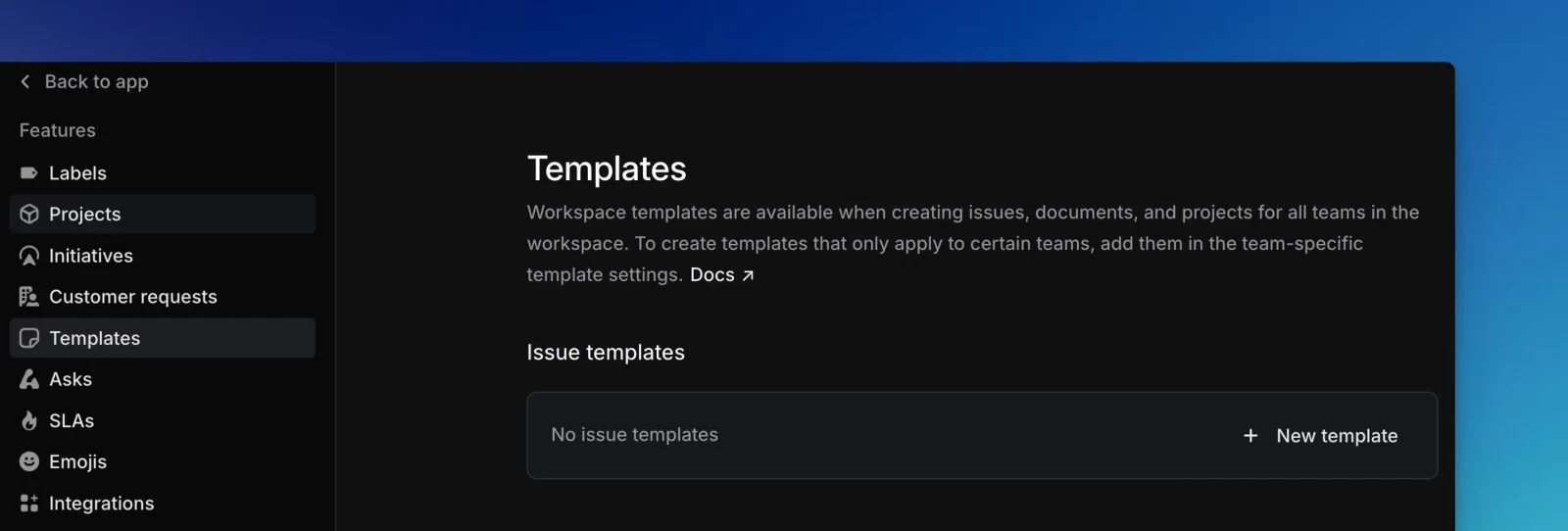
Open Workspace settings > Templates or Team settings > Templates to create a new standard or form template. Screenshot source Set default properties and placeholders or required form fields
In a standard template, preset properties (team, status, priority, assignee, delegated agent, project, labels, estimate, sub-issues) and highlight description text to click Aa on the formatting bar for placeholder prompts. For structured intake, create a form template with generic fields (Text, Long text, Dropdown, Checkboxes, Date, Instructions) and property fields (customer, label group, priority, title, due date), marking needed fields required.
Use standard templates for fast internal filing and form templates when Slack or Asks reporters must supply exact details.
Configure Default templates and external intake integrations
Set Default templates on your team's template settings page separately for team members and non-team members. Attach templates inside Linear's integration settings for Slack, Asks (Slack or Email), Intercom & Zendesk, Zapier, or team template Email addresses.
Form templates can only be set as Default templates for non-team members, letting external requesters see a structured form while team members keep a lightweight default.
File issues from templates and filter results in Insights
Press Option/Alt C to create an issue from a template, or click Template beside the team name inside the issue composer. Filter views and Insights reports by template name once issues are filed.
Template filters capture issues created via Linear, Slack, Asks, and Intercom & Zendesk, making it easy to compare bug versus feature volume and intake sources in Insights.
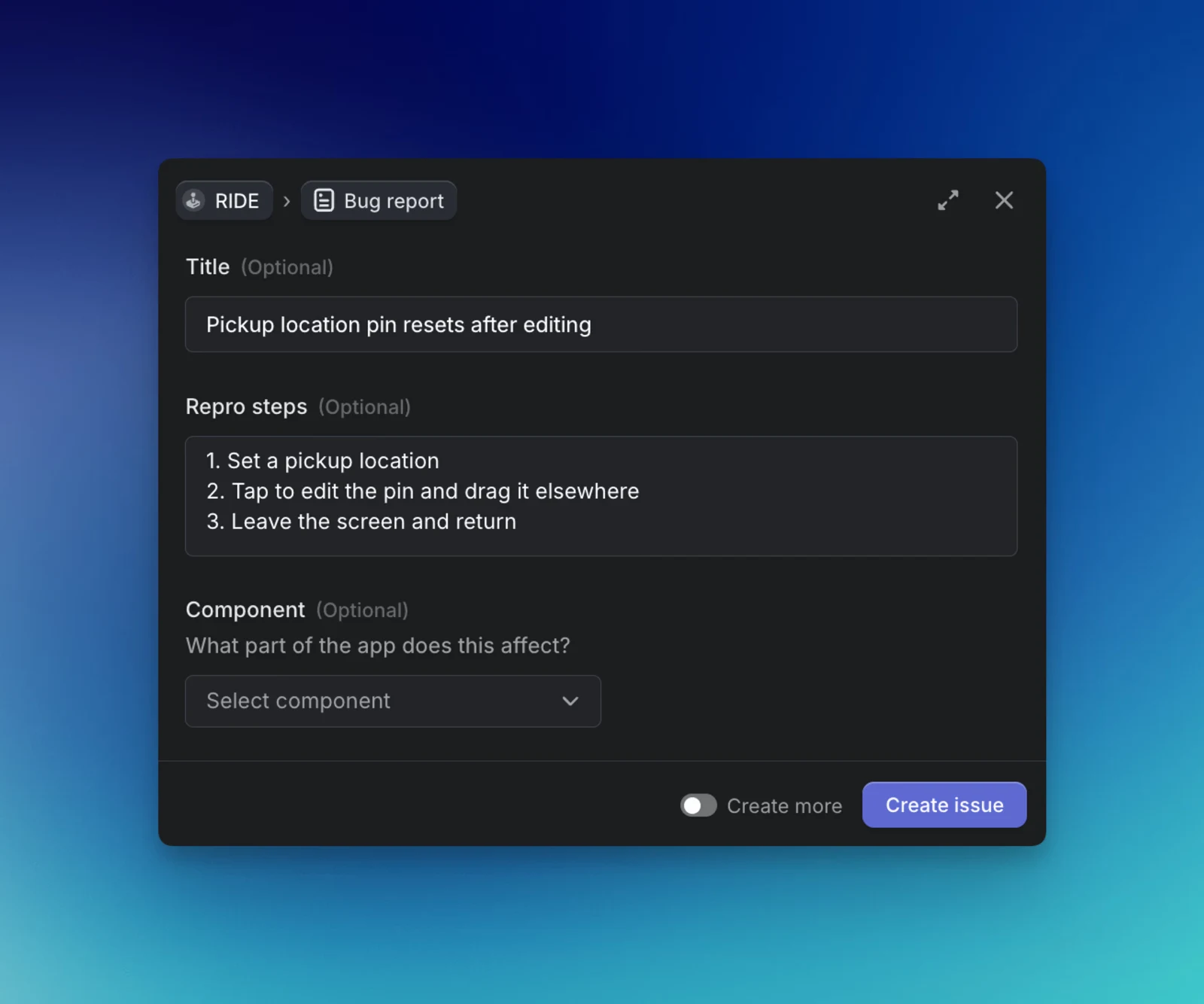
Select a form template via Template next to the team name or Option/Alt C to fill structured fields in the composer. Screenshot source
How does this Linear setup work in practice?
Worked example: Required bug report form for support and Slack
A product team wants support agents and Slack requesters to submit reproduction steps that route straight into Triage.
| Choice | Why it matters | How to check |
|---|---|---|
| Team-scoped Form template under Team settings > Templates with Triage status and Bug label | Unlocks team statuses and labels so incoming bugs route automatically. | Template defaults display Triage status and Bug label. |
| Required Long text Repro steps, Dropdown Component, plus Priority and Customer fields | Collects structured environment details while mapping Priority and Customer directly to issue properties. | Composer blocks submission until Repro steps is completed. |
| Assigned as Default template for non-team members and enabled in Asks and Zendesk | Gives external reporters a guided form while keeping engineers' composer fast. | Non-members opening New Issue or Asks see the Bug Report form automatically. |
Support and Slack bugs arrive in Triage with complete context, and leads filter Insights by the Bug Report template across intake channels.
How do you verify your result in Linear?
Press Option/Alt C in your target team and submit a test issue to confirm preset statuses, labels, and form fields populate properly. Next, enable the template inside Slack, Asks, or helpdesk integration settings and track intake volume in Insights.
| Step | What you should see |
|---|---|
| Open Templates settings and select workspace or team scope | The template editor opens at your chosen scope with matching property controls. |
| Set default properties and placeholders or required form fields | Your template saves preset properties alongside either Aa placeholders or required form fields. |
| Configure Default templates and external intake integrations | Team template settings show member and non-member defaults, and enabled integrations list the template. |
| File issues from templates and filter results in Insights | Pressing Option/Alt C preloads your template fields and properties, and filed issues match template filters. |
Related Linear guides include How to configure and manage repeating team cycles in Linear and How to structure teams, projects, and issues in Linear.
Which official Linear sources were checked?
Every step and limit in this Linear guide was verified against official documentation on 27 Nov 2026 following how we check figures, alongside more walkthroughs in our Linear tutorials hub:
How do you troubleshoot common Linear issues?
Why is my template missing from the Template menu in the composer?
Team templates only appear when the composer is set to that specific team (or its sub-teams), so check the selected team name first. Also, sub-issues hide any template that contains preset sub-issues.
Why can I not set a form template as the default for team members?
Form templates are only available as Default templates for non-team members, though members can still select them via Option/Alt C or Template. Use a standard template with Aa placeholders for member defaults, or convert the form template back to a standard template.
Why can I not preset team labels or workflow statuses on my template?
Templates under Workspace settings > Templates span all teams and cannot preset team-specific labels or statuses. Create the template under Team settings > Templates instead.
 Reviewed byDanny Kirk
Founder of ReddiReach.
 Checked byAndrés Felipe
Digital designer and marketer.
Every figure is checked against the vendor's own page. Read our editorial standards.