
Key Takeaways
- Structure Linear around team-owned workflows and Cycles paired with deliverable Projects, Milestones, Initiatives, and filtered Views.
- Log into your company's Linear workspace URL via the top-left switcher with Team Settings permissions to adjust workflows or sub-teams.
- Define teams and statuses, process incoming issues in Triage, group deliverables into Projects and Milestones, align Initiatives and Cycles, and navigate via Views.
- Verify on the Active issues page and inside Project milestone filters that accepted issues show clear owners, statuses, and project links.
You can organize daily execution and cross-team deliverables in Linear by defining team workflows, triaging incoming issues, and grouping related work into projects, milestones, and initiatives. Teams use this hierarchy so contributors focus on clear active queues while stakeholders track deliverable progress over the same issues.
For plan limits and team seat pricing behind this workflow, read our Linear review or connect Linear to AI agents in Linear API and MCP.
Key steps
What do you need before starting in Linear?
Linear requires the following workspace setup before you begin:
- Access to your company's Linear workspace URL via the workspace dropdown menu in the top left-hand corner.
- Permissions in Team Settings if customizing team workflow statuses, labels, cycles, or parent and sub-team inheritance.
How do you complete the steps in Linear?
Follow these 5 steps in Linear in order:
Choose your workspace and set team and sub-team workflows
Confirm your active company workspace using the top-left workspace dropdown menu, then create Teams for distinct ownership groups and customize ordered workflow statuses inside Team Settings.
Workflow statuses group issues on list views and form column headers on boards. Structure larger departments into parent teams and sub-teams so sub-teams inherit shared workflows, labels, or cycles while managing independent issue queues.
Evaluate incoming requests in Triage before Active views
Log bugs, features, follow-ups, and internal requests as Issues under the owning team, routing unvetted work into Triage first before moving accepted items onto the Active issues page.
During triage, clarify the problem, decide whether to track it, assign an owner, set priority and labels, and advance the status so unreviewed requests never clutter your backlog.
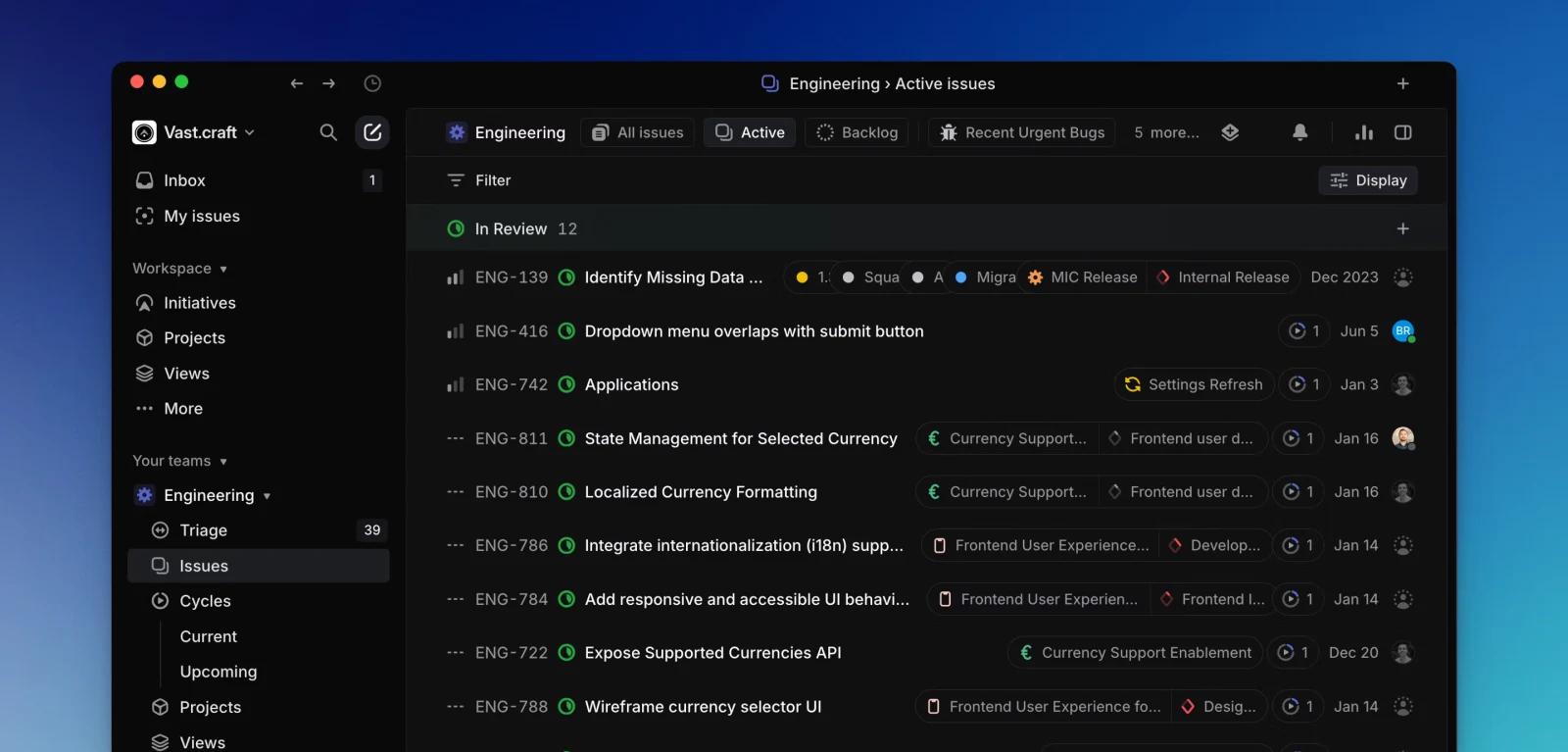
Inspect the team's active issues view and left sidebar navigation to see how workflow statuses group day-to-day issues. Screenshot source Group deliverable work into Projects and Milestones
Create Projects for multi-issue deliverables such as launches, customer migrations, redesigns, or technical investments, and attach contributing issues. Define Milestones inside each project for key completion stages and assign project issues to them.
Filter by Milestones inside the project view to measure how close each stage is to completion and share clear deliverable status with stakeholders.
Align strategic Initiatives and short-term team Cycles
Group related projects across teams or phases under Initiatives (using parent and sub-initiatives for multi-area goals), and schedule near-term team execution inside repeating multi-week Cycles.
Initiatives and Projects clarify why work matters and what deliverable ships, whereas Cycles establish a predictable short-term rhythm for which issues a team tackles next.
Switch contexts cleanly using filtered Views
Open Views to examine slices of the same underlying issues, including personal assigned work, team backlogs, current cycle items, single-project scopes, or cross-team filters.
Because Views never modify issue ownership or status, contributors, leads, and executives can coordinate from tailored perspectives without duplicating tickets.
How does this Linear setup work in practice?
Worked example: Organizing a checkout migration across two sub-teams
A SaaS platform group with Backend and Frontend sub-teams is shipping a checkout migration while triaging daily support bugs.
| Choice | Why it matters | How to check |
|---|---|---|
| Platform parent team with Backend and Frontend sub-teams inheriting statuses and 2-week Cycles | Aligns board columns and cycle cadences across squads while keeping daily queues separate. | Both sub-teams display identical workflow statuses and synchronized cycle dates. |
| Checkout Migration Project divided into Schema, API, and UI Rollout Milestones | Connects cross-squad issues around one deliverable with filterable stage progress. | Filtering the project by API Milestone lists remaining work across both sub-teams. |
| Billing Reliability Initiative above the project plus Triage for incoming bugs | Rolls the migration into company strategy while holding unvetted bugs out of active cycles. | New bugs wait in Triage while vetted migration tasks appear in the current Cycle. |
Engineers execute from Active and Cycle views while leads track Milestone progress inside the Project and parent Initiative.
How do you verify your result in Linear?
Verify your hierarchy by checking a team's Active issues view, confirming unreviewed items route to Triage, and inspecting Milestone filters inside an active Project. Next, save cross-team Views for stakeholder reviews and add issue templates to standardize intake.
| Step | What you should see |
|---|---|
| Choose your workspace and set team and sub-team workflows | Each team appears in the left sidebar with its ordered workflow statuses grouping list and board views. |
| Evaluate incoming requests in Triage before Active views | Accepted issues appear on the team's Active issues view with a clear owner, priority, and workflow status. |
| Group deliverable work into Projects and Milestones | The project view displays linked issues organized and filterable by Milestone completion stages. |
| Align strategic Initiatives and short-term team Cycles | Multi-project efforts roll up under Initiatives while near-term tasks sit inside the team's current Cycle. |
| Switch contexts cleanly using filtered Views | Opening personal, cycle, project, or cross-team Views surfaces the exact matching issues immediately. |
Related Linear guides include How to configure and manage repeating team cycles in Linear and How to create standard and form issue templates in Linear.
Which official Linear sources were checked?
Every step and limit in this Linear guide was verified against official documentation on 27 Nov 2026 following how we check figures, alongside more walkthroughs in our Linear tutorials hub:
How do you troubleshoot common Linear issues?
When should our team use a Project versus a Cycle?
Use a Project to group issues around a shared deliverable or outcome (such as a redesign) tracked through Milestones. Use Cycles as repeating short-term timeboxes to schedule which project issues and standalone tasks your team works on next.
How do Milestones, Projects, and Initiatives fit together?
Milestones break issues inside one Project into filterable completion stages. Initiatives sit above Projects (with optional sub-initiatives) to connect multiple projects supporting a broader strategic objective.
Does filtering or creating a View alter issue ownership or status?
No, Views only change how underlying issues are displayed and filtered without modifying team ownership, workflow status, cycle, or project links. Updates made inside any View reflect everywhere immediately.
 Reviewed byDanny Kirk
Founder of ReddiReach.
 Checked byAndrés Felipe
Digital designer and marketer.
Every figure is checked against the vendor's own page. Read our editorial standards.