
Key Takeaways
- Ahrefs Site Explorer displays competitor search ad titles, display URLs, and descriptions inside the Ads report for any selected target country.
- Applying Keyword filters with a Contains rule and Any rule isolates topic-specific ad messaging across broad advertisers using comma-separated query terms.
- Researching competitor ads requires an active Ahrefs account with Site Explorer access, a target domain or URL, and a defined geographic market.
- Verify completion by confirming each recorded ad text entry links directly to its corresponding search keywords, destination URLs, and historical traffic trend.
Review competitor search ad copy in Ahrefs by opening the Ads report in Site Explorer to examine ad headlines, descriptions, associated keywords, and destination URLs. Apply country selection and comma-separated keyword filters when researching broad advertisers so your analysis focuses strictly on relevant local markets or product categories.
For plan limits and team seat pricing behind this workflow, read our Ahrefs review or connect Ahrefs to AI agents in Ahrefs API and MCP.
Key steps
What do you need before starting in Ahrefs?
Ahrefs requires the following workspace setup before you begin:
- An active Ahrefs account with access to Site Explorer.
- The specific competitor website domain or page URL you want to analyze.
- A defined product topic, service category, or audience segment to focus your ad copy review.
- A target country market that aligns with your paid search campaign comparison.
How do you complete the steps in Ahrefs?
Follow these 5 steps in Ahrefs in order:
Open the competitor’s Ads report
Enter the competitor website or specific URL into Ahrefs Site Explorer and navigate to the Ads report. Select the target country that matches your campaign market before reading any creative, because advertisers frequently run distinct promotions, currencies, and value propositions across regions. Once the table loads, scan the ad list to inspect each entry's visible title, display URL, and description fields.
Review the ad copy in context
Read the displayed ad text carefully and document the core claim, promotional offer, call to action, and phrasing patterns that address your research question. Pay attention to how the headline pairs with the display URL path and description lines to frame the offer. Treat every piece of copy in the Ads report as an observation of what the advertiser has run in search results rather than proof that the wording converts well.
Filter to a topic when the competitor is broad
When analyzing multi-category advertisers, open Keyword filters, set the Keyword condition to Contains, and select Any rule. Enter a comma-separated list of topic terms to narrow the table to relevant ads. For instance, filtering a United States report for Expedia using the comma-separated phrases "san francisco" and "hotel" isolates local hospitality ad copy from unrelated flight or car rental promotions.
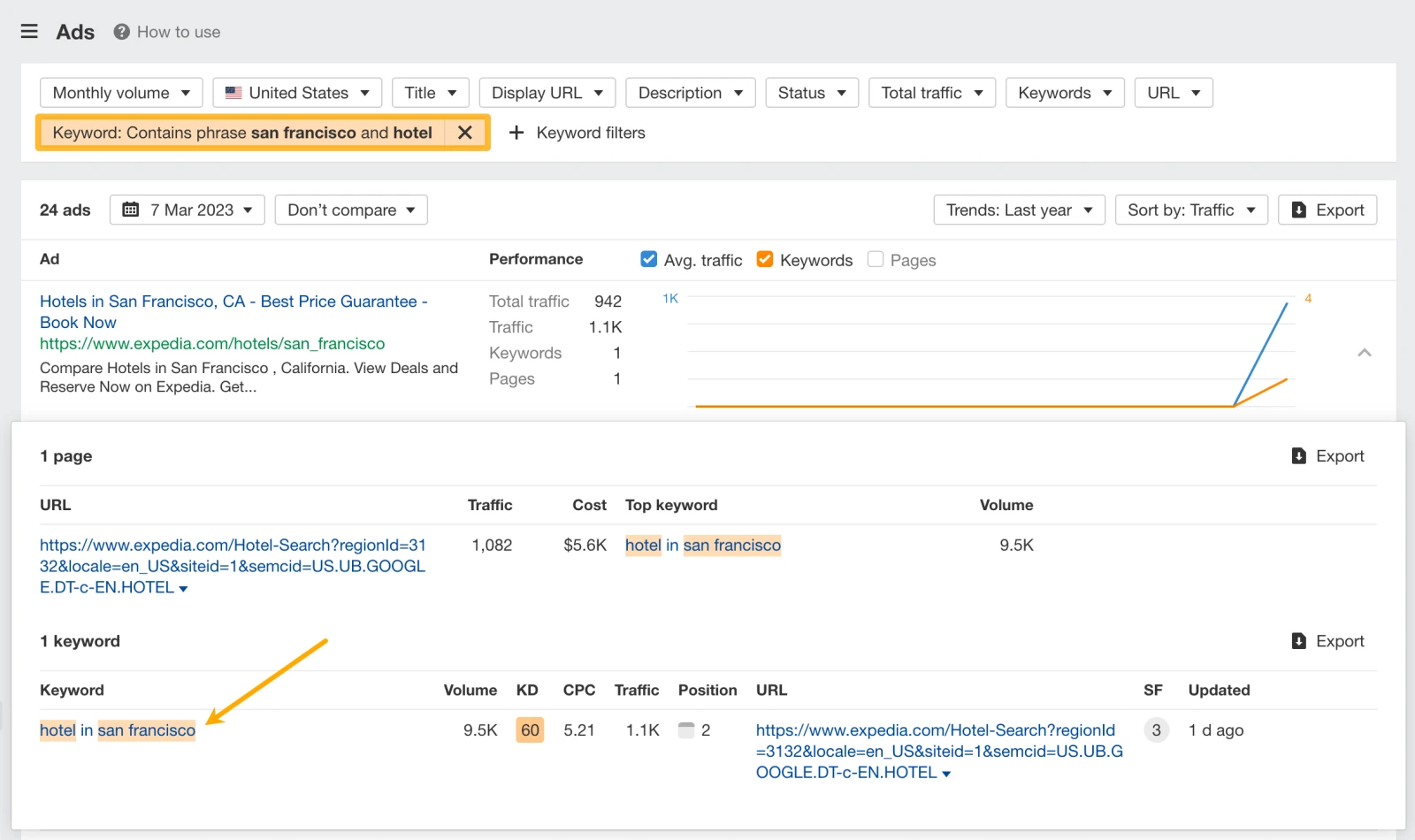
The visible filter and ad row show a topic-focused view, including the ad’s display URL and destination page. Screenshot source Open an ad to inspect associated keywords
Click a relevant ad entry in the table to expand and inspect the specific search keywords associated with that exact ad copy. Evaluate whether those underlying queries reflect commercial, local, or informational search intent that aligns with the audience you want to reach. Log each keyword group directly beneath the specific ad variation you opened so you never mix trigger queries across separate creative messages.
Review the ad’s destination URLs and traffic context
Click the ad to inspect its destination URLs and see where searchers land after clicking. While many ads route to a single landing page, the Ads report can surface exceptions where one ad connects to multiple destination URLs. Sort the report by Traffic when you want to prioritize ads carrying higher estimated paid traffic, and review the historical chart to see how paid traffic volume evolved over time.
How does this Ahrefs setup work in practice?
Example: hospitality marketing team researching regional search ads
A regional hotel marketing team uses Ahrefs Site Explorer to study how Expedia positions San Francisco lodging offers in United States paid search results before writing new seasonal ad variations. These workflow steps organize competitive creative research and do not guarantee campaign performance.
| Choice | Why it matters | How to check |
|---|---|---|
| Enter expedia.com in Site Explorer, open Ads, and set the country selector to United States. | Paid travel messaging and seasonal promotions vary across domestic and international search markets. | The Ads report header confirms United States data for the target domain. |
| Open Keyword filters, choose Keyword, Contains, and Any rule, then enter "san francisco, hotel". | Expedia bids on thousands of travel categories, so comma-separated topic terms isolate local lodging ads. | The active filter pill displays both terms and removes non-lodging and out-of-market ads. |
| Record the visible ad title, display URL, and description text before expanding the ad row. | Capturing the complete creative unit first keeps headline claims and promotional phrasing intact for copywriters. | Each research row contains the full ad text verbatim before keyword data is added. |
| Click the ad to log its associated keywords, check all destination URLs, and sort by Traffic. | Linking search queries, landing pages, and traffic trends reveals how the advertiser pairs intent with landing pages. | Associated keywords and destination URLs are saved under the matching ad copy entry. |
The team compiles a clean reference sheet pairing San Francisco hotel ad copy with actual search queries and landing pages, ready to inform original headline tests tailored to their own property amenities.
How do you verify your result in Ahrefs?
You finish with a structured breakdown of competitor search ad headlines, descriptions, display paths, associated trigger keywords, destination URLs, and paid traffic trends in Ahrefs. Your team can use these documented messaging angles and landing page pairings to draft differentiated search ad tests tailored to your own audience and offer.
| Step | What you should see |
|---|---|
| Open the competitor’s Ads report | The Site Explorer target path and selected country selector match the exact competitor domain and geographic market you intend to study. |
| Review the ad copy in context | You have recorded the ad’s exact visible title, display URL, and description wording alongside notes on how the angle relates to your offer. |
| Filter to a topic when the competitor is broad | The Keyword filter displays Contains with Any rule for your comma-separated terms, and the filtered ad list reflects your target topic. |
| Open an ad to inspect associated keywords | Every exported or noted keyword list is mapped directly to the single ad copy variation that triggered it in the report. |
| Review the ad’s destination URLs and traffic context | You have documented all destination URLs tied to the ad along with paid traffic sorting context and historical chart trends. |
Related Ahrefs guides include Ahrefs Link Intersect guide and Find broken internal links in Ahrefs Site Audit.
Which official Ahrefs sources were checked?
Every step and limit in this Ahrefs guide was verified against official documentation on 21 Nov 2026 following how we check figures, alongside more walkthroughs in our Ahrefs tutorials hub:
How do you troubleshoot common Ahrefs issues?
Why are unrelated ads appearing in the Ahrefs Ads report?
Large competitors frequently bid across multiple product lines, services, and regional markets simultaneously. Verify that you selected the right country at the top of the report, then apply Keyword filters using Keyword, Contains, and Any rule with comma-separated topic terms to isolate relevant ads.
Why does a single ad show more than one destination URL?
While most search ads point to a single landing page, the Ahrefs Ads report can capture exceptions where identical ad copy routes to multiple destination pages over the reporting period. Record every URL listed under that ad and inspect each page separately to see how the offer changes.
Does sorting by Traffic prove which competitor ad copy performs best?
No. Sorting by Traffic highlights which ads receive higher estimated paid search traffic in Ahrefs and lets you inspect volume trends on the historical chart, but high traffic can reflect broad keyword volume or budget allocation rather than strong conversion rates. Always validate messaging with your own campaign tests.
 Reviewed byDanny Kirk
Founder of ReddiReach.
 Checked byAndrés Felipe
Digital designer and marketer.
Every figure is checked against the vendor's own page. Read our editorial standards.