
Key Takeaways
- Ahrefs Site Explorer displays every backlink phrase pointing to your selected website, URL, or subsection inside the Anchors report alongside referring-domain, referring-page, and link data.
- Applying the Dofollow filter in the Ahrefs Anchors report narrows the table to value-passing links when your audit question distinguishes them from the full backlink list.
- Running a consistent anchor audit in Ahrefs requires Site Explorer access, a defined audit question, and written notes recording your target scope and active filter state.
- Completion is verified when your audit log separates observed anchor phrases from interpretation and documents the specific links and context needed before any disavowal decision.
Review backlink anchor phrases for any website, URL, or subsection in Ahrefs by opening the target in Site Explorer and inspecting the Anchors report. Apply the Dofollow filter when evaluating value-passing links, use the include control to isolate suspected wording, and verify patterns against broader backlink evidence before taking action.
For plan limits and team seat pricing behind this workflow, read our Ahrefs review or connect Ahrefs to AI agents in Ahrefs API and MCP.
Key steps
What do you need before starting in Ahrefs?
Ahrefs requires the following workspace setup before you begin:
- An Ahrefs account with access to Site Explorer.
- The target website, specific URL, or site subsection whose backlink anchors you need to audit.
- A clear audit question, such as evaluating link anchors for over-optimization or checking a specific suspected phrase.
- An audit log to record the exact target scope and active filters so future reviews compare equivalent views.
How do you complete the steps in Ahrefs?
Follow these 5 steps in Ahrefs in order:
Open the target in Site Explorer
Enter the target website, individual URL, or site subsection into Ahrefs Site Explorer. Select the scope that matches your audit question before inspecting any backlink reports. Choosing a whole-site scope captures anchor distribution across every page on the domain, which suits broad profile reviews. Selecting a specific URL or subsection restricts the dataset to backlinks pointing directly to that page or directory so page-level link campaigns stay isolated from sitewide navigation and homepage mentions.
Open the Anchors report
Select Anchors in Site Explorer to load the anchor text table for your chosen target. The report aggregates the clickable phrases used in backlinks pointing to that scope. Scan the listed anchor texts alongside the accompanying referring-domain, referring-page, and link columns to see whether a phrase comes from many separate websites or repeats across pages on a single referring domain.
Apply Dofollow when the audit calls for it
Add the Dofollow filter from the filter bar at the top of the Anchors report when your audit specifically evaluates value-passing backlinks. Leave the report unfiltered if you are cataloging every mention regardless of link attribute, and avoid mixing filtered and unfiltered counts in the same comparison. Record whether Dofollow is active in your audit notes so future checks reproduce the exact same table view.
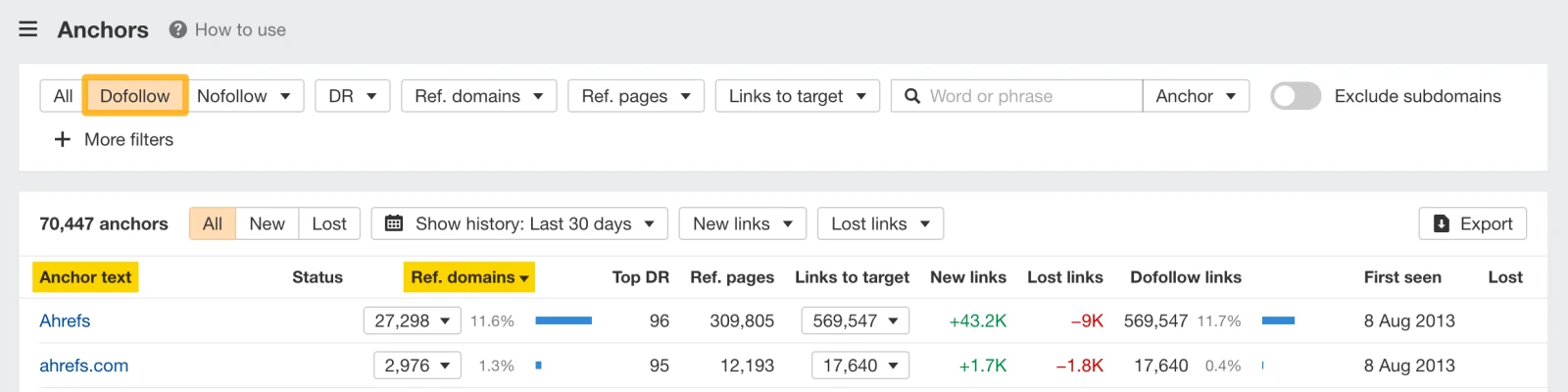
The screenshot shows the Anchors report controls, including Dofollow, for narrowing the backlink anchor review. Screenshot source Look for patterns and phrases to investigate
Scan the anchor mix for branded terms, relevant descriptive wording, and any heavy concentration of unnatural, off-topic, or repetitive commercial phrases. When checking a specific phrase flagged during a site review, type that wording into the report's include control to filter the table down to matching anchors. Treat an unusual phrase or skewed ratio as a prompt to inspect the underlying links rather than immediate proof of intent or ranking impact.
Compare the pattern with other evidence
Cross-check flagged anchor patterns against link acquisition timing, referring-page context, and the wider audit record when investigating potential over-optimization or negative SEO concerns. Never infer an algorithmic penalty or deliberate attack from anchor wording alone. Before considering link disavowal, manually inspect the referring pages and evaluate how those links fit within the site's broader backlink profile.
How does this Ahrefs setup work in practice?
Example: auditing an unrelated anchor phrase during an agency onboarding review
An agency SEO analyst onboarding a B2B software client reviews a product subsection after spotting an unrelated consumer phrase during an initial backlink check. The workflow isolates where the phrase appears without assuming an attack or attributing prior traffic shifts to those anchors.
| Choice | Why it matters | How to check |
|---|---|---|
| Enter the client's product subsection in Site Explorer and record the selected scope in the onboarding sheet. | Scoping to the affected subsection prevents homepage brand links from obscuring page-group anchor patterns. | The Site Explorer header confirms the exact product subsection and scope. |
| Open the Anchors report and review the anchor text table alongside referring-domain and referring-page counts. | Checking referring domains alongside link totals shows whether the phrase comes from one sitewide template or multiple domains. | The unrelated phrase is located in the table or logged as absent for that subsection. |
| Enable the Dofollow filter for the audit pass focused on value-passing backlinks. | The client's risk question specifically concerns links capable of passing link equity to product pages. | The active Dofollow filter state is recorded next to the exported observation notes. |
| Enter the unrelated wording into the include control and note the matching anchors for manual link review. | Filtering by the exact phrase isolates every variation so the analyst can inspect the actual referring pages next. | The onboarding log lists the matching anchor rows separately from any hypothesis about why the links exist. |
The analyst pairs the filtered anchor notes with manual checks of the referring pages and acquisition dates before recommending whether to leave the links alone or evaluate disavowal.
How do you verify your result in Ahrefs?
You have a scoped, reproducible record of the anchor phrases linking to your target in Ahrefs, narrowed to Dofollow links or specific included terms where relevant to your audit. Flagged phrases give your team a concrete list for manual referring-page inspection, keeping observed anchor data separate from assumptions about manipulation, negative SEO, or traffic shifts.
| Step | What you should see |
|---|---|
| Open the target in Site Explorer | The Site Explorer target input and scope selector match the exact site, subsection, or URL documented in your audit log. |
| Open the Anchors report | The report header displays your intended target scope and the table populates with anchor text rows and link metrics. |
| Apply Dofollow when the audit calls for it | The Dofollow filter displays as active for a value-passing link review, or your audit notes explicitly state why the unfiltered anchor list was retained. |
| Look for patterns and phrases to investigate | Your audit log lists the exact anchor phrases, include filter terms, and distribution patterns flagged for deeper link inspection. |
| Compare the pattern with other evidence | Your notes clearly separate observed anchor phrases from interpretation and list the manual link checks required before any action. |
Related Ahrefs guides include Ahrefs Link Intersect guide and Find broken internal links in Ahrefs Site Audit.
Which official Ahrefs sources were checked?
Every step and limit in this Ahrefs guide was verified against official documentation on 21 Nov 2026 following how we check figures, alongside more walkthroughs in our Ahrefs tutorials hub:
How do you troubleshoot common Ahrefs issues?
Why does the anchor list change after applying the Dofollow filter?
Enabling Dofollow restricts the Anchors report to value-passing links and removes non-followed backlinks from the table counts. Compare filtered and unfiltered views only when that distinction answers your audit question, and always log which state you used.
Does a high share of branded anchors guarantee a natural backlink profile?
No. While branded phrases frequently appear in organic link profiles, anchor ratios cannot be judged in isolation. You still need to inspect the referring pages, link context, and site history alongside the anchor table.
Should I immediately disavow backlinks that use an odd or irrelevant anchor phrase?
No. Unusual or off-topic anchor text is a signal to inspect the underlying links manually, not standalone proof of harm. Review the referring pages and the site's broader backlink profile before deciding whether disavowal is warranted.
 Reviewed byDanny Kirk
Founder of ReddiReach.
 Checked byAndrés Felipe
Digital designer and marketer.
Every figure is checked against the vendor's own page. Read our editorial standards.