
Key Takeaways
- Plane provides an open-source project management platform combining engineering sprint delivery, knowledge wikis and customer intake forms in one unified environment.
- Plane offers a free tier for up to 12 members, scaling to Pro at $6 and Business at $13 per seat monthly on yearly billing.
- Plane allocates monthly AI credits on paid plans, running agent workflows through isolated workspace pools sized directly by seat count and plan tier.
- Plane restricts recurring task automation, custom templates and advanced analytics to its Business plan, creating functional hurdles for growing engineering teams.
Plane is the right project workspace when you need open-source deployment, a wiki and structured delivery work in the same system. It suits product and engineering teams that want a clear Free plan, then paid cloud or self-hosted options without a mystery price until Enterprise.
Agent access
- API
- Yes
- MCP server
- Official, hosted or local, OAuth or personal access token headers, with environment variables for local stdio
- Works with
 ClaudeClaude Code
 ChatGPT
 Cursor
 VS Code
What are the primary pros and cons of using Plane?
What works
- Free includes projects, cycles, modules, intake and pages
- Cloud, self-hosted and air-gapped deployment options
- Published yearly and monthly seat prices
What to watch
- Free stops at 12 users
- Business gates project templates, recurring work and advanced widgets
- Paid self-hosting has a 10-seat minimum
What project management capabilities does Plane provide?
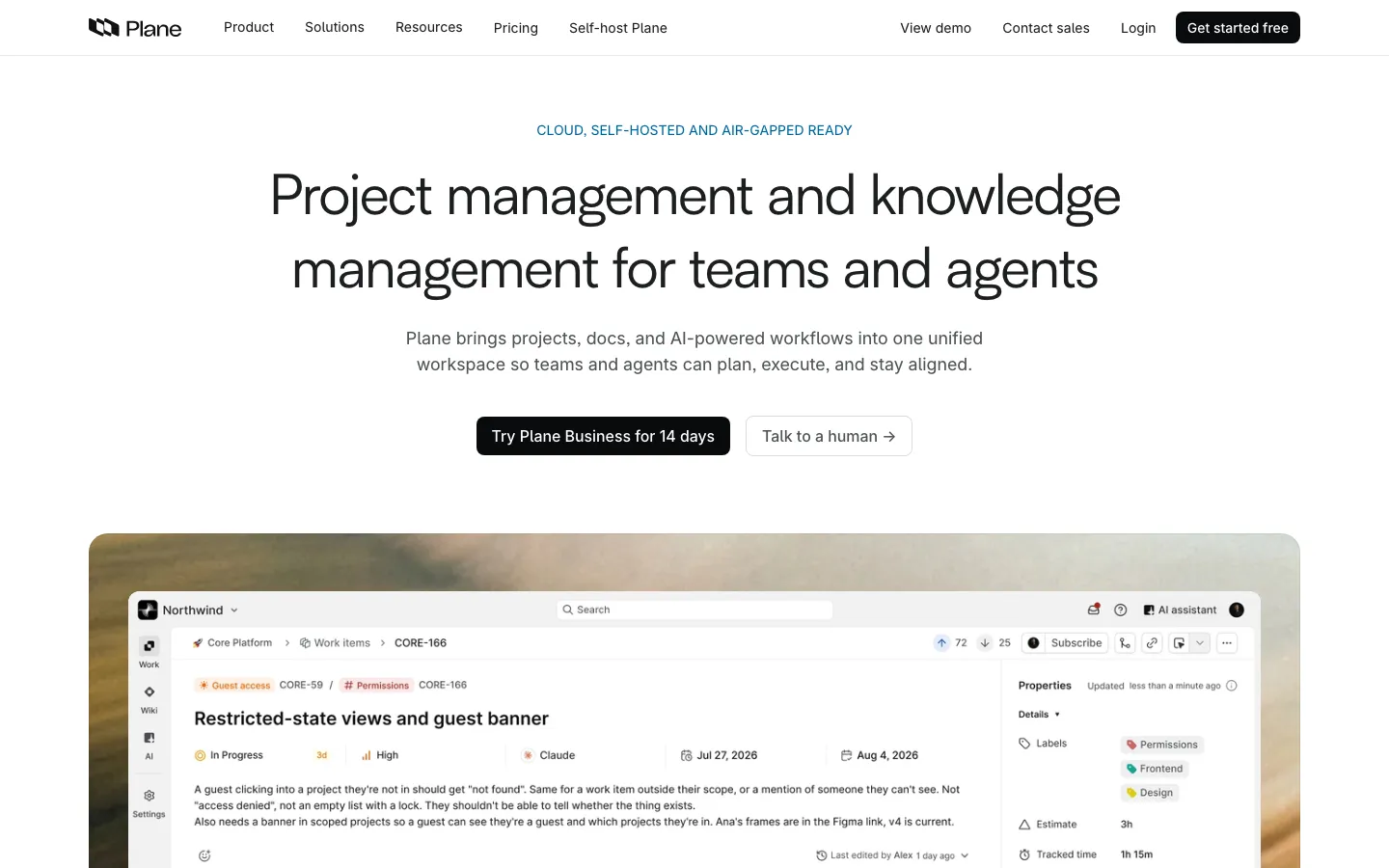
Plane gives a delivery team one place for work items, project planning, knowledge and incoming requests. The useful distinction is not that it has a board. It is that projects can hold cycles and modules while the same workspace keeps project pages, a company wiki and work item intake close to the work they explain or create.
That makes Plane a credible system of record for a product team that otherwise splits planning, documentation and feedback across several places. If your buying decision begins with client-service operations instead, the Productive review frames the adjacent question. The Free plan here already covers the core project surface. Pro adds a workspace wiki, work item and page templates, and dashboards. Business is where recurring work items, project templates, intake email and forms, customer profiles, and advanced dashboard widgets arrive.
Deployment is the other reason to consider it. Plane is open source and offers cloud, self-hosted and air-gapped paths. Its developer documentation includes Docker Compose and Kubernetes guides, so self-hosting is an operational option for a team that has infrastructure ownership, not just a line in a comparison table.
Which product and engineering teams should select Plane?
Small product teams
Use Free for up to 12 people needing projects, work items, cycles, layouts, intake and project pages.
Knowledge-heavy teams
Choose Pro when a shared workspace wiki and reusable work item or page templates belong beside delivery.
Operations with repeatable work
Business adds recurring work items, project templates, forms and advanced dashboard widgets for established workflows.
Controlled environments
Self-host or run air-gapped when deployment control matters, with Enterprise adding LDAP and API-enabled audit logs.
The price boundary is easy to understand. A five-person team on yearly-billed Pro is $30 a month. The same five seats on Business are $65 a month. That comparison is more useful than treating Free as the permanent answer when your team needs templates, repeated work or richer reporting.
Which delivery and documentation tools are built into Plane?
Projects, cycles and flexible layouts
Projects hold work items, cycles and modules. Cycles organize work into timeboxes, while modules group repeatable work under their own leads. Teams can choose List, Board, Calendar, Gantt or Spreadsheet layouts, then save sorting, filters and display choices as views. That breadth lets one project team work from a board while another plans a release in a timeline-shaped view.
Pages and workspace knowledge
Free includes project pages for the documentation attached to an individual project. Pro adds a workspace wiki for knowledge that belongs to the company or a team rather than one project. Business builds on that with nested pages and embeds. The split is sensible: start with project context, then pay when a shared knowledge base needs a home.
AI credits and agents
Plane AI can read projects, cycles, documents and threads in the workspace, and agents can run from mentions, assignments, work item events and schedules. Pro includes 500 AI credits per seat each month; Business includes 1,000. Agent runs draw from a separate workspace pool based on the plan and paid seats, so an agent workflow needs its own usage plan rather than an assumption that individual credits cover it.
Intake, customers and integrations
Work item intake captures feedback for triage. Business adds intake email and forms, plus customer profiles that link requests to work items. Plane also lists connections for GitHub, GitLab,  Slack, Sentry and Draw.io, and importers for Asana,
 ClickUp, Confluence, Jira and
 Notion. Its developer documentation includes API references for work items and projects.
How is Plane priced for cloud and self-hosted instances?
Price checked 27 Nov 2026
| Plan detail | Free$0 | Pro$6/seat/mo | Business$13/seat/mo |
|---|---|---|---|
| Billing shown | Free | Yearly | Yearly |
| Seat limit | 12 users | Unlimited | Unlimited |
| AI credits | Not stated | 500 per seat | 1,000 per seat |
| Workspace wiki | Not confirmed | ✓ | ✓ |
| Project templates | Not confirmed | Not confirmed | ✓ |
| Recurring work items | Not confirmed | Not confirmed | ✓ |
Plane yearly plans, 27 Nov 2026.Plane pricing
Monthly billing changes Pro to $8 per seat per month and Business to $15. Enterprise Grid is quote on request and adds flexible AI credit allocation, multiple workflows and approvals, LDAP support, granular access control, and API-enabled audit logs. Paid self-hosted Pro and Business licenses require at least 10 seats. Plane also offers a two-week trial for Pro and Business.
What enterprise controls does Plane Enterprise Grid provide?
Plane Enterprise Grid becomes necessary when enterprise organizations demand strict auditability and role-based access control. It includes everything in Business, then adds custom roles through RBAC and granular access control, LDAP support, API-enabled audit logs and priority support. Plane publishes no Enterprise Grid price, so ask for the complete seat, deployment and support terms before comparing it with a cloud plan.
Where does Plane exhibit tier limitations?
Plane creates friction primarily through feature placement across its lower and upper tiers. Free covers a practical project core, but the reusable operating layer is divided above it. Workspace wiki and dashboards are Pro features; project templates, recurring work, intake email and forms, customer profiles, and advanced dashboard widgets are Business features. A team with an established delivery process should price the plan that carries those habits, not the entry tier.
Self-hosting is not automatically a small-team escape route. Plane supports it, but paid self-hosted licenses require a minimum of 10 seats. That makes the route more compelling for an organization with infrastructure capability and enough users to meet the minimum than for a tiny team trying to minimize its software bill.
Finally, enterprise controls are quote-based. LDAP, granular access control and API-enabled audit logs sit in Enterprise Grid. If those are mandatory, published Pro and Business prices are only part of the decision.
What are the strongest alternatives to Plane?
 The Productive review is the better comparison for professional-services teams that need budgeting, resource planning and time tracking alongside project work. Those capabilities matter more than Plane's deployment options when client capacity and billable delivery set the operating model.
The ProofHub review is worth weighing if flat pricing with unlimited users would suit your team better than Plane's per-seat pricing. Use Plane's deployment choice and the Business features you need as the points to test in either evaluation.
What is the final verdict on adopting Plane?
Plane is an excellent open-source choice when teams prioritize integrating task delivery, documentation and issue intake. Its cloud, self-hosted and air-gapped options make deployment control a real trade-off, while the Free plan is substantial enough to establish whether the project model fits. Move to Pro for a shared wiki and work item or page templates, then choose Business only when repeatable work, richer intake or advanced dashboards are part of how the team actually operates.
Begin with Free for a team of up to 12, or take the two-week free trial of Pro or Business with one real project, its working documentation and incoming requests. Before choosing a paid tier, list the features your workflow cannot do without and calculate the seat bill on yearly billing.
How was the data for this Plane review compiled?
Plane features, pricing and deployment options were validated across official developer resources on 27 Nov 2026. Prices are in US dollars as Plane shows them, and every figure follows how we check figures.
- Plane pricing pages for yearly, monthly and self-hosted plans
- Plane product pages for project, knowledge and AI features
- Plane marketplace and developer documentation for integrations, API and deployment guides
What are common questions regarding Plane?
Is Plane free?
Yes. Plane's Free plan is $0 and allows up to 12 users. It includes projects, work items, cycles, modules, layouts, intake, estimates and project pages.
How much does Plane cost?
On yearly billing, Pro is $6 per seat per month and Business is $13 per seat per month. Monthly billing is $8 for Pro and $15 for Business. Enterprise Grid is quote on request.
Can Plane be self-hosted?
Yes. Plane is open source and documents Docker Compose and Kubernetes deployment. Paid self-hosted Pro and Business licenses require a minimum of 10 seats.
Does Plane include AI agents?
Plane AI can read workspace context, and agents can run from mentions, assignments, events and schedules. Pro includes 500 AI credits per seat monthly and Business includes 1,000.
 Reviewed byDanny Kirk
Founder of ReddiReach.
 Checked byAndrés Felipe
Digital designer and marketer.
Every figure is checked against the vendor's own page. Read our editorial standards.