
Key Takeaways
- Pumble provides small teams and agencies with unlimited message history, unlimited channels, and unlimited users on its permanently free tier.
- Pumble offers paid plans beginning at $2.49 per seat monthly on annual billing, which unlocks screen sharing and expanded cloud storage.
- Pumble supports automated workflows by providing a dedicated Model Context Protocol server alongside an API add-on available across all tiers.
- Pumble reserves essential enterprise features including single sign-on, audit logs, guest controls, and group video calls for higher paid tiers.
When decisions resurface weeks later, you need chat that preserves the record rather than discarding it behind a history limit. Pumble fits teams that want unlimited message history, unlimited channels and unlimited users on its Free plan; choose another tool only if SSO and audit logs must be available without paying for Enterprise, or if group calls must be free.
Agent access
- API
- Yes, available on all Pumble plans to Owners, Admins, and Members.
- MCP server
- Official, hosted, App key and user or bot token
- Works with
 ClaudeClaude Code
 Gemini
- Automation
- Zapier
What are the main pros and cons of Pumble?
What works
- Unlimited history and channels on the free workspace
- Free plan accepts an unlimited number of users
- API add-on is available on every subscription
What to watch
- Free workspaces allow only three extra apps
- Group calls and screen sharing begin on Pro
- SSO and audit logging require Enterprise
What core team collaboration features does Pumble provide?
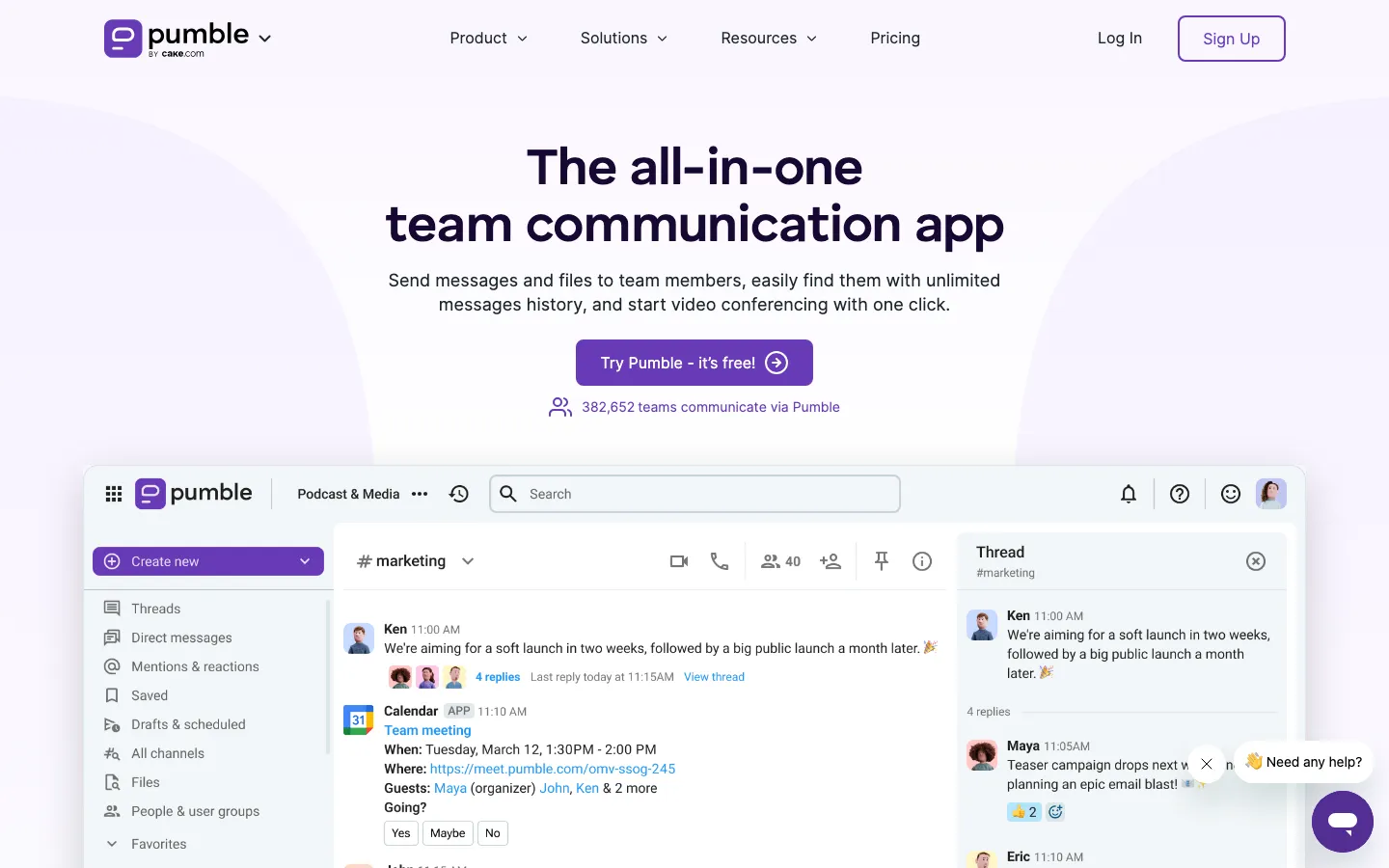
Pumble prioritizes an accessible communication record over cosmetic chat features for teams whose work regularly returns to past decisions. Pumble gives a workspace channels, direct messages, threads, file sharing, search and calls, then keeps the conversation history available on its no-cost plan. It belongs in the wider marketing tools directory because a team coordinating campaigns, client work or launches still needs a dependable place to make decisions visible.
The free tier has unlimited people, unlimited channels, voice and video messages, one-to-one voice and video meetings, basic workspace analytics, import from  Slack, 10 GB of workspace storage and up to three apps or integrations.
Pumble is made by CAKE.com and sits beside Clockify and Plaky in its Productivity Suite. The bundle combines communication, time tracking and project management for US$12.99 per seat each month on annual billing. I would treat that as a reason to consolidate only when your team already wants all three jobs under one subscription, not as a reason to upgrade chat on its own.
Which types of teams and organizations should use Pumble?
Growing small teams
Keep unlimited channels and message history available to an unlimited number of users as your team grows.
Agencies with clients
Give a client one-channel access at no charge, with five single-channel guests included for every paid workspace user.
Teams moving chat
Bring public channels, messages and teammates across from Slack using Pumble’s included import, rather than rebuilding conversations manually.
Operations builders
Use the API add-on and MCP server to send messages, find files and automate everyday team workflows.
The strongest fit is a team that wants chat to remain a reference, rather than a stream that disappears after a limit. Pumble becomes less compelling when the buyer needs formal administration immediately: Business is where permissions, user groups, guest users and recordings arrive, while Enterprise is where the more controlled setup begins.
Which business messaging and file-sharing features does Pumble offer?
Channels that keep their context
Channels organize discussion by subject, and threads pull a side discussion away from the main flow. Pumble also supports one-to-one and group messages, plus files, images and links. Its search promise is simple: find a message whenever it happened. That makes the free plan useful for work that needs an accessible decision trail, rather than only quick updates.
Calls by plan
Everyone can use voice and video messages and one-to-one meetings on Free. Pro adds group meetings, screen sharing and screen-share annotations. Business adds recordings. Use the free workspace for chat and direct calls, then choose Pro when conversations routinely need more people looking at the same screen.
Guests and workspace administration
Guest accounts can be limited to selected channels and can expire after a chosen period or at a fixed date. A single-channel guest costs nothing, and each paid user allows five of them. Multi-channel guests are charged as regular users. Business adds permissions, user groups and channel managers, so it is the relevant tier for an agency making separate spaces for several clients or a company that needs more control over who can do what.
Integrations without a forced upgrade
Pumble lists calendar, project, development, email, file and automation connections, with its own Clockify and Plaky integrations free and outside a plan's app allowance. Any subscription can install integrations and access the API. The free workspace still caps additional apps at three, Pro raises that to 10, and Business and Enterprise remove the cap. That is a sensible ladder: choose the plan for the connected work you actually need, not just for a longer chat archive.
API and MCP for agents
The API is an add-on installed within a workspace. It lets a user create API keys and make HTTP requests for sending messages, replying, adding reactions, creating channels and listing messages. The documented rate limit is up to 1,000 requests a minute for each user, and Swagger lists the available actions. Pumble also promotes an MCP server for collaboration with AI agents, including conversation summaries and file finding. This suits a team that needs programmatic access without making the API a separate enterprise conversation.
How much does Pumble cost across its free and paid plans?
Price checked 27 Nov 2026
| Plan detail | FreeUS$0 | ProUS$2.49/seat/mo | BusinessUS$3.99/seat/mo | EnterpriseUS$6.99/seat/mo |
|---|---|---|---|---|
| Billing shown | Unlimited users | Annual billing | Annual billing | Annual billing |
| Monthly-billing price | US$0 | US$2.99/seat | US$4.99/seat | US$7.99/seat |
| Storage | 10 GB/workspace | 10 GB/seat | 20 GB/seat | 100 GB/seat |
| Apps and integrations | Up to 3 | Up to 10 | Unlimited | Unlimited |
| Group meetings and screen sharing | ✕ | ✓ | ✓ | ✓ |
| Recordings, permissions and user groups | ✕ | ✕ | ✓ | ✓ |
| SSO, retention and audit log | ✕ | ✕ | ✕ | ✓ |
Pumble prices in US dollars, 27 Nov 2026.Pumble pricing
The free option is the genuine starting point for a group that can work within its app limit and does not need group meetings. Once you move to paid access, every active user or invited member on the member list occupies a paid seat, including owners, administrators, members and multi-channel guests. A 10-person team on Pro therefore pays US$24.90 a month on annual billing, before tax, or US$29.90 month to month.
- Pro is the paid step for group meetings, screen sharing, advanced analytics and up to 10 apps
- Business is the step for guest users, permissions, user groups, recordings and 20 GB per seat
- Enterprise adds SSO, data retention, full organization analytics, the audit log and 100 GB per seat
- Productivity Suite costs US$12.99 per seat each month on annual billing for communication, time tracking and project management
That seat rule is the figure to model before inviting external people into several channels. A single-channel guest is free, but a multi-channel guest is priced like a regular user. For an agency, that difference can make Business worthwhile only after the workspace structure, not the headline plan price, demands it.
What security and governance capabilities does Pumble Enterprise deliver?
Pumble positions its Enterprise tier as an administrative control package rather than merely an expanded version of everyday team chat. It adds single sign-on, data retention, full organization analytics, the audit log and 100 GB of storage per seat. If those are contractual or governance requirements, Enterprise is the relevant starting point. If they are not, the jump from Business buys more administration rather than a better core conversation space.
Where does Pumble fall short for growing organizations?
Pumble imposes a sharp collaboration boundary on its free plan by restricting group meetings and guest accounts. It handles direct meetings but not group meetings or screen sharing, so a team that runs review calls will reach Pro quickly. Its 10 GB storage pool is also per workspace rather than per person, and it permits only three additional apps or integrations. The free history is generous, but the surrounding workflow is deliberately narrower.
Control is staged across the plans. Business is needed for guest users, permissions, user groups and recordings, while Enterprise holds SSO, data retention and audit logging. That can make Pumble inexpensive for a team that mainly chats, yet less inexpensive once formal access management becomes part of the requirement.
The API and MCP story also needs a practical reading. The API requires the add-on to be installed in the workspace before keys are generated. When it lists messages in a private channel, Addon Bot needs to be a member of that channel. Treat it as a useful connection point, then set clear ownership and access rules before routing routine work through it.
Which team chat alternatives compete directly with Pumble?
 Pumble competes with Rocket.Chat, which supports on-premise, sovereign cloud, and fully air-gapped infrastructure deployments. If that deployment choice is a requirement, read the Rocket.Chat review before choosing a team-chat platform.
 Shortcut’s Free plan covers 10 users and includes Kanban views, Roadmaps, Reports, Iterations and Docs. Read the Shortcut review if your team needs that work-planning structure alongside chat.
What is our final evaluation and recommendation on Pumble?
Free message history makes Pumble a practical chat base for teams that do not yet need paid collaboration controls. Its plan ladder makes sense: Free for the shared record, Pro for group calls, Business for managed client or team access, and Enterprise for organization-wide controls. Do not pay for the higher tiers until the corresponding operational need is real.
Open the free workspace first, import the conversations that matter and identify which people actually need group meetings or multi-channel access. Move those needs to Pro or Business, and reserve Enterprise for a documented SSO, retention or audit-log requirement.
How did we verify all Pumble pricing and capability data?
Pumble pricing, limit, and feature data in this review was verified against official documentation and integration pages on 27 Nov 2026. Prices are in US dollars, as Pumble displays them, and every figure follows how we check figures.
- Pumble pricing and US currency plan details
- Pumble feature and integration pages
- Pumble guest-access and API documentation
What are the most frequently asked questions about Pumble?
Is Pumble free?
Yes. Free supports an unlimited number of users, unlimited message history and unlimited channels. It also includes voice and video messages, one-to-one meetings, 10 GB of workspace storage and up to three additional apps or integrations.
What does Pumble cost for a team?
On annual billing, Pro is US$2.49 per paid seat each month, Business is US$3.99 and Enterprise is US$6.99. A 10-person team on Pro pays US$24.90 monthly before tax on annual billing.
Can clients join a Pumble workspace?
Yes. Single-channel guests are free, with five allowed for every paid user. Guest accounts can be limited to selected channels and set to deactivate at a chosen time or date. Multi-channel guests are paid seats.
Does Pumble have an API and MCP server?
Yes. The API add-on is available on every plan and lets users generate keys for actions including messages, replies, reactions, channels and message lists. Pumble also provides an MCP server for AI-agent collaboration.
 Reviewed byDanny Kirk
Founder of ReddiReach.
 Checked byAndrés Felipe
Digital designer and marketer.
Every figure is checked against the vendor's own page. Read our editorial standards.